Permissions in page propeties | Community
Skip to main content
Level 3
October 15, 2017
Solved

Permissions in page propeties

  • October 15, 2017
  • 6 replies
  • 3814 views

Hi Team,

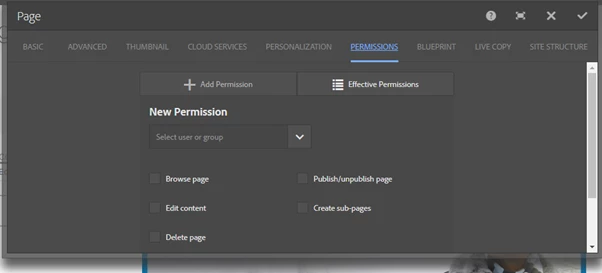
there is a permissions tab in every page under page properties.

If i select any user and assign any permission to him, permissions are not getting reflected after submitting dialog.

I found this issue in Geometrix site example too.

Can anyone please let me know how to fix this.

I am not able to assign permissions through this tab

Thanks

This post is no longer active and is closed to new replies. Need help? Start a new post to ask your question.
Best answer by Mallik-Vamaraju

I think i figured out something (probably there could be more to it). Basically, it is a new way to keep the permissions within the context of the page which i feel is nicer way to handle instead of the traditional classic UI user admin console where it often leads to confusion.

A simple use case to see it working

1) Logged in as admin, create a custom user and assign it to a custom group or the existing group(authors, contributors)

2) Pick up a page in geometrixx(hiking) and edit the permissions by adding a new permission. In my case, I selected all the permissions( browse page, publish/unpublish, create sub page) but for the 'delete page'

3) Now, login with the custom user and you will see that you can not delete the page(hiking) where as you could delete all the other pages.

So, yeah a nice feature to manage permissions at a page level.
6 replies

edubey
Level 10
October 16, 2017

AEM 6.1 or 6.2 ?

Level 3
October 16, 2017

AEM 6.2

smacdonald2008
Level 10
October 16, 2017

Follow docs here for best practices around permissions -- User Administration and Security

smacdonald2008
Level 10
October 16, 2017

Permission tab on page prop is for tasks like setting up a login page as discussed here -- Creating a Login Component for the Experience Manager Toy Store

Mallik-VamarajuAccepted solution
Level 3
October 16, 2017

I think i figured out something (probably there could be more to it). Basically, it is a new way to keep the permissions within the context of the page which i feel is nicer way to handle instead of the traditional classic UI user admin console where it often leads to confusion.

A simple use case to see it working

1) Logged in as admin, create a custom user and assign it to a custom group or the existing group(authors, contributors)

2) Pick up a page in geometrixx(hiking) and edit the permissions by adding a new permission. In my case, I selected all the permissions( browse page, publish/unpublish, create sub page) but for the 'delete page'

3) Now, login with the custom user and you will see that you can not delete the page(hiking) where as you could delete all the other pages.

So, yeah a nice feature to manage permissions at a page level.

Level 3
October 16, 2017

thank you very much. installed it locally and works like a charm.