Permission sensitive caching dispatcher | Community
Skip to main content
trc41594544
Level 3
April 27, 2021
Solved

Permission sensitive caching dispatcher

  • April 27, 2021
  • 2 replies
  • 1666 views

Hi all, 


I am trying to set up our dispatcher with /auth_chcker module as per the documentation.

https://experienceleague.adobe.com/docs/experience-manager-dispatcher/using/configuring/permissions-cache.html?lang=en#configuring


After configuring i did got 

Authorization checker: initialized with URL '/bin/permissioncheck'

I also added the filters for some dam files. 


Only question i have is how to initiate this check? If i request the image directly, it does not do any check as i need to call it using /bin/permissioncheck. I tried to call using /bin/permissioncheck?uri=/content/dam/a.pdf


I am getting 405 error because that servlet only has HEAD method and browser calls it using GET. 


I am unsure on how to initiate this check? Please let me know with any thoughts.  

This post is no longer active and is closed to new replies. Need help? Start a new post to ask your question.
Best answer by MarkusBullaAdobe

Hi @trc41594544!

There are two prerequisites for it:

  1. You need to add the according dispatcher configuration (the /auth_checker section mentioned in the documentation you linked and posted by @asutosh_jena_) and
  2. you need to have your authorization checker servlet up and running on your AEM instance.


If you are now requesting any page that matches the defined filter rules of the auth_checker section from the dispatcher, the following will happen:

  • The dispatcher will send a HEAD request to the auth servlet on the publisher with a parameter containing the requested pages path.
  • If the response from the auth servlet on the publisher to that HEAD request is HTTP 200 OK, the dispatcher will continue processing and either deliver the requested page from cache or request it from the publisher.
  • If the response from the auth servlet on the publisher to that HEAD request is HTTP 403 Forbidden, the dispatcher will return this HTTP error status to the client (and probably deliver an according error document, if configured).

As outlined, permission sensitive caching needs both, an AEM instance and a dispatcher, to work properly.


You can test 1 (the dispatcher configuration) by requesting a page that should be protected and reviewing the dispatcher.log on the dispatcher (ideally set to debug log level) and the request.log/access.log on your AEM instance. You should see two requests from the dispatcher to the AEM instance: one HEAD requests to the auth servlet and - if you are allowed to see the page - one request to the actual page.
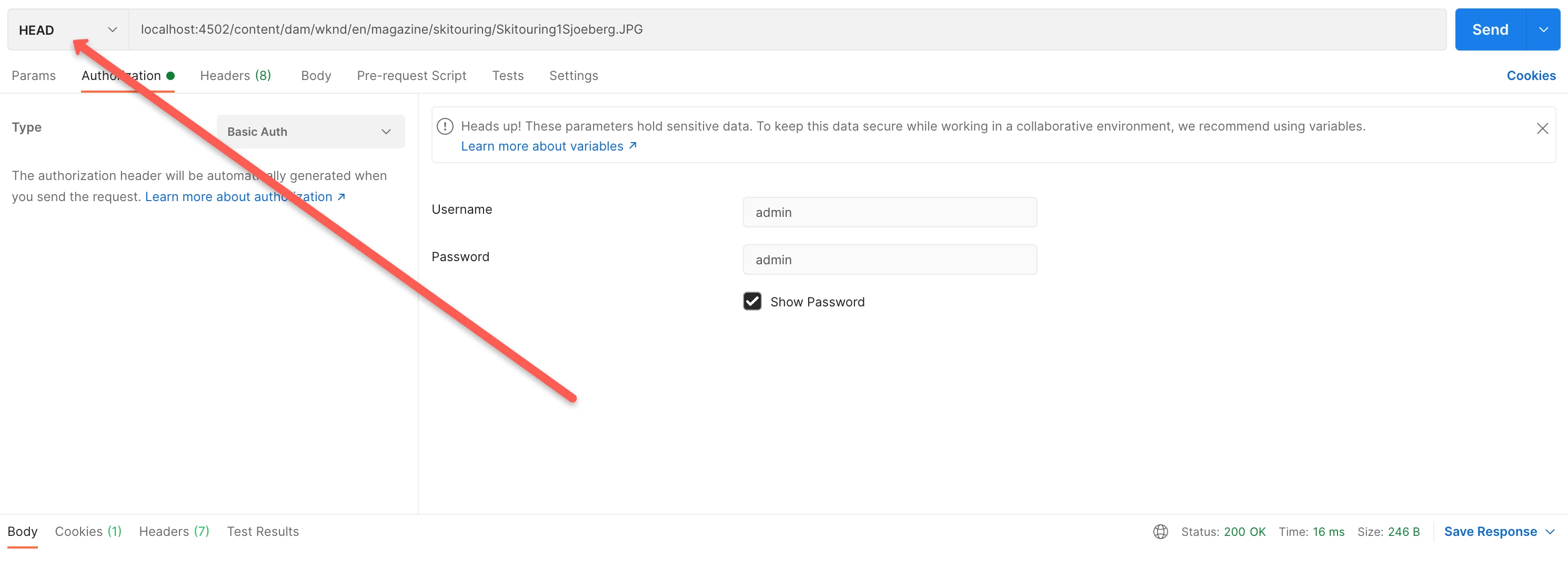
You can test 2 (your auth servlet) by "manually" sending a HEAD request with the page url as a parameter to the auth servlet on your AEM instance and review the response (HTTP status), e. g. using Postman or curl.


Hope that helps!

2 replies

Asutosh_Jena_
Community Advisor
Community Advisor
April 27, 2021

Hi @trc41594544 


You can make HEAD requests from postman client by passing any Auth Header (if any). I just passed the AEM author URL in request. You can pass the dispatcher URL in place of that.


If you see the below code, any page request from /content/secure folder will be appended with /bin/permissioncheck?{pagepath} and will be served only if the condition matches.

/auth_checker
{
# request is sent to this URL with '?uri=<page>' appended
/url "/bin/permissioncheck"

# only the requested pages matching the filter section below are checked,
# all other pages get delivered unchecked
/filter
{
/0000
{
/glob "*"
/type "deny"
}
/0001
{
/glob "/content/secure/*.html"
/type "allow"
}
}
# any header line returned from the auth_checker's HEAD request matching
# the section below will be returned as well
/headers
{
/0000
{
/glob "*"
/type "deny"
}
/0001
{
/glob "Set-Cookie:*"
/type "allow"
}
}
}

Thanks!

trc41594544
Level 3
April 27, 2021
Hi,
MarkusBullaAdobe
Adobe Employee
MarkusBullaAdobeAdobe EmployeeAccepted solution
Adobe Employee
April 29, 2021

Hi @trc41594544!

There are two prerequisites for it:

  1. You need to add the according dispatcher configuration (the /auth_checker section mentioned in the documentation you linked and posted by @asutosh_jena_) and
  2. you need to have your authorization checker servlet up and running on your AEM instance.


If you are now requesting any page that matches the defined filter rules of the auth_checker section from the dispatcher, the following will happen:

  • The dispatcher will send a HEAD request to the auth servlet on the publisher with a parameter containing the requested pages path.
  • If the response from the auth servlet on the publisher to that HEAD request is HTTP 200 OK, the dispatcher will continue processing and either deliver the requested page from cache or request it from the publisher.
  • If the response from the auth servlet on the publisher to that HEAD request is HTTP 403 Forbidden, the dispatcher will return this HTTP error status to the client (and probably deliver an according error document, if configured).

As outlined, permission sensitive caching needs both, an AEM instance and a dispatcher, to work properly.


You can test 1 (the dispatcher configuration) by requesting a page that should be protected and reviewing the dispatcher.log on the dispatcher (ideally set to debug log level) and the request.log/access.log on your AEM instance. You should see two requests from the dispatcher to the AEM instance: one HEAD requests to the auth servlet and - if you are allowed to see the page - one request to the actual page.
You can test 2 (your auth servlet) by "manually" sending a HEAD request with the page url as a parameter to the auth servlet on your AEM instance and review the response (HTTP status), e. g. using Postman or curl.


Hope that helps!