PEN test vulnerabilities for jquery used by AEM | Community
Skip to main content
Level 6
February 19, 2021
Solved

PEN test vulnerabilities for jquery used by AEM

  • February 19, 2021
  • 5 replies
  • 12350 views


Hi folks,


Our PEN testers are saying there are  2 new Medium vulnerabilities in the 1.12.4 version of JQuery .

https://snyk.io/test/npm/jquery/1.12.4

  1. https://cve.mitre.org/cgi-bin/cvename.cgi?name=CVE-2020-11023
  2. https://cve.mitre.org/cgi-bin/cvename.cgi?name=CVE-2020-11022

Does the service pack 6 or 7 contain a patched version of JQuery that include fixes for all of the latest vulnerabilities ? 

BTW.  Are we allowed to change the version of jquery ourselves ?  I always thought we weren't allowed to change it but I have seen tutorials explaining how to do it.

https://aem4beginner.blogspot.com/overriding-jquery-version-in-cq


I'm a bit puzzled. Anybody know the answer ?


thanks

Fiona

This post is no longer active and is closed to new replies. Need help? Start a new post to ask your question.
Best answer by BrianKasingli

@fionas76543059,

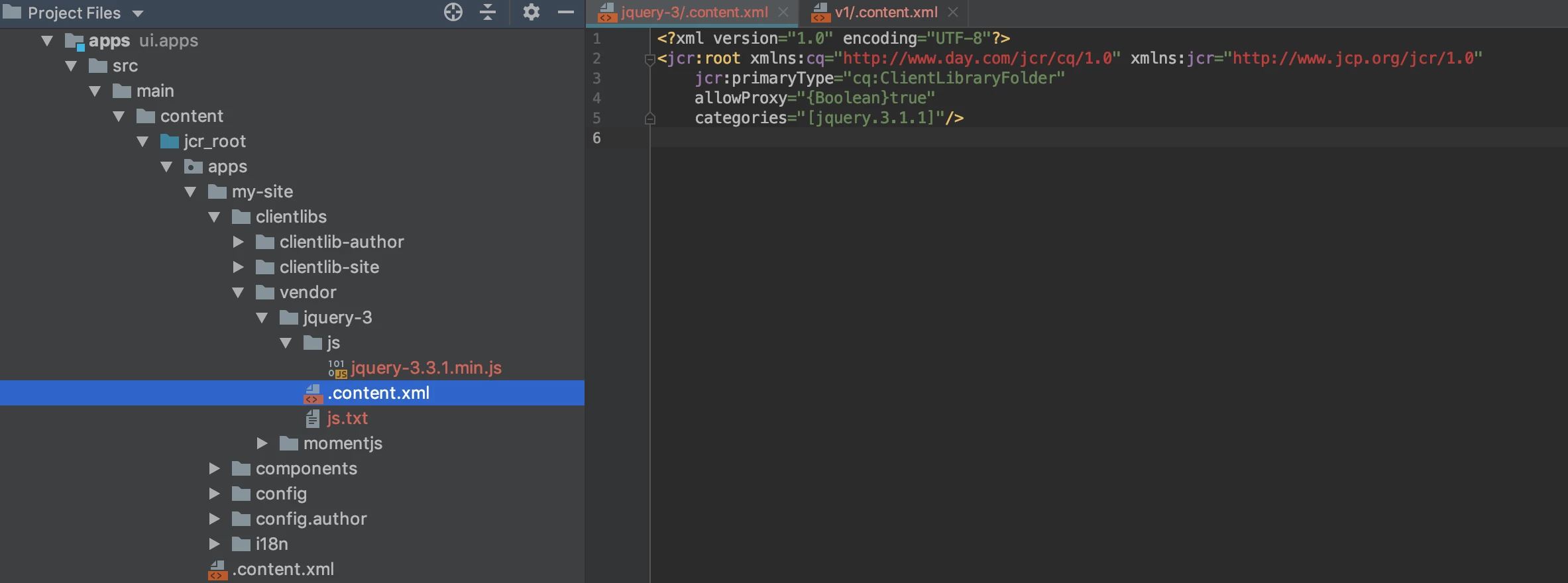
Definitely, While the AEM platform uses the cq.jquery client library for internal use. For your company's website, you can totally define your own jquery library which contains the latest version of jquery. You can place the "VENDOR" client library under /apps/my-site/clientlibs/vendor/*. A standard practice is to place and export 3rd party JavaScript libraries in an AEM project that will be from the vendor folder as a client library.

Example:


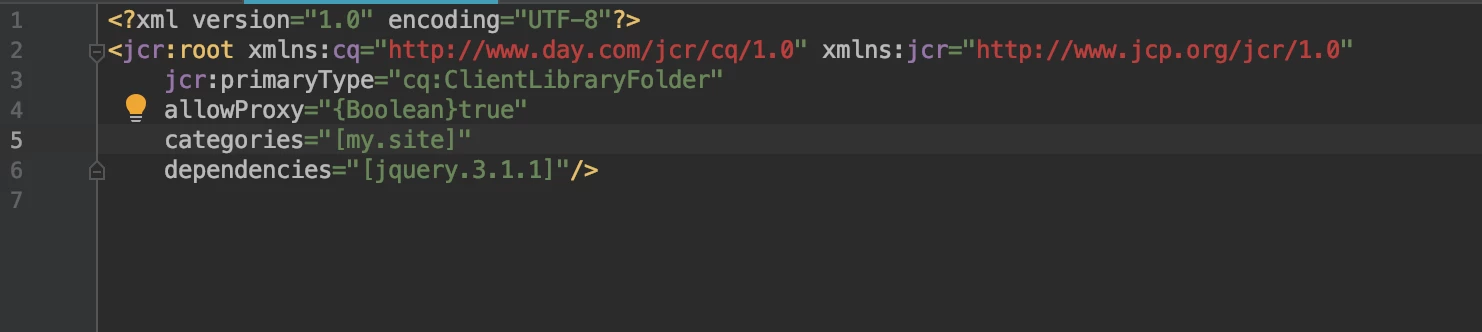
Next, you can set your clientlib-site with the jquery.3.1.1 as a dependency


5 replies

BrianKasingli
Community Advisor and Adobe Champion
BrianKasingliCommunity Advisor and Adobe ChampionAccepted solution
Community Advisor and Adobe Champion
February 19, 2021

@fionas76543059,

Definitely, While the AEM platform uses the cq.jquery client library for internal use. For your company's website, you can totally define your own jquery library which contains the latest version of jquery. You can place the "VENDOR" client library under /apps/my-site/clientlibs/vendor/*. A standard practice is to place and export 3rd party JavaScript libraries in an AEM project that will be from the vendor folder as a client library.

Example:


Next, you can set your clientlib-site with the jquery.3.1.1 as a dependency


Level 6
February 19, 2021
Thanks Brian, Is it the case that the CQ version of jQuery is used only internally in the Author instance then ? So we don't have to worry about it with the published public site.?
kartheekd203042
Level 3
September 26, 2023

Hi all,

Please confirm how this was actioned since we are in the same boat on AEM 6.5.9.0?

CVEs were reported on the version of Jquery used and while we are looking into upgrading it or overriding it ,wanted to know how anyone of you solved recently since the accepted response is a bit dated.Any service packs need to be installed or custom override is the way to go? 

Appreciate responses on how it was mitigated?


Thanks in advance!

Level 3
October 9, 2023

@kartheekd203042 , Adobe Support confirmed us they've already add the fixes for these issues in their product.

Level 2
December 15, 2023

Old post, but people still have the same question, and the "solution" doesn't really solve the problem.

First though, the OOTB version of jQuery is an updated version of v1.12.4 it already contains fixes for the known vulnerabilities.  So if you are looking to update jQuery simply to pass a security scan, then you should read this:

https://docs.mktossl.com/docs/experience-cloud-kcs/kbarticles/KA-21173.html

If you still want to use a newer version of jQuery, then the solution is simple.

Create your own clientlib that contains the version of jQuery that you want.
Set the 'categories' property of your clientlib to be "jquery".
Set the 'replaces' property of your clientlib to be "/libs/clientlibs/granite/jquery".


The key point is to set the 'replaces' property, otherwise you'll end up loading both the OOTB code and your own version.


RashidJorvee
Level 4
August 6, 2024

Adobe says this about this jQuery version; "AEM includes version 1.12.4 of the jQuery library to provide maximum compatibility with existing custom code. Modifications have been done by Adobe to address known security issues."


Ref: General Release Notes for Adobe Experience Manager 6.5 | Adobe Experience Manager

August 14, 2024

After testing all the approaches mentioned here, I wonder why there are no more disussion, nothing that really concludes the issue is menioned here.


Yes, the  answer marked as correct helps to use a different version, however, during edition mode, the jquery version used is the default one otherwise (when forcing to use a different version, for instance version 4) the component dialog will not open.


So, being that the link mentioned here from official docs for aem 6.5 indicates that the version used contains fixes to vulnerabilities for that default jquery version used as default should make us use that version without being worried about it? 


@debal_das did you solve the issue so the security team was satisfied? did you raise a ticket with adobe?


As usual broken links like this one:

https://helpx.adobe.com/in/experience-manager/kb/resolve-jquery-library-conflicts-aem6.html

are refered in other pages like https://experienceleaguecommunities.adobe.com/t5/adobe-experience-manager/jquery-conflict-in-aem-6-4/m-p/303695


were you guys able to fix the issue? you care only about the publish view? not the editor ?

Thanks