Pathfield inside Multifield AEM 6.5 [Touch Ui Dialog] | Community
Skip to main content
tushaar_srivastava
Level 6
December 5, 2020
Solved

Pathfield inside Multifield AEM 6.5 [Touch Ui Dialog]

  • December 5, 2020
  • 3 replies
  • 5646 views

Hi Team,


There is a requirement here is like.

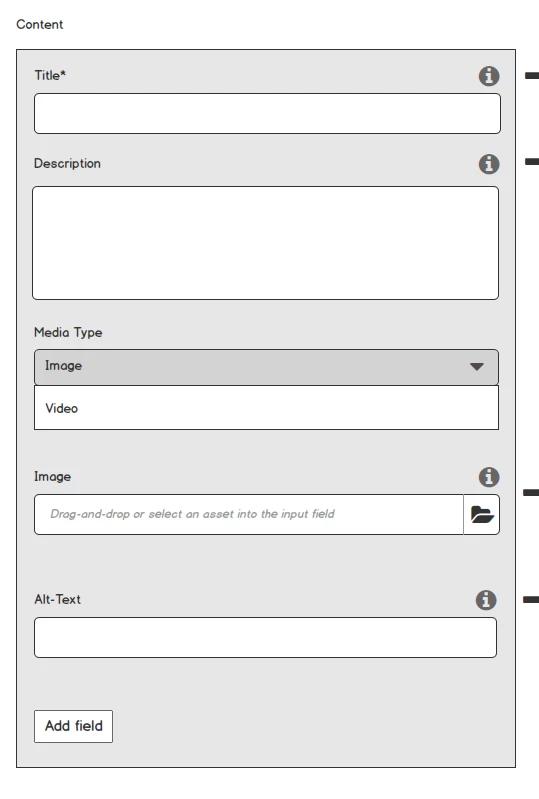
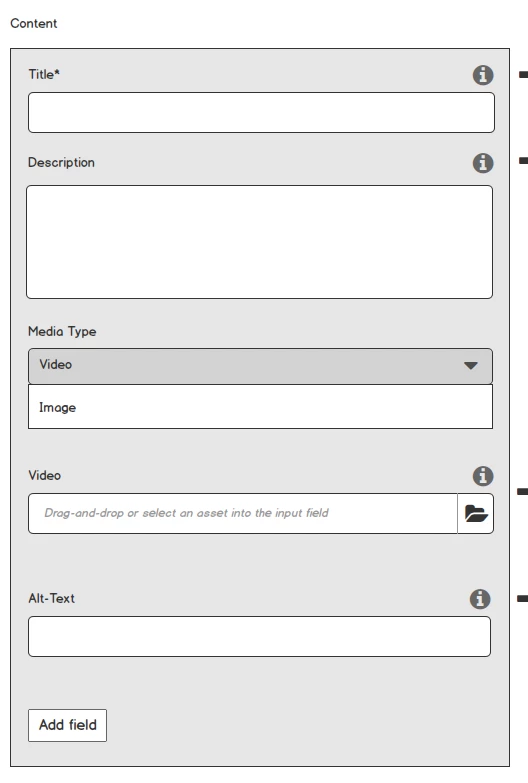
Need to create a Multifield having 4 maximum limit, and each field should contain

  • Title
  • Description
  • Media Type:
    • Options:
      • Image
      • Video
  • Note: Based on Media Type selection can show either Image or Video fields.
  • Image:
  • Video:
  • Alt-Text:


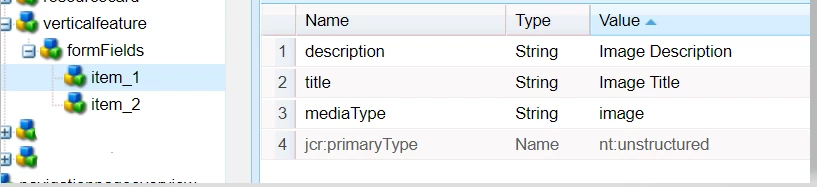
Problem : It is not storing the values of pathBrowser, I have Created a Tab and limit the multifiled, created textfield and text area, pathfield, but not able to retain the values of pathBrowser, where other values are retained as is.

PFB Code snippet

<tab2 jcr:primaryType="nt:unstructured" jcr:title="Content" sling:resourceType="granite/ui/components/foundation/section"> <layout jcr:primaryType="nt:unstructured" sling:resourceType="granite/ui/components/foundation/layouts/fixedcolumns"/> <items jcr:primaryType="nt:unstructured"> <column jcr:primaryType="nt:unstructured" sling:resourceType="granite/ui/components/foundation/container"> <items jcr:primaryType="nt:unstructured"> <fieldset jcr:primaryType="nt:unstructured" jcr:title="" sling:resourceType="granite/ui/components/coral/foundation/form/fieldset"> <layout jcr:primaryType="nt:unstructured" sling:resourceType="granite/ui/components/foundation/layouts/fixedcolumns"/> <items jcr:primaryType="nt:unstructured"> <formFields jcr:primaryType="nt:unstructured" sling:resourceType="granite/ui/components/foundation/form/multifield" eaem-multi-nested="" fieldLabel="Content" maxLimit="4"> <field jcr:primaryType="nt:unstructured" sling:resourceType="granite/ui/components/foundation/form/fieldset" name="./formFields"> <layout jcr:primaryType="nt:unstructured" sling:resourceType="granite/ui/components/foundation/layouts/fixedcolumns" method="absolute"/> <items jcr:primaryType="nt:unstructured"> <column jcr:primaryType="nt:unstructured" sling:resourceType="granite/ui/components/foundation/container" fieldLabel="Items"> <items jcr:primaryType="nt:unstructured"> <title jcr:primaryType="nt:unstructured" sling:resourceType="granite/ui/components/coral/foundation/form/textfield" fieldDescription="Under 45 characters recommended." fieldLabel="Title" name="./title" required="{Boolean}true"/> <description jcr:primaryType="nt:unstructured" sling:resourceType="granite/ui/components/coral/foundation/form/textarea" fieldDescription="Under 140 characters recommended." fieldLabel="Description" name="./description"/> <mediaType granite:class="cq-dialog-dropdown-showhide" jcr:primaryType="nt:unstructured" sling:resourceType="granite/ui/components/coral/foundation/form/select" fieldLabel="Media Type" name="./mediaType"> <granite:data jcr:primaryType="nt:unstructured" cq-dialog-dropdown-showhide-target=".image-video-mediatype-showhide-target"/> <items jcr:primaryType="nt:unstructured"> <image jcr:primaryType="nt:unstructured" text="Image" value="image"/> <video jcr:primaryType="nt:unstructured" text="Video" value="video"/> </items> </mediaType> <image granite:class="hide image-video-mediatype-showhide-target" jcr:primaryType="nt:unstructured" sling:resourceType="granite/ui/components/coral/foundation/container"> <granite:data jcr:primaryType="nt:unstructured" showhidetargetvalue="image"/> <items jcr:primaryType="nt:unstructured"> <image jcr:primaryType="nt:unstructured" sling:resourceType="granite/ui/components/foundation/form/pathbrowser" emptyText="Drag-and-drop or select an asset into the input field" fieldLabel="Image" mimetype="image" name="./image" rootPath="/content/dam"/> <alttextimage jcr:primaryType="nt:unstructured" sling:resourceType="granite/ui/components/coral/foundation/form/textfield" fieldLabel="Alt-Text" name="./alttextimage"/> </items> </image> <video granite:class="hide image-video-mediatype-showhide-target" jcr:primaryType="nt:unstructured" sling:resourceType="granite/ui/components/coral/foundation/container"> <granite:data jcr:primaryType="nt:unstructured" showhidetargetvalue="video"/> <items jcr:primaryType="nt:unstructured"> <video jcr:primaryType="nt:unstructured" sling:resourceType="granite/ui/components/coral/foundation/form/pathbrowser" emptyText="Drag-and-drop or select an asset into the input field" fieldLabel="Video" name="./video" rootPath="/content/dam"/> <alttextvideo jcr:primaryType="nt:unstructured" sling:resourceType="granite/ui/components/coral/foundation/form/textfield" fieldLabel="Alt-Text" name="./alttextvideo"/> </items> </video> </items> </column> </items> </field> </formFields> </items> </fieldset> </items> </column> </items> </tab2>


Need help to get the values retained in pathBrowser. 

CRX Node Not able to retain pathBrowservalue:
 

@arunpatidar @vijayalakshmi_s  @kautuk_sahni  @theo_pendle  @vanegi  @manjunath_k 

This post is no longer active and is closed to new replies. Need help? Start a new post to ask your question.
Best answer by BrianKasingli

@tushaar_srivastava,

You can try this:


<?xml version="1.0" encoding="UTF-8"?> <jcr:root xmlns:sling="http://sling.apache.org/jcr/sling/1.0" xmlns:cq="http://www.day.com/jcr/cq/1.0" xmlns:jcr="http://www.jcp.org/jcr/1.0" xmlns:nt="http://www.jcp.org/jcr/nt/1.0" jcr:primaryType="nt:unstructured" sling:resourceType="cq/gui/components/authoring/dialog"> <content jcr:primaryType="nt:unstructured"> <items jcr:primaryType="nt:unstructured"> <tabs jcr:primaryType="nt:unstructured"> <items jcr:primaryType="nt:unstructured"> <example jcr:primaryType="nt:unstructured" jcr:title="Example will be displayed here" sling:resourceType="granite/ui/components/coral/foundation/fixedcolumns"> <items jcr:primaryType="nt:unstructured"> <column jcr:primaryType="nt:unstructured" sling:resourceType="granite/ui/components/coral/foundation/container"> <items jcr:primaryType="nt:unstructured"> <exampleText jcr:primaryType="nt:unstructured" sling:resourceType="granite/ui/components/coral/foundation/form/textfield" fieldLabel="Example Text" name="./exampleText"/> <exampleFieldSet jcr:primaryType="nt:unstructured" jcr:title="Example FieldSet" sling:resourceType="granite/ui/components/coral/foundation/form/fieldset"> <items jcr:primaryType="nt:unstructured"> <exampleImagePath jcr:primaryType="nt:unstructured" sling:resourceType="granite/ui/components/coral/foundation/form/pathfield" fieldLabel="Example Image Path" name="./exampleImagePath" required="{Boolean}true" rootPath="/content/dam"/> <exampleLinkTarget jcr:primaryType="nt:unstructured" sling:resourceType="granite/ui/components/coral/foundation/form/select" fieldLabel="Example Link Target" name="./exampleLinkTarget"> <items jcr:primaryType="nt:unstructured"> <self jcr:primaryType="nt:unstructured" selected="{Boolean}true" text="Same Page" value="_self"/> <blank jcr:primaryType="nt:unstructured" text="New Tab" value="_blank"/> </items> </exampleLinkTarget> </items> </exampleFieldSet> </items> </column> </items> </example> </items> </tabs> </items> </content> </jcr:root>


3 replies

santhosh_kumark
Level 6
December 5, 2020

Hi @tushaar_srivastava ,


Have you tried adding composite="{Boolean}true" for the multifield.

This post explains it well.


Regards,

Santosh

Manjunath_K
Level 7
December 5, 2020

Hi @tushaar_srivastava 

Please add changes in provided dialog xml as mentioned below, then the value will be stored & retained in dialog as expected.


change "granite/ui/components/foundation/form/multifield" to "granite/ui/components/coral/foundation/form/multifield" and add composite="{Boolean}true"

<formFields
jcr:primaryType="nt:unstructured"
sling:resourceType="granite/ui/components/coral/foundation/form/multifield"
composite="{Boolean}true"
eaem-multi-nested=""
fieldLabel="Content"
maxLimit="4">


 Hope this helps!

tushaar_srivastava
Level 6
December 7, 2020
BrianKasingli
Community Advisor and Adobe Champion
BrianKasingliCommunity Advisor and Adobe ChampionAccepted solution
Community Advisor and Adobe Champion
December 5, 2020

@tushaar_srivastava,

You can try this:


<?xml version="1.0" encoding="UTF-8"?> <jcr:root xmlns:sling="http://sling.apache.org/jcr/sling/1.0" xmlns:cq="http://www.day.com/jcr/cq/1.0" xmlns:jcr="http://www.jcp.org/jcr/1.0" xmlns:nt="http://www.jcp.org/jcr/nt/1.0" jcr:primaryType="nt:unstructured" sling:resourceType="cq/gui/components/authoring/dialog"> <content jcr:primaryType="nt:unstructured"> <items jcr:primaryType="nt:unstructured"> <tabs jcr:primaryType="nt:unstructured"> <items jcr:primaryType="nt:unstructured"> <example jcr:primaryType="nt:unstructured" jcr:title="Example will be displayed here" sling:resourceType="granite/ui/components/coral/foundation/fixedcolumns"> <items jcr:primaryType="nt:unstructured"> <column jcr:primaryType="nt:unstructured" sling:resourceType="granite/ui/components/coral/foundation/container"> <items jcr:primaryType="nt:unstructured"> <exampleText jcr:primaryType="nt:unstructured" sling:resourceType="granite/ui/components/coral/foundation/form/textfield" fieldLabel="Example Text" name="./exampleText"/> <exampleFieldSet jcr:primaryType="nt:unstructured" jcr:title="Example FieldSet" sling:resourceType="granite/ui/components/coral/foundation/form/fieldset"> <items jcr:primaryType="nt:unstructured"> <exampleImagePath jcr:primaryType="nt:unstructured" sling:resourceType="granite/ui/components/coral/foundation/form/pathfield" fieldLabel="Example Image Path" name="./exampleImagePath" required="{Boolean}true" rootPath="/content/dam"/> <exampleLinkTarget jcr:primaryType="nt:unstructured" sling:resourceType="granite/ui/components/coral/foundation/form/select" fieldLabel="Example Link Target" name="./exampleLinkTarget"> <items jcr:primaryType="nt:unstructured"> <self jcr:primaryType="nt:unstructured" selected="{Boolean}true" text="Same Page" value="_self"/> <blank jcr:primaryType="nt:unstructured" text="New Tab" value="_blank"/> </items> </exampleLinkTarget> </items> </exampleFieldSet> </items> </column> </items> </example> </items> </tabs> </items> </content> </jcr:root>