Parsys invisible when component is empty | Community
Skip to main content
April 13, 2023
Solved

Parsys invisible when component is empty

  • April 13, 2023
  • 1 reply
  • 806 views

I have had this problem numerous times, where the parsys drag-icon doesn't show when a component is empty (i.e when you just created it). My code returns existing items (from the previous component version - backwards compatibility) and otherwise you have the option to add new ones via parsys.


A teammate of mine pointed out this is an issue caused by flexbox, but I am not sure about that. He recommended using this:

Personally, this has never worked for me (but tbf I might have just done it wrong as well). Either way this is a persisting problem across multiple components I've written (they all use flexbox) and it's annoying me. Any ideas why the icon doesn't show?


For Reference: the class that contains my parsys item is styled using flexbox.
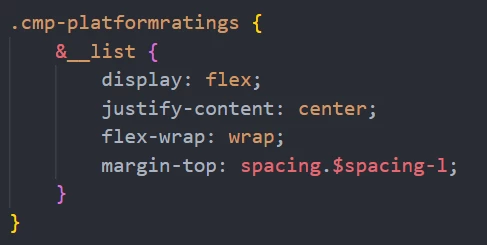
 

Update: I've tried setting flex-basis 100 for the parsys icon and it works for existing components but not new ones. I think the problem occurs because of the code in html. Maybe if the returned list is empty it just skips the whole container idk.
This post is no longer active and is closed to new replies. Need help? Start a new post to ask your question.
Best answer by kaikubad

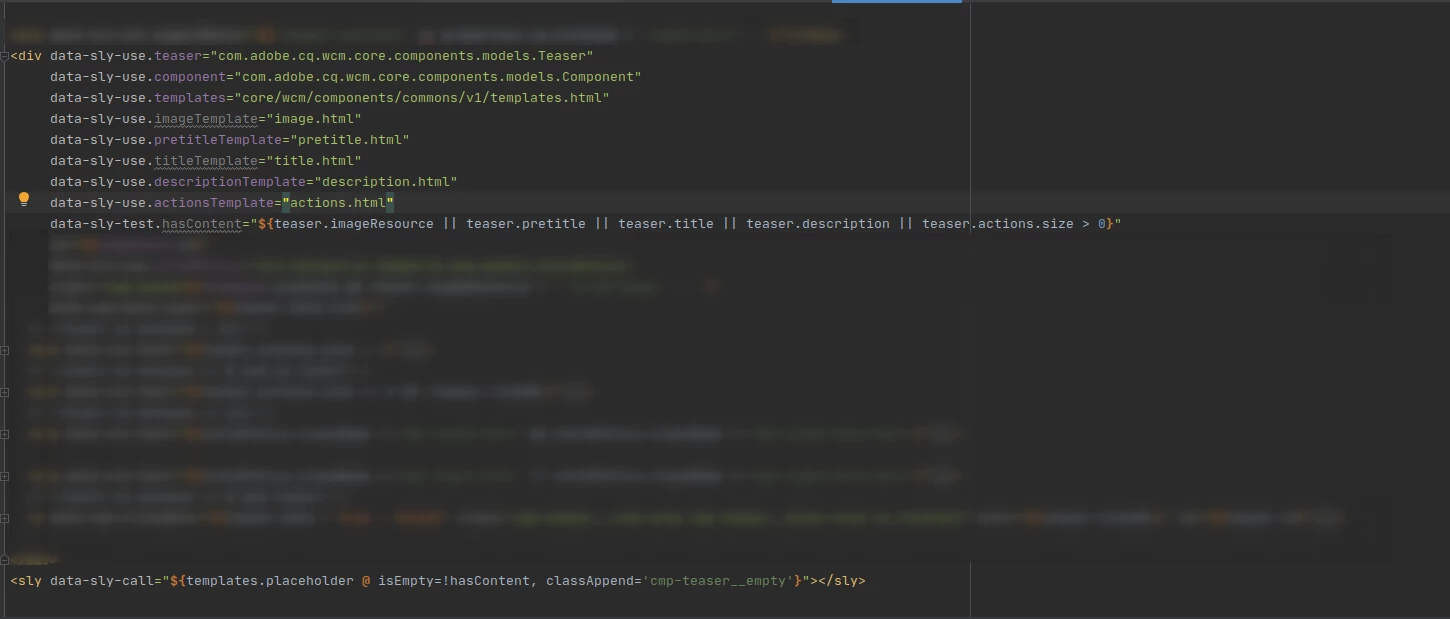
I had the same issue. You can try core component templates here.
just check the screenshot


Checkout the code below. I guess this will solve your problem. I have used the same on teaser component.


<div data-sly-use.teaser="com.adobe.cq.wcm.core.components.models.Teaser"
data-sly-use.component="com.adobe.cq.wcm.core.components.models.Component"
data-sly-use.templates="core/wcm/components/commons/v1/templates.html"
data-sly-use.imageTemplate="image.html"
data-sly-use.pretitleTemplate="pretitle.html"
data-sly-use.titleTemplate="title.html"
data-sly-use.descriptionTemplate="description.html"
data-sly-use.actionsTemplate="actions.html"
data-sly-test.hasContent="${teaser.imageResource || teaser.pretitle || teaser.title || teaser.description || teaser.actions.size > 0}"
</div>
<sly data-sly-call="${templates.placeholder @ isEmpty=!hasContent, classAppend='cmp-teaser__empty'}"></sly>

1 reply

kaikubad
Community Advisor
kaikubadCommunity AdvisorAccepted solution
Community Advisor
April 26, 2023

I had the same issue. You can try core component templates here.
just check the screenshot


Checkout the code below. I guess this will solve your problem. I have used the same on teaser component.


<div data-sly-use.teaser="com.adobe.cq.wcm.core.components.models.Teaser"
data-sly-use.component="com.adobe.cq.wcm.core.components.models.Component"
data-sly-use.templates="core/wcm/components/commons/v1/templates.html"
data-sly-use.imageTemplate="image.html"
data-sly-use.pretitleTemplate="pretitle.html"
data-sly-use.titleTemplate="title.html"
data-sly-use.descriptionTemplate="description.html"
data-sly-use.actionsTemplate="actions.html"
data-sly-test.hasContent="${teaser.imageResource || teaser.pretitle || teaser.title || teaser.description || teaser.actions.size > 0}"
</div>
<sly data-sly-call="${templates.placeholder @ isEmpty=!hasContent, classAppend='cmp-teaser__empty'}"></sly>