Paragraph HTL - Components in containers do not line up when using content flex | Community
Skip to main content
January 3, 2024
Solved

Paragraph HTL - Components in containers do not line up when using content flex

  • January 3, 2024
  • 1 reply
  • 506 views

Hi everyone!


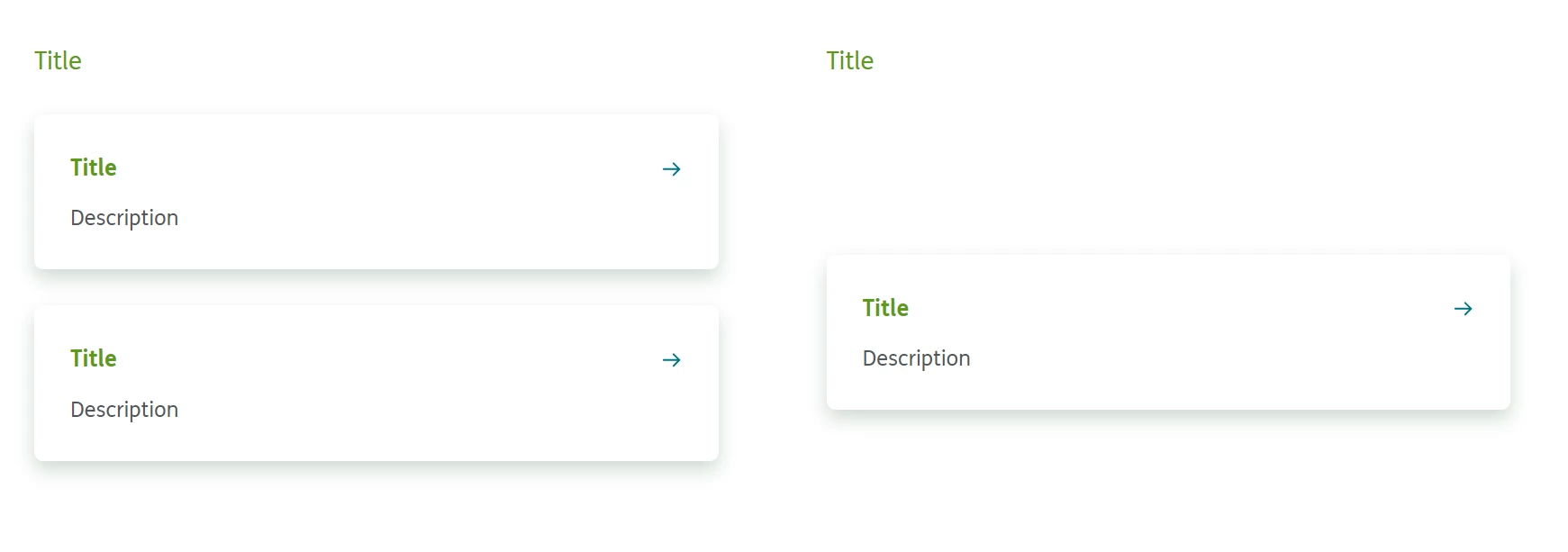
I'm experiencing an issue when using containers in Paragraph HTL's in a Column Control Grid. When content flex isn't a selected property of the grid, the containers stack like normal (pictured on the right) even when there are an uneven number of containers in each column.


When content flex isn't enabled however, it is unresponsive and not compatible with mobile. When content flex is enabled, the containers in the column fill the paragraph HTL rather than stack.

Is there any way around this? Thanks!
 

This post is no longer active and is closed to new replies. Need help? Start a new post to ask your question.
Best answer by EstebanBustamante

Hi


This seems to be a 'CSS naming conflict.' Please be aware that the 'container' component will append the 'container' class to the main wrapper div. You can modify this behavior by updating the decoration tag configuration: Decoration Tag Configuration. However, my advice is to allow the 'container' class from AEM to function as needed and consider renaming any custom 'container' classes you may have.


You can easily check which classes are applied by inspecting the code.

Hope this helps.

1 reply

EstebanBustamante
Community Advisor and Adobe Champion
EstebanBustamanteCommunity Advisor and Adobe ChampionAccepted solution
Community Advisor and Adobe Champion
January 8, 2024

Hi


This seems to be a 'CSS naming conflict.' Please be aware that the 'container' component will append the 'container' class to the main wrapper div. You can modify this behavior by updating the decoration tag configuration: Decoration Tag Configuration. However, my advice is to allow the 'container' class from AEM to function as needed and consider renaming any custom 'container' classes you may have.


You can easily check which classes are applied by inspecting the code.

Hope this helps.

Esteban Bustamante