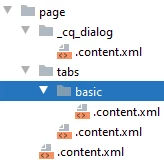
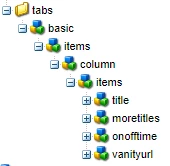
Page Properties dialog tab is empty on page creation
Hello All - I see the behavior that the page properties dialog tab is blank only when I create a page. once the page is created, I am able to see the all fields. The issue is happening only with the page creation flow. If it is an individual fields, I can use "cq:showOnCreate" to handle the field but this case is different. Could someone tell me what could be the cause for this issue. I dont see any errors in the logs.
Dialog:
<?xml version="1.0" encoding="UTF-8"?> <jcr:root xmlns:sling="http://sling.apache.org/jcr/sling/1.0" xmlns:granite="http://www.adobe.com/jcr/granite/1.0" xmlns:cq="http://www.day.com/jcr/cq/1.0" xmlns:jcr="http://www.jcp.org/jcr/1.0" xmlns:nt="http://www.jcp.org/jcr/nt/1.0" jcr:primaryType="nt:unstructured" jcr:title="Page" sling:resourceType="cq/gui/components/authoring/dialog" extraClientlibs="[cq.common.wcm,core.wcm.components.page.v1.editor,cq.wcm.msm.properties,granite.contexthub.configuration,cq.siteadmin.admin.properties]" helpPath="https://www.adobe.com/go/aem_cmp_page_v1" mode="edit" trackingFeature="core-components:page:v1"> <content granite:class="cq-dialog-content-page" jcr:primaryType="nt:unstructured" sling:resourceType="granite/ui/components/coral/foundation/container"> <items jcr:primaryType="nt:unstructured"> <tabs granite:class="cq-siteadmin-admin-properties-tabs" jcr:primaryType="nt:unstructured" sling:resourceType="granite/ui/components/coral/foundation/tabs" size="L"> <items jcr:primaryType="nt:unstructured" sling:hideChildren="[advanced,thumbnail,cloudservices,personalization,permissions]"> <basic jcr:primaryType="nt:unstructured" jcr:title="Basic" sling:resourceType="granite/ui/components/coral/foundation/fixedcolumns"> <items jcr:primaryType="nt:unstructured"> <column jcr:primaryType="nt:unstructured" sling:resourceType="granite/ui/components/coral/foundation/container"> <items jcr:primaryType="nt:unstructured"> <title jcr:primaryType="nt:unstructured" sling:resourceType="granite/ui/components/coral/foundation/include" path="/mnt/overlay/wcm/foundation/components/basicpage/v1/basicpage/tabs/basic/items/column/items/title"/> <disabledefault jcr:primaryType="nt:unstructured" sling:resourceType="granite/ui/components/coral/foundation/form/checkbox" fieldDescription="By selecting this option, the default no index tag value will be removed from the HTML of the page" fieldLabel="Disable Default No indexTag" name="./disablebydefault" text="Disable Default No indexTag"/> <noindex jcr:primaryType="nt:unstructured" sling:resourceType="granite/ui/components/coral/foundation/form/textfield" fieldLabel="No Index" name="./noIndex"/> <moretitles jcr:primaryType="nt:unstructured" jcr:title="More Titles and Description" sling:resourceType="granite/ui/components/coral/foundation/form/fieldset"> <items jcr:primaryType="nt:unstructured"> <pagetitle jcr:primaryType="nt:unstructured" sling:resourceType="granite/ui/components/coral/foundation/form/textfield" fieldLabel="Page Title for Site1" name="./pageTitle"/> <pagetitleUms jcr:primaryType="nt:unstructured" sling:resourceType="granite/ui/components/coral/foundation/form/textfield" fieldLabel="Page Title for Site2" name="./pageTitleUms"/> <navtitle jcr:primaryType="nt:unstructured" sling:resourceType="granite/ui/components/coral/foundation/form/textfield" fieldLabel="Navigation Title" name="./navTitle"/> <subtitle jcr:primaryType="nt:unstructured" sling:resourceType="granite/ui/components/coral/foundation/form/textfield" fieldLabel="Subtitle" name="./subtitle"/> <description jcr:primaryType="nt:unstructured" sling:resourceType="granite/ui/components/coral/foundation/form/textarea" fieldLabel="Description for Site1" name="./jcr:description"/> <descriptionUms jcr:primaryType="nt:unstructured" sling:resourceType="granite/ui/components/coral/foundation/form/textarea" fieldLabel="Description for Site2" name="./jcr:descriptionUms"/> </items> </moretitles> <onofftime jcr:primaryType="nt:unstructured" sling:resourceType="granite/ui/components/coral/foundation/include" path="/mnt/overlay/wcm/foundation/components/basicpage/v1/basicpage/tabs/basic/items/column/items/onofftime"/> <vanityurl jcr:primaryType="nt:unstructured" sling:resourceType="granite/ui/components/coral/foundation/include" path="/mnt/overlay/wcm/foundation/components/basicpage/v1/basicpage/tabs/basic/items/column/items/vanityurl"/> </items> </column> </items> </basic> <pageBanner jcr:primaryType="nt:unstructured" jcr:title="Banner" sling:resourceType="granite/ui/components/coral/foundation/fixedcolumns"> <items jcr:primaryType="nt:unstructured"> <column jcr:primaryType="nt:unstructured" sling:resourceType="granite/ui/components/foundation/container"> <items jcr:primaryType="nt:unstructured"> <isPageBannered jcr:primaryType="nt:unstructured" sling:resourceType="granite/ui/components/coral/foundation/form/checkbox" fieldDescription="Check to Banner the page" fieldLabel="Is Page Bannered?" name="./isPageBannered" text="Is Page Bannered?"/> <customBanneringMessage/> </items> </column> </items> </pageBanner> <tagging jcr:primaryType="nt:unstructured" jcr:title="Tagging" sling:resourceType="granite/ui/components/coral/foundation/fixedcolumns"> <items jcr:primaryType="nt:unstructured"> <column jcr:primaryType="nt:unstructured" sling:resourceType="granite/ui/components/foundation/container"> <items jcr:primaryType="nt:unstructured"> <hideFromSearch jcr:primaryType="nt:unstructured" sling:resourceType="granite/ui/components/coral/foundation/form/checkbox" fieldDescription="By selecting this option, this page will be hidden from site crawls and search results." fieldLabel="Hide From Search" name="./hideFromSearch" text="Hide From Search"/> <description jcr:primaryType="nt:unstructured" sling:resourceType="granite/ui/components/coral/foundation/form/textarea" fieldLabel="Search Description" name="./description"/> <tags jcr:primaryType="nt:unstructured" sling:resourceType="cq/gui/components/coral/common/form/tagfield" fieldLabel="Tags/Keywords" multiple="{Boolean}true" name="./tags"/> </items> </column> </items> </tagging> </items> </tabs> </items> </content> </jcr:root>