Package name shows random characters while deployment | Community
Skip to main content
ashishkhadpe
Level 3
April 17, 2019
Solved

Package name shows random characters while deployment

  • April 17, 2019
  • 2 replies
  • 1902 views

Hi

I have upgraded my website from AEM 6.2 to AEM 6.4 but while deploying the new code using command line on new upgraded server it shows me random name at each deployment. It use to work fine on AEM 6.2. Any guesses what could be the changes required to make it normal :

Packages Screenshot :
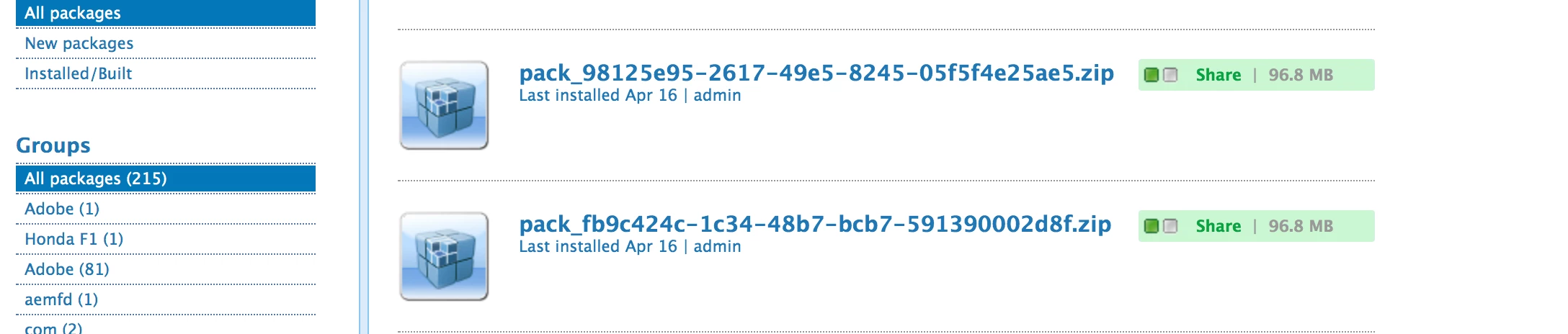
I am not sure what changes required in pom.

This post is no longer active and is closed to new replies. Need help? Start a new post to ask your question.
Best answer by Ravi_Pampana

Hi,

Check below post if your issue is similar to this

AEM 6.3.2 package manager file names replaced with random UUID

2 replies

Adobe Employee
April 17, 2019

You need to check the package metadata before deployment.

Extract the package and go to "/META-INF/vault/properties.xml", Check the name property here which I believe will be the random character.

Check how this name property is getting set and change it accordingly.

Ravi_Pampana
Community Advisor
Ravi_PampanaCommunity AdvisorAccepted solution
Community Advisor
April 17, 2019

Hi,

Check below post if your issue is similar to this

AEM 6.3.2 package manager file names replaced with random UUID