Package download and upload | Community
Skip to main content
shaheenas113483
Level 3
March 27, 2019
Solved

Package download and upload

  • March 27, 2019
  • 10 replies
  • 8076 views

When I create a package in package manager, I build and install it, after which I download the package, but that gets downloaded a folder instead of a zipped file. Next if I try to upload the same page again after zipping it, it shows me error: as given in the image.
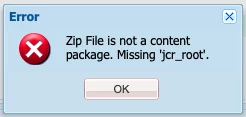
What might be wrong?

This post is no longer active and is closed to new replies. Need help? Start a new post to ask your question.
Best answer by Peter_Puzanovs

OOTB Package manager provides only .zip if your Mac/OS decides to unzip it, it's a matter of you to config OS[1] in a way that package won't be unzipped or zip the folder back correctly, without loosing essential info for package manager system.

[1] https://www.addictivetips.com/mac-os/stop-automatically-unzipping-files-in-safari/

Regards,

Peter

10 replies

Hemant_arora
Level 8
March 27, 2019

check the jcr_root folder in the zip file. a package must have the jcr_root folder. also it should not get downloaded as a folder. it should be a zip file.

are you creating package using aem package manager ?

shaheenas113483
Level 3
March 27, 2019

Yes, I created the package from AEM Package Manager, it is showing PackageName.zip but it getting downloaded as a folder.

How can I prevent it from getting downloaded as a folder? Is it some settings of the browse?

Prince_Shivhare
Community Advisor
Community Advisor
March 27, 2019

It's weird, as you can also see package extension is ZIP.

probably can you try giving some content folder in the filter? because I Can't see anything you have selected from a filter.

Also if that doesn't work try restarting the AEM or check the same thing with your local with the same AEM version and after deleting the quickstart folder. something might be corrupt.

~ Prince

arunpatidar
Community Advisor
Community Advisor
March 27, 2019

Are you using Mac or windows. It seems your zip is getting extracted and original zip is may be in trash/bin. could you please check?

Arun Patidar
shaheenas113483
Level 3
March 27, 2019

I have cropped the area including content foldr in the provided image. I have restarted and created instance several times, but it doesn't help me.

shaheenas113483
Level 3
March 27, 2019

I use Mac.

When I get the downloaded folder I created a zip using the jcr_root and meta_inf folders, only that zip get uploaded successfully. But if I try to zip the folder itself, which contains the jcr_root and meta_inf, that doesn't get uploaded.

arunpatidar
Community Advisor
Community Advisor
March 27, 2019

Can you check downloaded zip in trash?

Arun Patidar
shaheenas113483
Level 3
March 28, 2019

I have checked, it's not there.

Infact, the problem is really peculiar. At times when I download a package, I get zipped file, which I can upload. But, at other times when I download, I get unzipped file, which on compressing doesn't gets uploaded!

Peter_Puzanovs
Community Advisor
Peter_PuzanovsCommunity AdvisorAccepted solution
Community Advisor
March 28, 2019

OOTB Package manager provides only .zip if your Mac/OS decides to unzip it, it's a matter of you to config OS[1] in a way that package won't be unzipped or zip the folder back correctly, without loosing essential info for package manager system.

[1] https://www.addictivetips.com/mac-os/stop-automatically-unzipping-files-in-safari/

Regards,

Peter

smacdonald2008
Level 10
March 28, 2019

Great answers everyone!