Override core component dialog fields | Community
Skip to main content
October 7, 2021
Solved

Override core component dialog fields

  • October 7, 2021
  • 2 replies
  • 3742 views

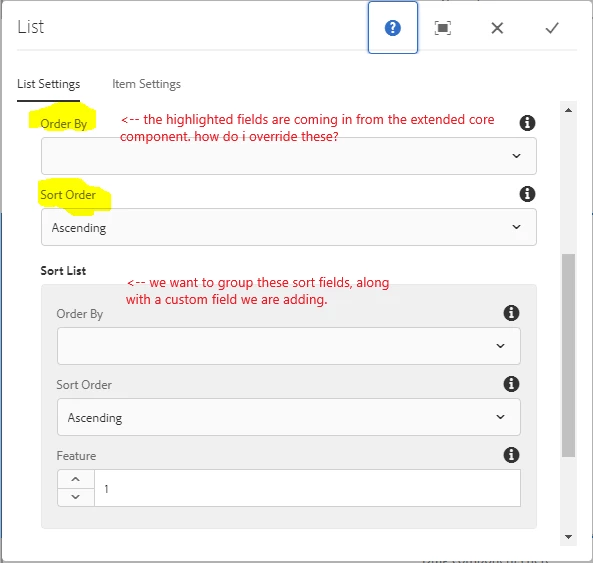
I have extended the List core component and we have added a custom field, that I have wrapped with a header/well to group the fields together. However, the fields at the top of the screen shot are coming in from the core component -- can I turn those off somehow? 


This post is no longer active and is closed to new replies. Need help? Start a new post to ask your question.
Best answer by Sanjay_Bangar

Hi @melaniejo,

       We can use sling resource merger to hide those properties.


https://experienceleague.adobe.com/docs/experience-manager-64/developing/platform/sling-resource-merger.html?lang=en


2 replies

Kishore_Kumar_
October 8, 2021
Sanjay_Bangar
Community Advisor
Sanjay_BangarCommunity AdvisorAccepted solution
Community Advisor
October 8, 2021

Hi @melaniejo,

       We can use sling resource merger to hide those properties.


https://experienceleague.adobe.com/docs/experience-manager-64/developing/platform/sling-resource-merger.html?lang=en


MelanieJoAuthor
October 8, 2021


Unfortunately I have not been able to get the Sling Resource Merger to work. I applied sling:hideResource to the field, but that just hides the one I want to keep. Using slide:hideChildren didn't work either - perhaps I was putting it on the wrong node.


In the core List component, we want to group the existing fields of orderBy and sortOrder, with the custom field we are adding (feature), so they are in that shaded gray area. How can we add this formatting to the dialog while suppressing the dialog from the extended component? Our CRX fields are the ones that are in the gray area. How can I remove the fields in the white area without losing the ones in the gray?