Optimizing page loading by removing script inside html files | Community
Skip to main content
JakeCham
Level 6
March 20, 2021
Solved

Optimizing page loading by removing script inside html files

  • March 20, 2021
  • 2 replies
  • 2275 views

Hi Team,

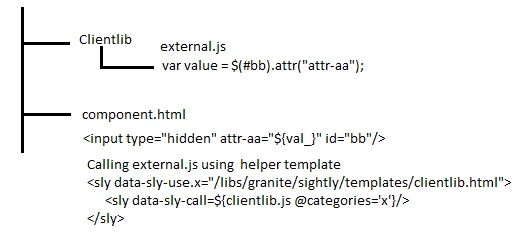
Currently I'm trying to reduce the page loading by removing internal script inside html files.Trying to achieve it by using helper template provided by AEM. There are parameters to pass from htl to external java script.To achieve it , I'm trying to use below way.

Passing parameters from htl to external js of the clientlib folder , the logic as below

Inside htl

<input type="hidden" attr-aa="${val_}" id="bb"/>

Inside external JS

var value = $(#bb).attr("attr-aa");

Problem is ${val_} is unique id. When I put multiple components(same component repeating) inside same page it is always getting same value which is on the top since this <input type="hidden" attr-aa="${val_}" id="bb"/> line is common to all the components on the same page . Is there any other way to achieve this ?
 

Thanks in advance!


This post is no longer active and is closed to new replies. Need help? Start a new post to ask your question.
Best answer by Anudeep_Garnepudi

@jakecham 

You hardcoded the id attribute value id="bb". This way when you do $("#bb").(...) you will always get first element as id must be unique. Try below approch

add the attribute to component div. Example if you component is text then

<div class="cmp-text" data-attr-aa="${val_}"> ... </div>

cmp-text is component class, write Javascript for each component on page and get data-attr-aa value.

document.querySelectorAll(".cmp-text").forEach(text => { text.getAttribute("data-atte-aa"); });

Similarly can do using jQuery as well.


2 replies

Bhuwan_B
Community Advisor
Community Advisor
March 22, 2021
Anudeep_Garnepudi
Community Advisor
Anudeep_GarnepudiCommunity AdvisorAccepted solution
Community Advisor
March 22, 2021

@jakecham 

You hardcoded the id attribute value id="bb". This way when you do $("#bb").(...) you will always get first element as id must be unique. Try below approch

add the attribute to component div. Example if you component is text then

<div class="cmp-text" data-attr-aa="${val_}"> ... </div>

cmp-text is component class, write Javascript for each component on page and get data-attr-aa value.

document.querySelectorAll(".cmp-text").forEach(text => { text.getAttribute("data-atte-aa"); });

Similarly can do using jQuery as well.


AG
JakeCham
JakeChamAuthor
Level 6
March 22, 2021
Hi @anudeep_garnepudi This works. Thanks.