OOTB WORKFLOW PURGE in AEMasCloud configuration-Request | Community
Skip to main content
raja-thannasi
Level 2
March 13, 2024
Solved

OOTB WORKFLOW PURGE in AEMasCloud configuration-Request

  • March 13, 2024
  • 3 replies
  • 1067 views

Hi Team,

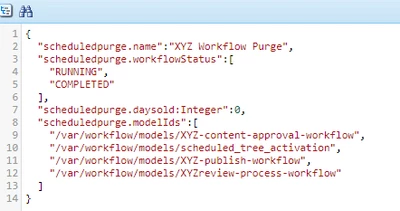
        Kindly help me to configure OOTB WORKFLOW PURGE on AEMasCS. though we have configured under

/apps/XYZ-project/osgiconfig/config.author/com.adobe.granite.workflow.purge.Scheduler~demoworkflowpurge.cfg.json , its not working as expected on aemcloud.

1) Kindly help us to troubleshoot, are we missing any configurations?


2) Also let us know where this class file exists com.adobe.granite.workflow.purge.Scheduler?  when we decompile the aemsdk file, this class file does not exists under com.adobe.granite.workflow.purge.Scheduler.


.

 

This post is no longer active and is closed to new replies. Need help? Start a new post to ask your question.
Best answer by somen-sarkar

HI @raja-thannasi ,


1) For OSGi configuration factory file names should use the <factoryPID>-<name>.cfg.json naming convention. So in this case try naming the file as com.adobe.granite.workflow.purge.Scheduler-demoworkflowpurge.cfg.json
2) Check Adobe Granite Workflow Core bundle for the respective class that you are searching (com.adobe.granite.workflow.core)


Above config should enable the configurations and you can cross verify the config in AEMaaCS via admin console. From schedular perspective Workflow purge may be running on weekly basis. In case you want change the frequency then you need to override the OOTB maintenance config in apps.  Hope this will help for resolving the issue.

Ref:-

1) https://experienceleague.adobe.com/docs/experience-manager-cloud-service/content/operations/maintenance.html?lang=en

2)https://experienceleague.adobe.com/docs/experience-manager-cloud-service/content/implementing/deploying/configuring-osgi.html?lang=en


Thanks,

Somen

3 replies

TarunKumar
Community Advisor
Community Advisor
March 13, 2024

HI @raja-thannasi ,

Where you are testing this configuration. Also can you try to change the name of your configuration as com.adobe.granite.workflow.purge.Scheduler.demoworkflowpurge.cfg.json and see if that works? 

To verify the appropriate OSGi configuration values are applied:

  1. In the Developer Console’s Configuration output
  2. Locate the pid representing the OSGi configuration to verify; this is the name of the OSGi configuration file in the AEM project’s source code.
  3. Inspect the properties list for the pid and verify the key and values match the OSGi configuration file in the AEM project source code for the runmode being verified.=


Thanks
Tarun

somen-sarkar
Community Advisor
somen-sarkarCommunity AdvisorAccepted solution
Community Advisor
March 13, 2024

HI @raja-thannasi ,


1) For OSGi configuration factory file names should use the <factoryPID>-<name>.cfg.json naming convention. So in this case try naming the file as com.adobe.granite.workflow.purge.Scheduler-demoworkflowpurge.cfg.json
2) Check Adobe Granite Workflow Core bundle for the respective class that you are searching (com.adobe.granite.workflow.core)


Above config should enable the configurations and you can cross verify the config in AEMaaCS via admin console. From schedular perspective Workflow purge may be running on weekly basis. In case you want change the frequency then you need to override the OOTB maintenance config in apps.  Hope this will help for resolving the issue.

Ref:-

1) https://experienceleague.adobe.com/docs/experience-manager-cloud-service/content/operations/maintenance.html?lang=en

2)https://experienceleague.adobe.com/docs/experience-manager-cloud-service/content/implementing/deploying/configuring-osgi.html?lang=en


Thanks,

Somen

Level 4
March 14, 2024

Hi @somen-sarkar , thanks for your response, let me validate the points above you mentioned.

kautuk_sahni
Community Manager
Community Manager
March 14, 2024

@raja-thannasi Did you find the suggestions from users helpful? Please let us know if more information is required. Otherwise, please mark the answer as correct for posterity. If you have found out solution yourself, please share it with the community.

Kautuk Sahni
Level 4
March 15, 2024

yes @kautuk_sahni , kindly close this forum.Thanks!.

kautuk_sahni
Community Manager
Community Manager
March 20, 2024

@rajat168 Can you mark the answer correct? Or if you identified an answer that was not shared by other users, can you share that here for posterity?

Kautuk Sahni