On selecting the Rich text editor(RTE)- special characters cursor is not moving forwards. | Community
Skip to main content
Level 2
November 12, 2021

On selecting the Rich text editor(RTE)- special characters cursor is not moving forwards.

  • November 12, 2021
  • 3 replies
  • 2135 views

I am trying to select the special characters from the RTE but when I select the special character the cursor is not moving forward because of which the next character is added in front of first character. 

In the below screenshot, first I have selected "£" next "—" and then "©".
So it should show up as "£—©" but since the cursor is not moving it is displayed as "©—£".


Below is the screenshot of the issue.
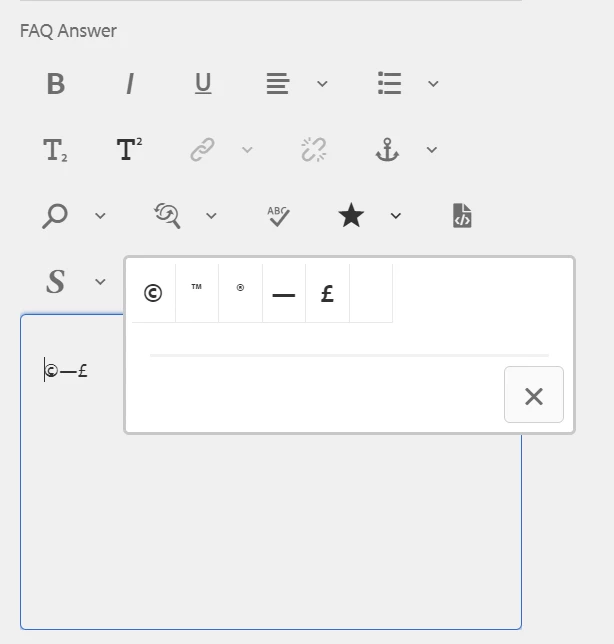


Can someone please help me how to resolve the issue.

This post is no longer active and is closed to new replies. Need help? Start a new post to ask your question.

3 replies

Level 2
November 15, 2021

@9571194 

Shubham_borole
Community Advisor
Community Advisor
November 16, 2021

Hi @junnu_ravali 
Can you please confirm what AEM version you are using and whether the richtext component is based on core component?

Please try extending from /apps/core/wcm/components/text/v2/text 

Also check out - https://experienceleague.adobe.com/docs/experience-manager-65/administering/operations/rich-text-editor.html?lang=en#aboutplugins


Thanks

Level 2
November 18, 2021

Hi @shubham_borole 
I am using AEM 6.5 and the sling:resourceType is  "cq/gui/components/authoring/dialog/richtext" and its a custom component.

Adobe Employee
December 30, 2021

Can also be seen in any Text component in AEM 6.5 using latest (2.17.14) WCM Core text component (/apps/core/wcm/components/text/v2/text).

It's a bug - SITES-1256

September 21, 2023

Hi

is this issue resolved ?

Adobe Employee
September 21, 2023

No, that bug is not fixed.