On/Off time DAM | Adobe Higher Education
Skip to main content
Level 4
September 23, 2020
Beantwoord

On/Off time DAM

  • September 23, 2020
  • 1 reactie
  • 1249 Bekeken

For on/off time on an asset, do i need to anything more than setting up th on/off time values in the asset properties in dam?

Er kunnen geen reacties meer worden geplaatst op dit onderwerp.
Beste antwoord door Manjunath_K

@shaheena_sk 

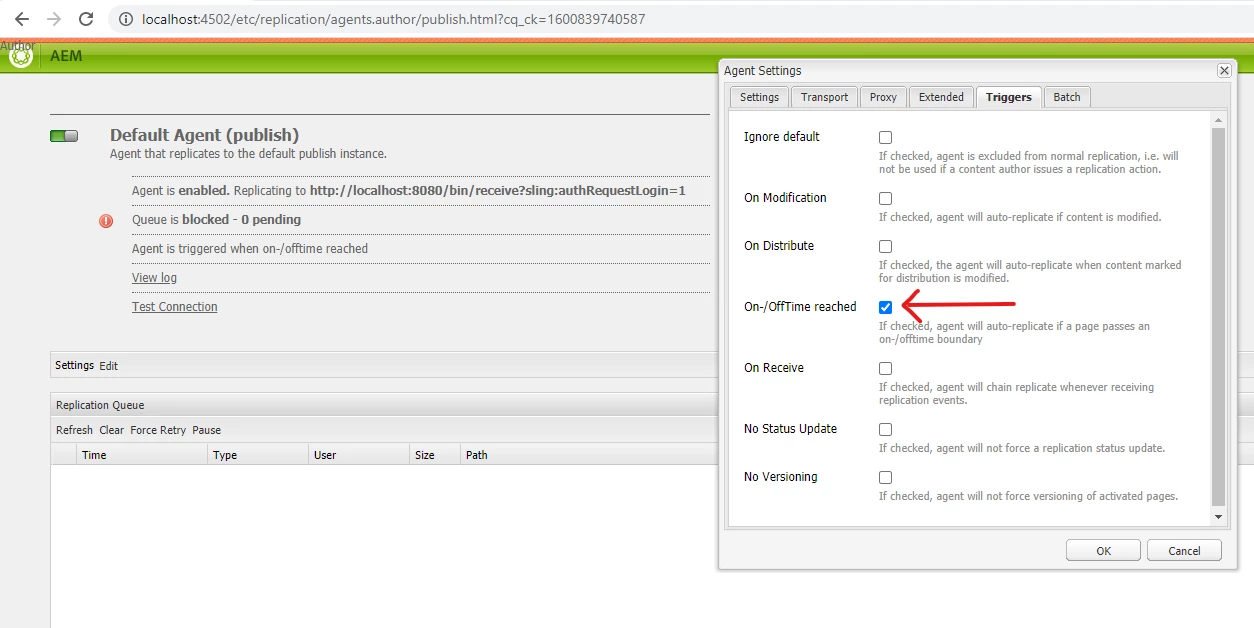
Yes, along with setting on/off time for asset you need check this property in replication agent config to enable auto replication by agent when on/off time reached.
 

1 reactie

Manjunath_K
Manjunath_KAntwoord
Level 7
September 23, 2020

@shaheena_sk 

Yes, along with setting on/off time for asset you need check this property in replication agent config to enable auto replication by agent when on/off time reached.


Manjunath_K
Level 7
September 23, 2020

@shaheena_sk 


When on-time is reached :


To verify on Author environment : navigate to root path on DAM where this asset is present & you can see published/activated icon(highlighted in below screenshot) visible on that asset. (ex : http://localhost:4502/assets.html/content/dam/wknd/en/magazine/western-australia )


To verify on Publish environment : you will be able to access that asset (http://localhost:4503/content/dam/wknd/en/magazine/western-australia/Adobe_WAAdobe_WA_B6A7083.JPG )


When off-time is reached :


To verify on Author environment : navigate to root path where this asset is present & you can see deactivated icon(highlighted in below screenshot) visible on that asset. (ex : http://localhost:4502/assets.html/content/dam/wknd/en/magazine/western-australia )


To verify on Publish environment : you will not be able to access that asset & you will get 404 since its deactivated (http://localhost:4503/content/dam/wknd/en/magazine/western-australia/Adobe_WAAdobe_WA_B6A7083.JPG )