Omnisearch | Community
Skip to main content
This post is no longer active and is closed to new replies. Need help? Start a new post to ask your question.

5 replies

jantzen_b
Adobe Employee
Adobe Employee
July 11, 2018

Is this question related to a specific Adobe product or solution? Based on the information you've provided, I'd guess it was related to AEM. Is this the case? If so, I'll move your question to the Adobe Experience Manager​ community.

Thanks,
Jantzen

arunpatidar
Community Advisor
Community Advisor
July 11, 2018

Hi,

You can check Empty String in Siteadmin Search

if doesn't help explain more about use case.

Arun Patidar
Level 2
July 12, 2018

Thanks for the response.

Can we change the file present under libs folder?

For present omnisearch i need to overlay with property cq:variant. How can I proceed for this?How to add this property in omnisearch.js?

arunpatidar
Community Advisor
Community Advisor
July 12, 2018

No, you should overlay files from libs to apps but if you want to change js file, you can create a copy of js file and modified and change the reference in js.txt

Overlays

what do you mean by adding cq:variant property in omnisearch.js ? you want extra filter?

Thanks

Arun

Arun Patidar
Level 2
July 13, 2018

Thanks for the response.

Yeah . I need to include the extra filter .

arunpatidar
Community Advisor
Community Advisor
July 15, 2018

Hi,

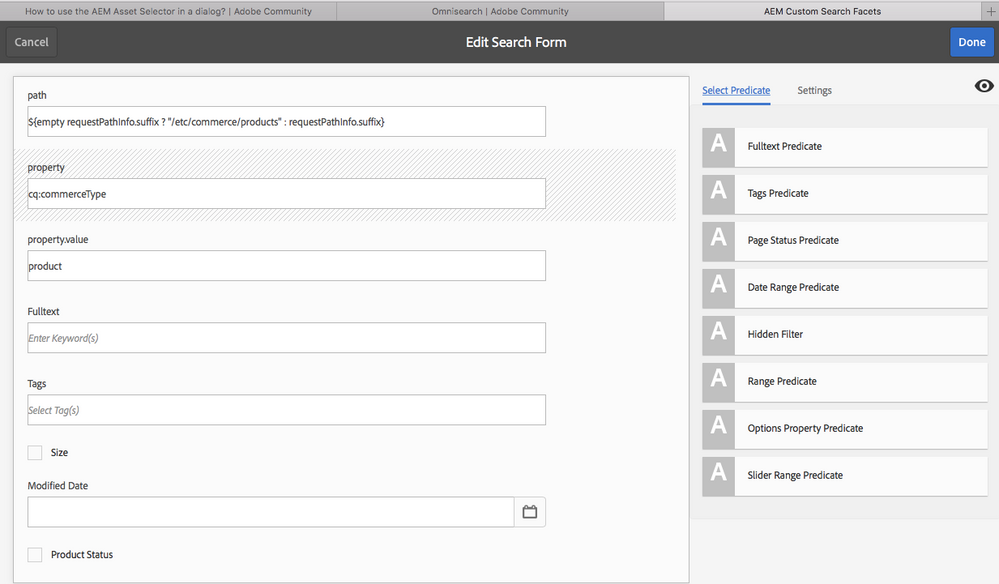
Please check Use custom search facets

Arun Patidar
Level 2
July 23, 2018

Thanks for the response.

How to add the property filter to the Omnisearch feature cq:CommerceType - variant when cq:CommerceType - product is already is present.

Both "variant" and "product" should be included because few products are  having cq:CommerceType - product as a property and few products are having cq:CommerceType - variant as a property.

Thanks,

Ashwini

Level 2
July 26, 2018

Thanks for the response.

But this solution dint work in my case.

Need to find the query builder so that I can add variant property to the query.

Thanks,

Ashwini