Numberfield and textfield are required, but if they are empty, only numberfield shows error when submitting. | Community
Skip to main content
January 5, 2021
Solved

Numberfield and textfield are required, but if they are empty, only numberfield shows error when submitting.

  • January 5, 2021
  • 2 replies
  • 2866 views

My AEM version is 6.5. The nodes follow


<items jcr:primaryType="nt:unstructured"> <number jcr:primaryType="nt:unstructured" sling:resourceType="granite/ui/components/coral/foundation/form/numberfield" fieldLabel="number" min="1" name="./number" required="{Boolean}true"/> <text jcr:primaryType="nt:unstructured" sling:resourceType="granite/ui/components/coral/foundation/form/textfield" fieldLabel="Text" name="./text" required="{Boolean}true"/> </items>


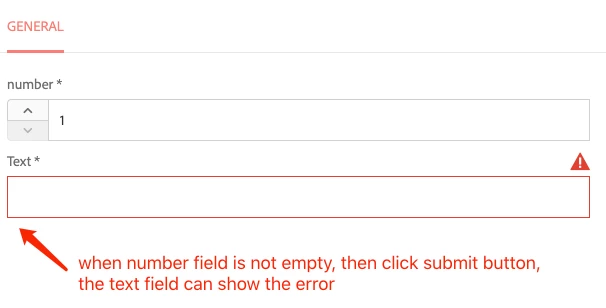
Observe: (The numberfield and textfield are requiredIf these two fields are empty, and then click submit button, only numberfield shows error.

Then I fill numberfield, and click submit button, the text field shows error.
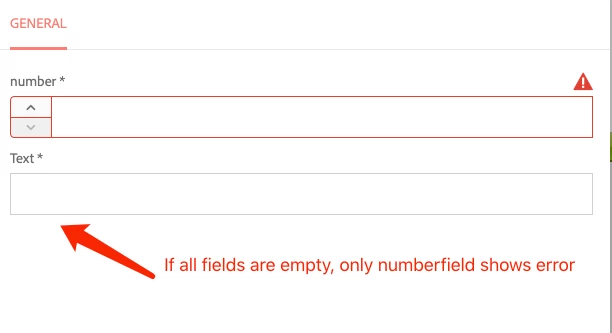
Expected: If the two fields are empty, both of them should show error when click submit button.
 

This post is no longer active and is closed to new replies. Need help? Start a new post to ask your question.
Best answer by Anudeep_Garnepudi

@dz_dai 

There is no such weightage or priority of fields based on types, all the form fields will be looped and validated on submit.

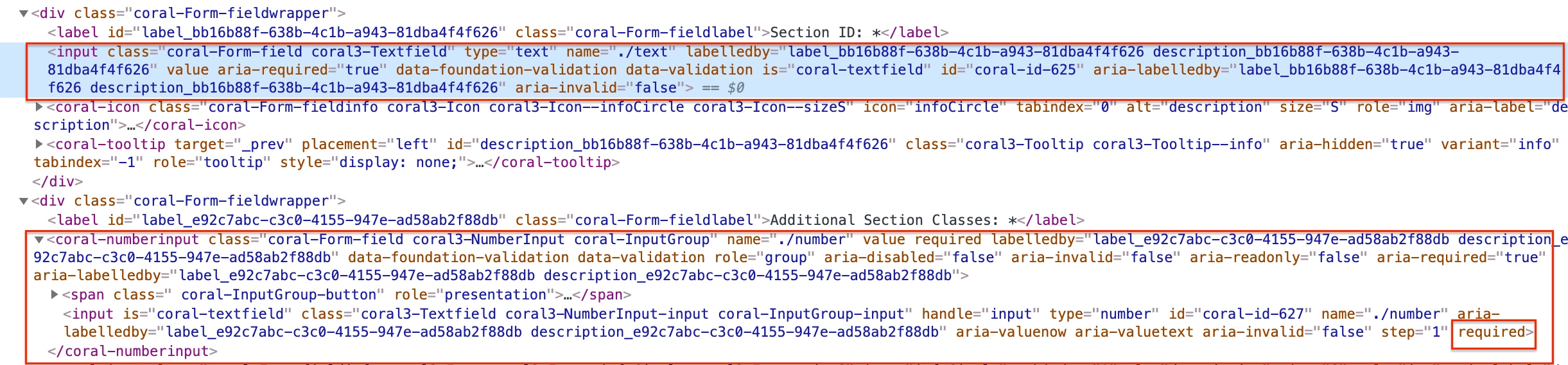
In your case, number field has an additional attribute "required" where textfield doesn't. Because of the required attribute, numberfield is being validated before the other fields(textfield) which is HTML validation. Try to inspect and remove the required attribute from numberfield, you see all fields turning red at once.


2 replies

Suraj_Kamdi
Community Advisor
Community Advisor
January 5, 2021

@dz_dai 

Yeah, I have seen this kind of behavior earlier. Try to install any 6.5 feature or service pack.

dz_daiAuthor
January 6, 2021
Now my AEM version is already 6.5. Maybe numberfield and textfield have weights? And numberfield has higher priority when throw required error?
Anudeep_Garnepudi
Community Advisor
Anudeep_GarnepudiCommunity AdvisorAccepted solution
Community Advisor
January 6, 2021

@dz_dai 

There is no such weightage or priority of fields based on types, all the form fields will be looped and validated on submit.

In your case, number field has an additional attribute "required" where textfield doesn't. Because of the required attribute, numberfield is being validated before the other fields(textfield) which is HTML validation. Try to inspect and remove the required attribute from numberfield, you see all fields turning red at once.


AG
Anudeep_Garnepudi
Community Advisor
Community Advisor
January 11, 2021

@dz_dai 

You don't need to remove anything if you want both the fields required. The required attribute/property is related to HTML and will be validated first. AEM does validation based on aria-required=true attribute. As the number field has both required and aria-required, HTML validation taking the precedence over AEM and will be validated first and highlighting in Red. At the end all the form fields will be validated nothing to worry.

-AG

AG