npm ci failed error | Community
Skip to main content
October 4, 2023
Solved

npm ci failed error

  • October 4, 2023
  • 5 replies
  • 7570 views

Hi Everyone, I have tried to run maven clean command. but it throws the error. Can anyone please help me to solve this error.


[INFO] WKND Sites Project ................................. SUCCESS [ 0.504 s]
[INFO] WKND Sites Project - Core .......................... SUCCESS [ 19.834 s]
[INFO] WKND Sites Project - UI Frontend ................... FAILURE [ 17.437 s]
[INFO] WKND Sites Project - Repository Structure Package .. SKIPPED
[INFO] WKND Sites Project - UI apps ....................... SKIPPED
[INFO] WKND Sites Project - UI content .................... SKIPPED
[INFO] WKND Sites Project - UI config ..................... SKIPPED
[INFO] WKND Sites Project - All ........................... SKIPPED
[INFO] WKND Sites Project - Integration Tests ............. SKIPPED
[INFO] WKND Sites Project - Dispatcher .................... SKIPPED
[INFO] WKND Sites Project - UI Tests ...................... SKIPPED
[INFO] ------------------------------------------------------------------------
[INFO] BUILD FAILURE
[INFO] ------------------------------------------------------------------------
[INFO] Total time: 41.337 s
[INFO] Finished at: 2023-10-04T17:49:42+05:30
[INFO] ------------------------------------------------------------------------
[ERROR] Failed to execute goal com.github.eirslett:frontend-maven-plugin:1.12.0:npm (npm ci) on project aem-guides-wknd.ui.frontend: Failed to run task: 'npm ci' failed. java.io.IOException: Cannot run program "\aem-guides-wknd\ui.frontend\node\node.exe" (in directory "aem-guides-wknd\ui.frontend"): CreateProcess error=193, %1 is not a valid Win32 application -> [Help 1]
[ERROR]
[ERROR] To see the full stack trace of the errors, re-run Maven with the -e switch.
[ERROR] Re-run Maven using the -X switch to enable full debug logging.
[ERROR]
[ERROR] For more information about the errors and possible solutions, please read the following articles:
[ERROR] [Help 1] http://cwiki.apache.org/confluence/display/MAVEN/MojoFailureException
[ERROR]
[ERROR] After correcting the problems, you can resume the build with the command
[ERROR] mvn <args> -rf :aem-guides-wknd.ui.frontend

This post is no longer active and is closed to new replies. Need help? Start a new post to ask your question.
Best answer by Jagadeesh_Prakash

@sowmiya_palanisamy  If all else fails, consider reinstalling npm to ensure you have a clean npm installation:

npm install -g npm


5 replies

sherinregi-1
Community Advisor
Community Advisor
October 4, 2023

Hi @sowmiya_palanisamy 

This looks mostly related to you local node version or installation

1) can you please check for the node version you are on . Try to upgrade or downgrade . Min version need is 10+ as per adobe documentation 

2) Also run the npm ci from ui.frontend for additional information


Jagadeesh_Prakash
Community Advisor
Community Advisor
October 4, 2023

@sowmiya_palanisamy 


Ensure that Node.js and npm are installed on your system and are accessible from the command line. You can check the versions by running node -v and npm -v. If they are not installed, download and install them from the official Node.js website (https://nodejs.org/).


Sometimes, connectivity issues or problems with the npm registry can prevent the npm ci command from running. You can switch to a different npm registry or mirror if you suspect this is the problem.


npm config set registry https://registry.npmjs.org/


If you are behind a corporate firewall or proxy, it may block npm from accessing external resources. You may need to configure npm to work with your proxy settings. You can set the proxy configuration using the following commands:

npm config set proxy http://proxy.example.com:port


npm config set https-proxy http://proxy.example.com:port


October 5, 2023

Hi @jagadeesh_prakash I'm using node v16.17.0 and npm version 8.15.0. I tried that npm registry command  and proxy configuration also but it shows same error.

Jagadeesh_Prakash
Community Advisor
Jagadeesh_PrakashCommunity AdvisorAccepted solution
Community Advisor
October 5, 2023

@sowmiya_palanisamy  If all else fails, consider reinstalling npm to ensure you have a clean npm installation:

npm install -g npm


TarunKumar
Community Advisor
Community Advisor
October 5, 2023

Hi @sowmiya_palanisamy 


You are probably getting this error maybe because you have not completed a "npm install".
NPM install will download all the dependencies that your projects needs to build and compile. 


In POM looks like you are missing the "npm install".

It should execute before your npm run dev or npm run prod

For reference please take a look at: aem-project-archetype/pom.xml at develop · adobe/aem-project-archetype · GitHub

Hope it helps!

Thanks
Tarun

kautuk_sahni
Community Manager
Community Manager
October 6, 2023

@sowmiya_palanisamy Did you find the suggestions from users helpful? Please let us know if more information is required. Otherwise, please mark the answer as correct for posterity. If you have found out solution yourself, please share it with the community.

Kautuk Sahni
February 25, 2024

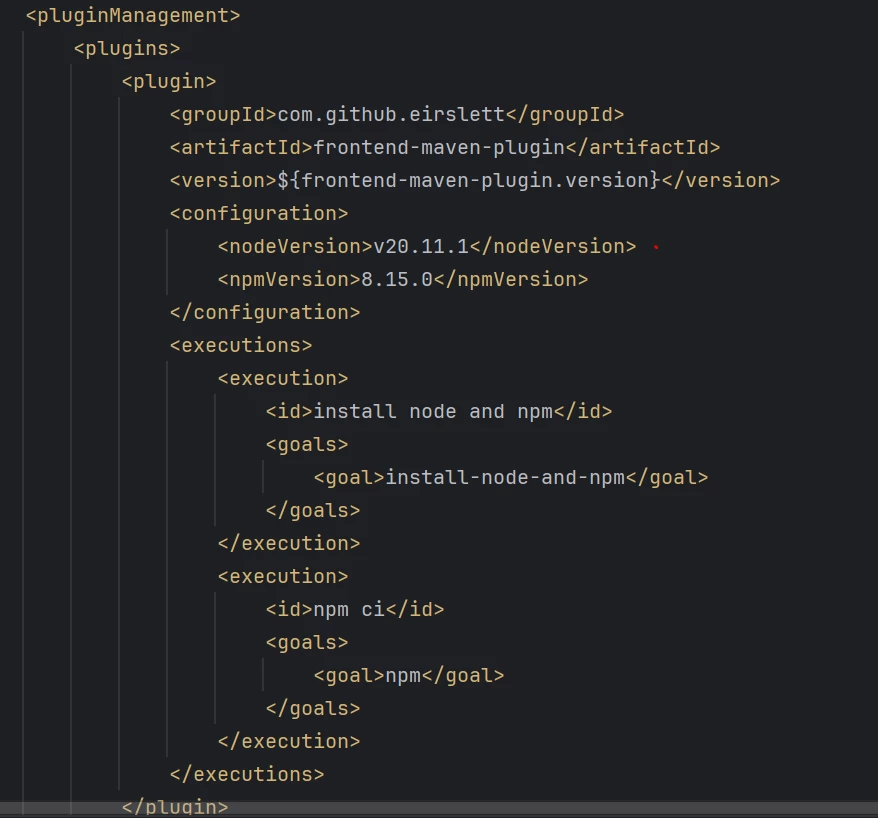
Try checking the node versions installed in system and in the parent pom.xml file of the project.

Make sure they are the same, if not change the node version in pom.xml to the same version as your system's node version.

It worked for me.


March 31, 2024

Hi @kavyasundar 


This worked for me. Kudos to your effort 🙂

kautuk_sahni
Community Manager
Community Manager
June 7, 2024

@mahesh_gunaje I hope the AEM community has been helpful. We look forward to your return as either a learner or a contributor. The community grows with SMEs like you. Invite your AEM peers to contribute too. Happy AEM learning!

Kautuk Sahni