Not getting option to delete the component in AEM | Community
Skip to main content
Level 3
January 9, 2025

Not getting option to delete the component in AEM

  • January 9, 2025
  • 4 replies
  • 1281 views

Hi Team,


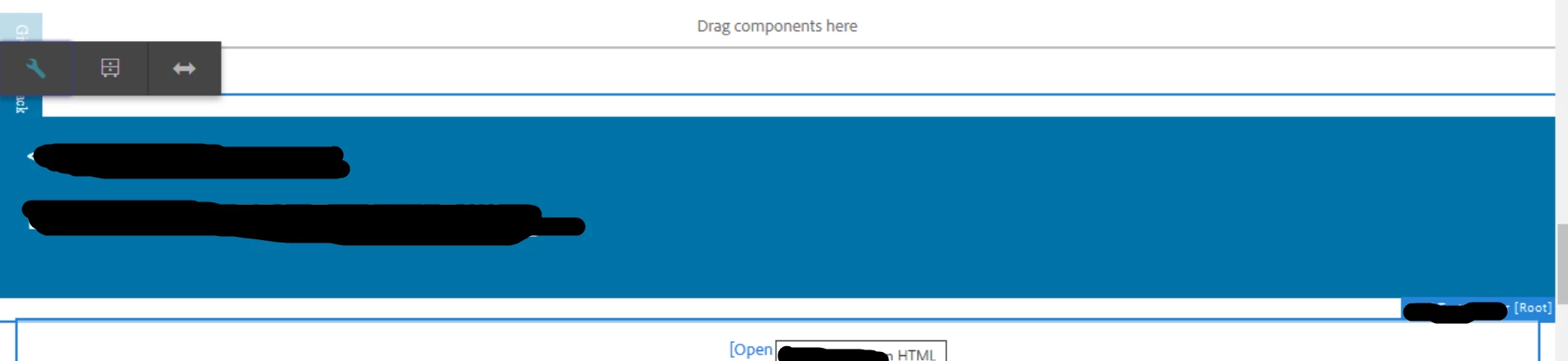
I am seeing the wired behavior on the production environment . One of the component on the page not showing option to delete or other options but if i drag and drop the same component i can able to do any of the operations on it and along with that i am seeing component name along with [Root].

Example Component name is Text , it is showing as Text[Root] (already existed on the page ) if i drag the component it is showing correct name as Text.

Only showing the option Configure, Convert to Experience fragment variation , layout 

Thank you,

4 replies

PRATHYUSHA_VP
Community Advisor
Community Advisor
January 9, 2025

Hi,


Check if you have necessary permissions to make CRUD operations in the page.


If there is no required permission, you will not able to see the options you're looking for 


Hope this helps


Thanks

Level 3
January 9, 2025

It is not permission issue , on the same page i can able to drag the same component and edit it and delete it  and different  components as well .

PRATHYUSHA_VP
Community Advisor
Community Advisor
January 9, 2025

Can you check your _cq_editConfig.xml file if any changes done to disable the options --


Found similar thread below -


https://experienceleaguecommunities.adobe.com/t5/adobe-experience-manager/edit-configure-options-of-component-are-not-showing/m-p/328334


Thanks

aanchal-sikka
Community Advisor
Community Advisor
January 9, 2025

@satish2info-1 


Please verify if the component is added via Drag-n-drop or is it included via "its parent component" in its HTL.


Aanchal Sikka
Level 3
January 9, 2025

I verified in the content structure it is showing component_copy , so it is copy pasted component not included it in sightly . 

kapil_rajoria
Community Advisor
Community Advisor
January 9, 2025

Hi @satish2info-1 if you have access to crx de, you can check the structures in both cases. See the difference, you will understand.
Also, compare the non-working one structure in the lower environments where the same is working. If you see a difference, make a package of the page from the lower environment and replace it on prod.

kautuk_sahni
Community Manager
Community Manager
February 18, 2025

@satish2info-1 Did you find the suggestions helpful? Please let us know if you need more information. If a response worked, kindly mark it as correct for posterity; alternatively, if you found a solution yourself, we’d appreciate it if you could share it with the community. Thank you!

Kautuk Sahni