Not getting AEM in properties of ui.apps and ui.content in Eclipse | Community
Skip to main content
sibim50528883
Level 2
November 28, 2019

Not getting AEM in properties of ui.apps and ui.content in Eclipse

  • November 28, 2019
  • 7 replies
  • 5545 views

Hi All,

I am facing an issue in Eclipse on AEM project.

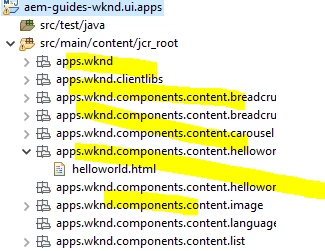
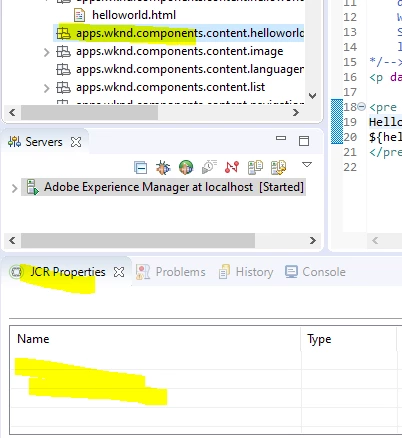
I am not getting JCR properties in AEM perspective and also the folder structure of ui.apps and ui.content also not looking great in my eclipse.

On searching in web I came across this thread unable to get jcr properties in eclipse  which will fix my jcr:properties visibility and folder structure issue.

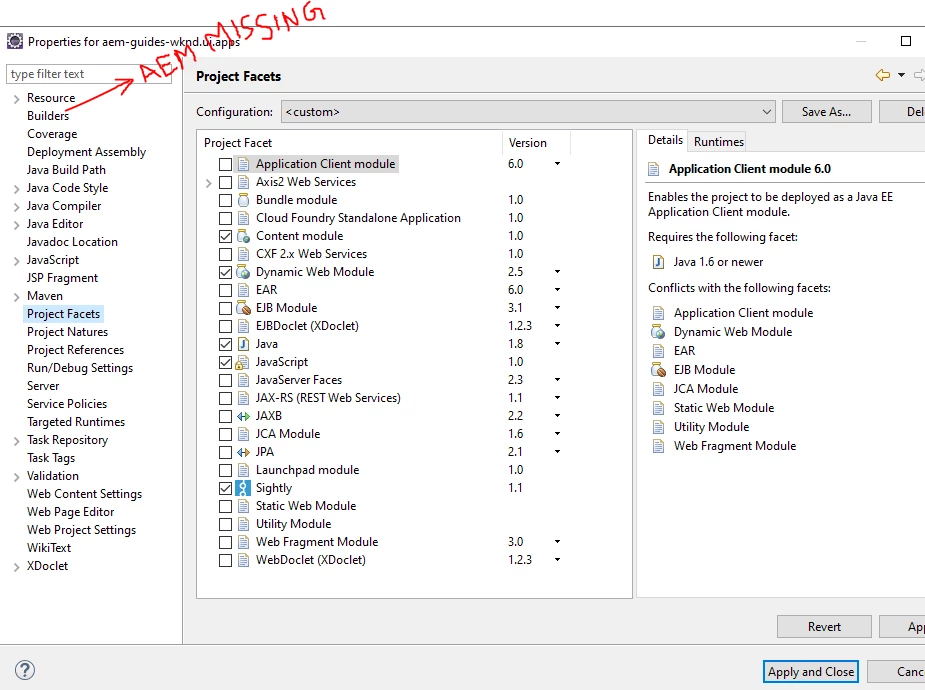
But the problem is I am not getting the AEM in Properties of project (ui.apps and ui.content).

I am on AEM perspective and also AEM server started successfully. My projects facets also proper.

Version of Eclipse: Version: 2018-12 (4.10.0)

Maven :3.6.0

Java: jdk 1.8.0_201

Kindly help me to fix this.

Thanks in Advance.

screenshot 1: folder structure
Screenshot 2: AEM option missing in properties
Screenshot 3: JCR properties
Adding screenshots

This post is no longer active and is closed to new replies. Need help? Start a new post to ask your question.

7 replies

Adobe Employee
November 28, 2019

You need to select a node type, so the JCR properties are applicable for that type of objects:

sibim50528883
Level 2
November 29, 2019

Hi Berliant,

I am looking for something like the below screenshot (Reference: Set up a local AEM Development Environment ). I followed the reference.

jcr:properties as exactly in AEM.

The change in Component code from eclipse are not publishing to AEM localhost. I turned on the "Automatically publish when resource changes" option in AEM server.

Adobe Employee
November 29, 2019

For JCR properties, check "Create Header Component" from 2 - Pages and Templates . It includes some AEM plugin troubleshooting tips.

sibim50528883
Level 2
November 30, 2019

From the steps he gave in the link you provided, there is a tab called AEM in the properties of ui.apps (Rightclick ui.apps --> Properties).

I am not getting that AEM tab to map the root directory.

That's where I am struck now.

arunpatidar
Community Advisor
Community Advisor
November 30, 2019

Hi,

Please check which prospective are you in. Navigator or in Project Explorer

https://adobeaemhub.com/synchronize-the-code-between-aem-instance-and-eclipse/

AEM Perspective - Node Details

Adding a node (component) via Eclipse

Arun Patidar
sibim50528883
Level 2
December 2, 2019

I am opening in AEM perspective only. AEM server also started successfully.

To sync the content root folder I am not getting the AEM option in the properties of the ui.apps and ui.content as below.

February 5, 2024
Hi I am getting exact same issue. No AEM menu in Properties, no Import From Server menu too. AEM Perspective is activated normally. Using Eclipse 2023-12 version. Thanks