Not able to drag & drop the custom workflow step
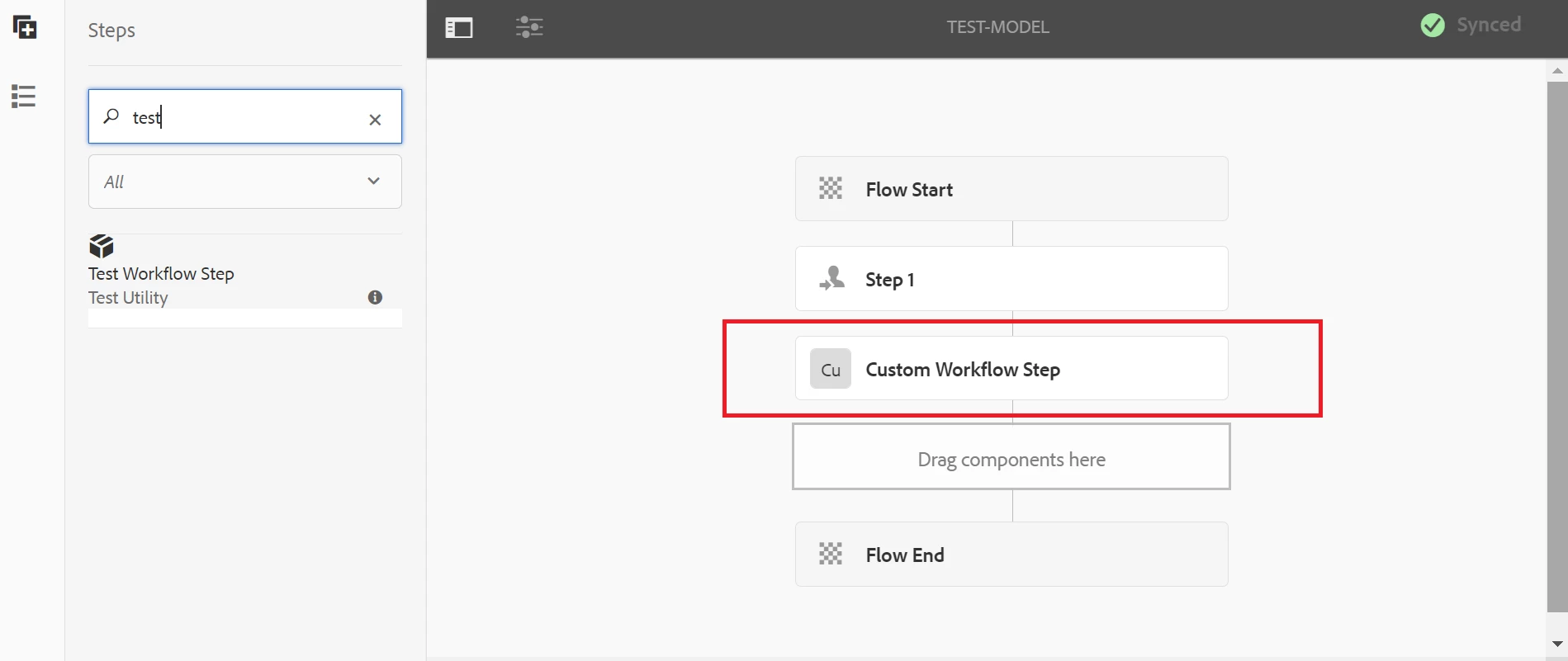
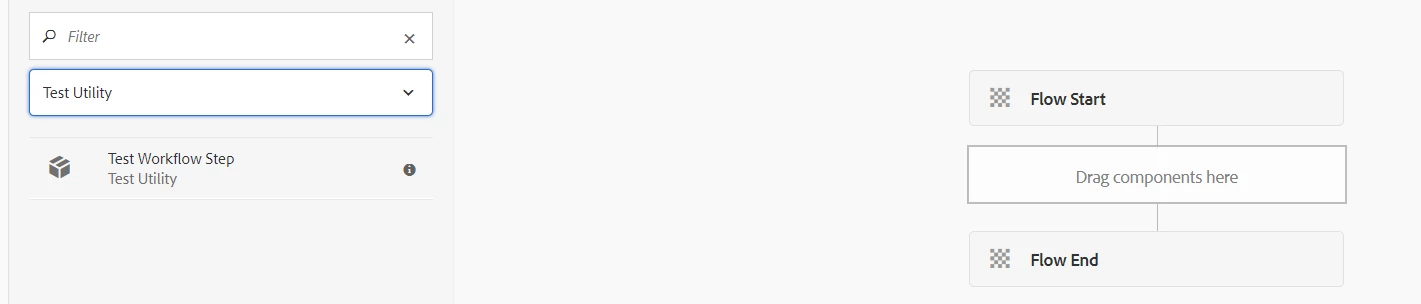
Hello Community - I am not able to drag & drop the custom workflow step in the workflow model. Not sure what is happening. Can someone advise on this?
customworkflowstep XML:
<?xml version="1.0" encoding="UTF-8"?>
<jcr:root xmlns:sling="http://sling.apache.org/jcr/sling/1.0" xmlns:cq="http://www.day.com/jcr/cq/1.0" xmlns:jcr="http://www.jcp.org/jcr/1.0"
jcr:description="This is a custom workflow step for test project."
jcr:primaryType="cq:Component"
jcr:title="Test Workflow Step"
sling:resourceSuperType="cq/workflow/components/model/process"
allowedParents="[*/parsys]"
componentGroup="Test Utility"/>
cq_editConfig.xml
<?xml version="1.0" encoding="UTF-8"?>
<jcr:root xmlns:cq="http://www.day.com/jcr/cq/1.0" xmlns:jcr="http://www.jcp.org/jcr/1.0" xmlns:nt="http://www.jcp.org/jcr/nt/1.0"
cq:dialogMode="floating"
jcr:primaryType="cq:EditConfig">
<cq:formParameters
jcr:description="custom workflow step."
jcr:primaryType="nt:unstructured"
jcr:title="Custom Workflow Step"
PROCESS="com.test.aem.core.workflows.CustomWorkflowStep"
PROCESS_AUTO_ADVANCE="true"/>
<cq:listeners
jcr:primaryType="cq:EditListenersConfig"
afterdelete="CQ.workflow.flow.Step.afterDelete"
afteredit="CQ.workflow.flow.Step.afterEdit"
afterinsert="CQ.workflow.flow.Step.afterInsert"
afterMove="REFRESH_PAGE"/>
</jcr:root>
cq_dialog.xml:
<?xml version="1.0" encoding="UTF-8"?>
<jcr:root xmlns:sling="http://sling.apache.org/jcr/sling/1.0" xmlns:cq="http://www.day.com/jcr/cq/1.0" xmlns:jcr="http://www.jcp.org/jcr/1.0" xmlns:nt="http://www.jcp.org/jcr/nt/1.0"
jcr:primaryType="nt:unstructured"
jcr:title="Test Workflow Step"
sling:resourceType="cq/gui/components/authoring/dialog">
<content
jcr:primaryType="nt:unstructured"
sling:resourceType="granite/ui/components/coral/foundation/tabs">
<items jcr:primaryType="nt:unstructured">
<common
cq:hideOnEdit="true"
jcr:primaryType="nt:unstructured"
jcr:title="Common"
sling:resourceType="granite/ui/components/coral/foundation/fixedcolumns"/>
<process
cq:hideOnEdit="true"
jcr:primaryType="nt:unstructured"
jcr:title="Process"
sling:resourceType="granite/ui/components/coral/foundation/fixedcolumns"/>
<processcommon
jcr:primaryType="nt:unstructured"
jcr:title="Common"
sling:resourceType="granite/ui/components/coral/foundation/fixedcolumns">
<items jcr:primaryType="nt:unstructured">
<column
jcr:primaryType="nt:unstructured"
sling:resourceType="granite/ui/components/coral/foundation/container">
<items jcr:primaryType="nt:unstructured">
<basic
jcr:primaryType="nt:unstructured"
sling:resourceType="granite/ui/components/coral/foundation/form/fieldset">
<items jcr:primaryType="nt:unstructured">
<title
jcr:primaryType="nt:unstructured"
sling:resourceType="granite/ui/components/coral/foundation/form/textfield"
disabled="false"
fieldLabel="Title"
name="./jcr:title"/>
<description
jcr:primaryType="nt:unstructured"
sling:resourceType="granite/ui/components/coral/foundation/form/textarea"
disabled="false"
fieldLabel="Description"
name="./jcr:description"/>
</items>
</basic>
<advanced
jcr:primaryType="nt:unstructured"
jcr:title="Advanced Settings"
sling:resourceType="granite/ui/components/coral/foundation/form/fieldset">
<items jcr:primaryType="nt:unstructured">
<advance
jcr:primaryType="nt:unstructured"
sling:resourceType="granite/ui/components/coral/foundation/form/checkbox"
fieldDescription="Check if your handler will advance to the next step."
fieldLabel="Handler Advance"
name="./metaData/PROCESS_AUTO_ADVANCE"
text="Handler Advance"
value="true"/>
</items>
</advanced>
</items>
</column>
</items>
</processcommon>
<processargs
jcr:primaryType="nt:unstructured"
jcr:title="Arguments"
sling:resourceType="granite/ui/components/coral/foundation/fixedcolumns">
<items jcr:primaryType="nt:unstructured">
<column
jcr:primaryType="nt:unstructured"
sling:resourceType="granite/ui/components/coral/foundation/container">
<items jcr:primaryType="nt:unstructured">
<arguments
jcr:primaryType="nt:unstructured"
jcr:title="Step Arguments"
sling:resourceType="granite/ui/components/coral/foundation/form/fieldset">
<items jcr:primaryType="nt:unstructured">
<brand
jcr:primaryType="nt:unstructured"
sling:resourceType="granite/ui/components/coral/foundation/form/textfield"
fieldLabel="Brand"
name="./metaData/BRAND"/>
<multinational
jcr:primaryType="nt:unstructured"
sling:resourceType="granite/ui/components/coral/foundation/form/checkbox"
checked="{Boolean}false"
fieldDescription="is your brand present in multiple conuntries."
name="./metaData/MULTINATIONAL"
text="Is Multinational"
uncheckedValue="{Boolean}false"
value="{Boolean}true"/>
<countries
jcr:primaryType="nt:unstructured"
sling:resourceType="granite/ui/components/coral/foundation/form/multifield"
fieldDescription="Add sites for countries."
fieldLabel="Countries">
<field
jcr:primaryType="nt:unstructured"
sling:resourceType="granite/ui/components/coral/foundation/form/textfield"
name="./metaData/COUNTRIES"/>
</countries>
</items>
</arguments>
</items>
</column>
</items>
</processargs>
</items>
</content>
</jcr:root>