Non-required field showing "Error: Please fill out this field" after input and delete | Community
Skip to main content
Level 2
December 21, 2022
Solved

Non-required field showing "Error: Please fill out this field" after input and delete

  • December 21, 2022
  • 2 replies
  • 2111 views

I'm using AEM 6.5.11 and have a CFM with a non-required multi-line field that allows plain text. I have not set any custom validation rules for this field. When I create a CF based on it and input something into the field, focus out, then delete all that I just input, and focus out again, an error message saying "Error: Please fill out this field" is displayed. I am unable to save the CF because of this error message.

Is this a default behavior of AEM or are there some settings that could be causing this problem?
This post is no longer active and is closed to new replies. Need help? Start a new post to ask your question.
Best answer by lukasz-m

Hi @wei_lyu,

I've checked that on clear AEM 6.5.11 - AEM 6.5.15, and I can confirm that this is AEM issue. It has been fixed in AEM 6.5.15. So to fix it, you will have to upgrade to SP15, alternatively you can contact Adobe, raising Adobe Support Ticket and ask to get back-ported fix for your version of AEM.

Multi line text component is represented by /libs/dam/cfm/admin/components/authoring/contenteditor/multieditor/cfeditor/js/multieditorfield.js, unfortunately it is part of granite:InternalArea, so you cannot apply the fix by yourself using overlay.

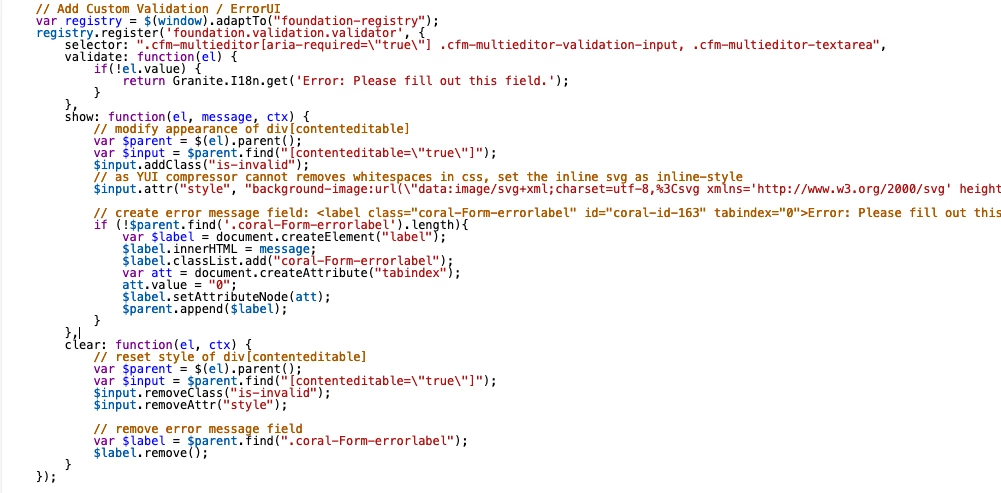
Below I presented detailed chnages between AEM 6.5.11-14 and AEM 6.5.15, where the issue is not present any more.

  • AEM 6.5 SP11 - SP14
  • AEM 6.5 SP15

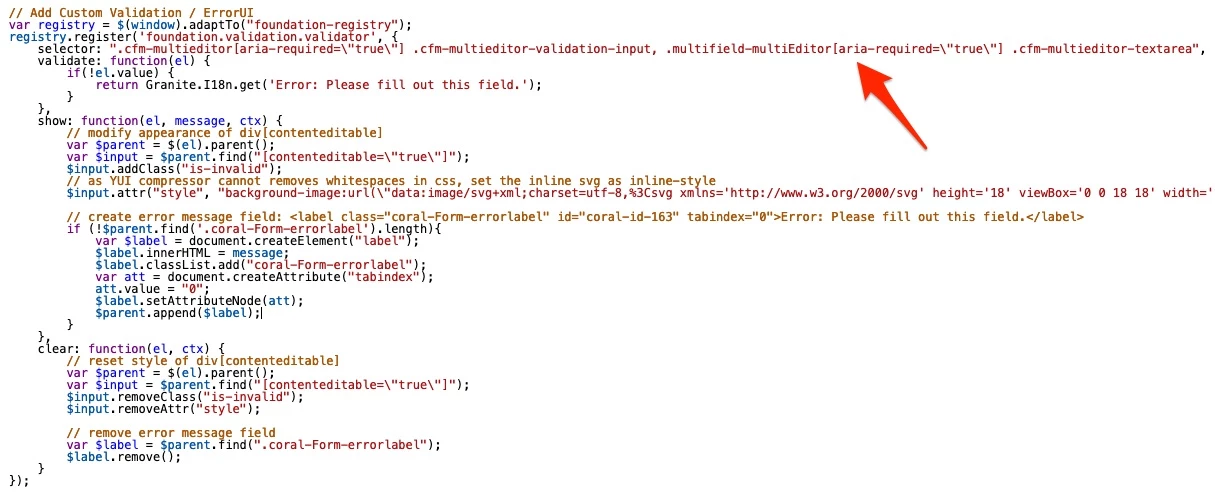
As you can see the only difference is that selector .multifield-multiEditor[aria-required=\"true\" has been added in SP15 and that solves the issue.

2 replies

krati_garg
Adobe Employee
Adobe Employee
December 22, 2022

@wei_lyu 

Can you share the screen shots of CF Model with this multi line field in focus so that we can see its properties and rules at schema level.

wei_lyuAuthor
Level 2
December 23, 2022

Hi @krati_garg 

Here are screenshots showing the field setting and the validation error.


lukasz-m
Community Advisor
lukasz-mCommunity AdvisorAccepted solution
Community Advisor
December 28, 2022

Hi @wei_lyu,

I've checked that on clear AEM 6.5.11 - AEM 6.5.15, and I can confirm that this is AEM issue. It has been fixed in AEM 6.5.15. So to fix it, you will have to upgrade to SP15, alternatively you can contact Adobe, raising Adobe Support Ticket and ask to get back-ported fix for your version of AEM.

Multi line text component is represented by /libs/dam/cfm/admin/components/authoring/contenteditor/multieditor/cfeditor/js/multieditorfield.js, unfortunately it is part of granite:InternalArea, so you cannot apply the fix by yourself using overlay.

Below I presented detailed chnages between AEM 6.5.11-14 and AEM 6.5.15, where the issue is not present any more.

  • AEM 6.5 SP11 - SP14
  • AEM 6.5 SP15

As you can see the only difference is that selector .multifield-multiEditor[aria-required=\"true\" has been added in SP15 and that solves the issue.

wei_lyuAuthor
Level 2
December 28, 2022

Thank you for the detailed information about the issue. I will bring this to the attention of our devops team and see if we can upgrade to AEM or request a back-ported fix from Adobe. I appreciate your help in troubleshooting this issue. Have a great day.