Nested lists in RTE | Community
Skip to main content
June 1, 2018
Solved

Nested lists in RTE

  • June 1, 2018
  • 5 replies
  • 1918 views

Hi Team,

Currently working in AEM 6.3 ENV and have a requirement to add nested lists in RTE plug-in. I have gone thru some of the online documentation and below lists available for RTE

lists#unordered   -->bullets

lists#ordered      -->numbers

lists#outdent

lists#indent

but for nested list don't have any information.

Example nested lists

  1. Fdgddgggnffgh

           (1) Fdgffhgfhdg

                    (a) Gfgfghffghhg

If any one implemented nested lists in RTE, please give me some inputs.

Thanks,

RR
This post is no longer active and is closed to new replies. Need help? Start a new post to ask your question.
Best answer by arunpatidar

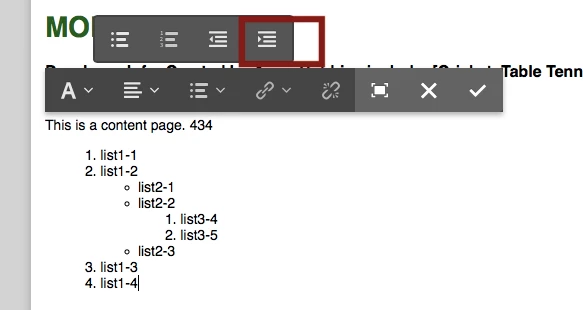
Hi you can use existing list to create nested list like below:

Thanks

Arun

5 replies

arunpatidar
Community Advisor
arunpatidarCommunity AdvisorAccepted solution
Community Advisor
June 1, 2018

Hi you can use existing list to create nested list like below:

Thanks

Arun

Arun Patidar
smacdonald2008
June 1, 2018

@arunp99088702 provided the correct response. Use the functionality provided.

RRP1Author
June 4, 2018

Thanks Arun. Our requirement is to use Numbers, Roman and English letters in list.  Like below

    (i)List1

           (1) List1

                    (a) List1

     (ii)List2

           (1) List1

                    (a) List1

Is this feature available in AEM 6.3 RTE plug-in? (OR) It possible to implement this type of requirement in AEM?

Thanks,RR

arunpatidar
Community Advisor
Community Advisor
June 4, 2018

AEM OOTB it is not possible but you can implement it with CSS.

1. First create list like above as I suggested.

2. Write CSS rule for nested list like below:

.someClass ul {list-style-type: lower-roman;}

.someClass ul ul{list-style-type: decimal;}

.someClass ul ul ul{list-style-type: lower-alpha;}

Thanks

Arun

Arun Patidar
RRP1Author
June 5, 2018

Thanks, Arun. I will check this new solution.

