Need to show featured image alone in list component | Community
Skip to main content
Adobe Employee
November 22, 2024

Need to show featured image alone in list component

  • November 22, 2024
  • 4 replies
  • 1260 views

I want to show featured image, title alone in one of our List component variations but in core list component ,only when we select display as teaser option, image is showing. along with that description also coming which I don't need.

How to segregate the image from teaser and show it.  From code they are getting as resource 

<sly data-sly-resource="${item.teaserResource }"></sly>
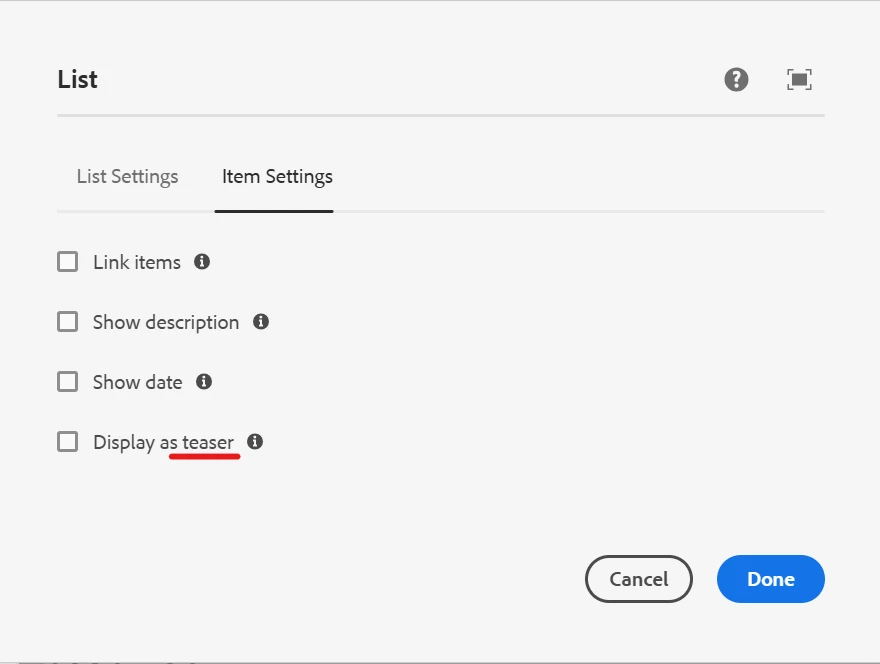


@estebanbustamante  @avinash_gupta_ @arunpatidar 


4 replies

Tethich
Community Advisor
Community Advisor
November 22, 2024

Hi @amsalek4 


Let me know if I got this right.

You have a List Core component and you also have a custom List component that extends the core one.


In the custom one you managed to display what you want, that being image and title.

And the core one displays by default ootb both image and description.


If that is the case, I would then say you would need to write a new custom List component for this particular use case and use it in the places were you have the core one instantiated. Mayne other have different ideas, but this is something that just came 

Amsalek4Adobe EmployeeAuthor
Adobe Employee
November 22, 2024

We are not able to achieve to show only image and title in custom component also which extends core List. 


As the image is coming along with teaser resource. so it always displays description ,image and title. 


Only way i can think of is tamper the teaser html and hide the description based on my list variation type by passing it to teaser resource. hope this would not be an issue 

Tethich
Community Advisor
Community Advisor
November 22, 2024

What if you don't tamper it, so that yoy avoid unexpected behaviors, and you rather create a new custom list component that extends the core one, and in addition you add a clientlib and manipulate the dom to hide what you don't need ?

Fanindra_Surat
Community Advisor
Community Advisor
November 22, 2024

Hi @amsalek4 - The teaser.html from the core list component is a template that gets called in the list.html. In this case instead of updating the teaser.html from the core component, try overriding the list.html in your custom component, and invoke your custom-teaser template that you create for your use case. The logic in your custom template can display just the title as intended.


Regards,

Amsalek4Adobe EmployeeAuthor
Adobe Employee
November 25, 2024

Thanks @fanindra_surat , we are going to follow the same

Shubham_borole
Community Advisor
Community Advisor
November 24, 2024

You can overlay list.html or  item.html and see if you update it to remove or hide description. 


aem-core-wcm-components/content/src/content/jcr_root/apps/core/wcm/components/list/v4/list/item.html at main · adobe/aem-core-wcm-components · GitHub


Amsalek4Adobe EmployeeAuthor
Adobe Employee
November 25, 2024

Hi @shubham_borole  when we select the option as display as teaser, it will directly call the teaser resource and tesaser.html from teaser component. so item.html and list.html will not be effective in this option

Shubham_borole
Community Advisor
Community Advisor
December 1, 2024

@amsalek4 yeah true, I see now item.html is not coming into picture. list.html can be explored. Looking little more into this,


We can also explore overriding teaserimpl (using delegate pattern) for this component resourcetype and in that case return the description as blank by overriding getDescription(). I also see a this.descriptionHidden field. Not explored in detail if that can be set as true via policy.


I am not sure if control over html structure is still needed. 

kautuk_sahni
Community Manager
Community Manager
December 16, 2024

@amsalek4 Did you find the suggestions helpful? Please let us know if you require more information. Otherwise, please mark the answer as correct for posterity. If you've discovered a solution yourself, we would appreciate it if you could share it with the community. Thank you!

Kautuk Sahni