My JS code nested multifield value is not coming properly
Dear All,
I have one multifield called File section and inside that another multifield called fileset , as shown below. Note - Fileset is nested multifield
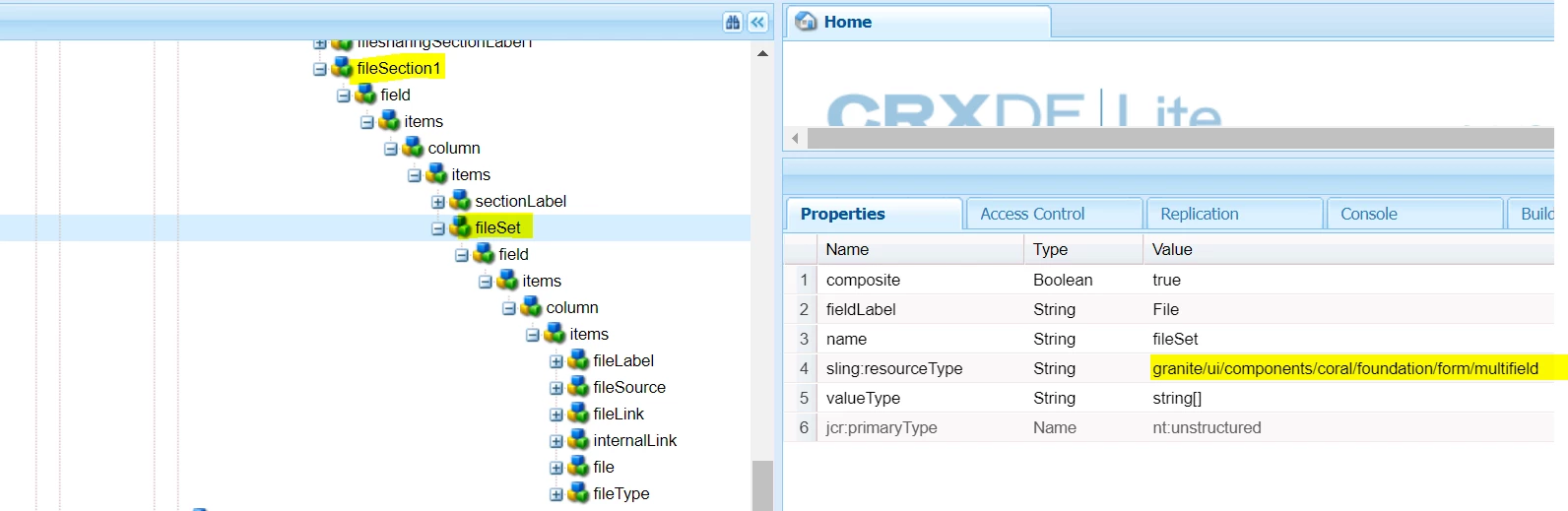
I have written below javascript for fetching the file set values and coming like below.
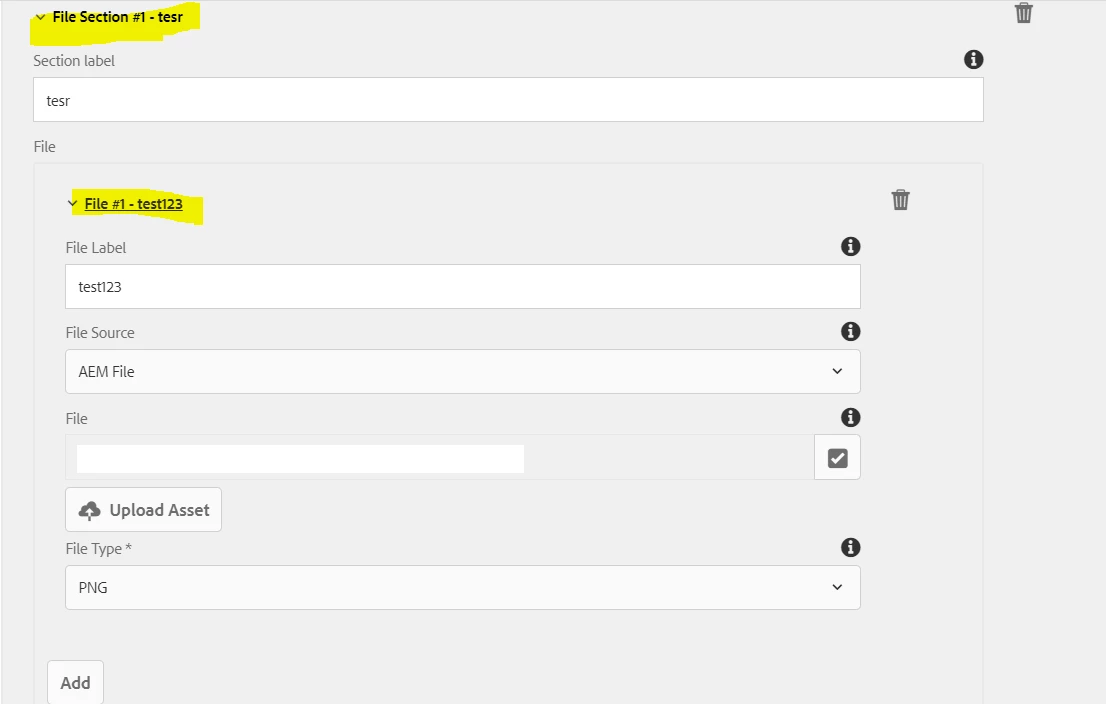
******************** JAVA SCRIPT **********************
function validateFileSection1($includeFileSection1, $fileSectionMultifield1, minFileSectionNumber, maxFileSectionNumber) {
		var isValid = true;
        var isMultifieldValid = true;

		if($includeFileSection1.prop('checked')==true){

        	$fileSectionMultifield1.parents('.coral-Form-fieldwrapper').first().show();
            var fileSectionMultifieldCount = $fileSectionMultifield1.children('.coral3-Multifield-item').length;

			if (fileSectionMultifieldCount >= maxFileSectionNumber && maxFileSectionNumber != -1) {
				$fileSectionMultifield1.children('button[is="coral-button"]').prop('disabled', true);
			} else {
				$fileSectionMultifield1.children('button[is="coral-button"]').prop('disabled', false);
			}
			console.log("fileSectionMultifieldCount ==== " + fileSectionMultifieldCount);
			if(fileSectionMultifieldCount < minFileSectionNumber){
                isValid = false;
                isMultifieldValid = false;
            } else {
            	var $multifieldItems1 = $fileSectionMultifield1.children('coral-multifield-item');

                for (var i = 0, multiItem, isInnerValid ; i < $multifieldItems1.length ; i++) {
					console.log("$multifieldItems1 secondtime ==== " + $multifieldItems1[0]);
                    multiItem = $multifieldItems1[i];
                    isInnerValid = true;

					var $sectionLabel1 = $(multiItem).find('input[name$="/sectionLabel"]');
					var $nestedFileSetMultifield1 = $(multiItem).find('coral-multifield[data-granite-coral-multifield-name$="/fileSet"]');
					//var $nestedFileSetMultifield1 = $(multiItem).find('coral-multifield[data-element="fileSet"]');
					console.log("nestedFileSetMultifield1 ==== " + $nestedFileSetMultifield1[0]);
					var $nestedFileSetMultifieldItems1 = $nestedFileSetMultifield1.children('coral-multifield-item');
					//console.log("nestedFileSetMultifieldItems1 ==== " + $nestedFileSetMultifieldItems1[0]);

					for (var j = 0, nestedMultiItem ;  j < $nestedFileSetMultifieldItems1.length ; j++){
						nestedMultiItem = $nestedFileSetMultifieldItems1[j];
						console.log("nestedMultiItemsecond ==== " + nestedMultiItem);
						//var nestedMultiItemsecond = $(nestedMultiItem).find("coral-select").val();
						//console.log("nestedMultiItemsecond ==== " + nestedMultiItemsecond);
						var $fileLabel = $(nestedMultiItem).find('input[name$="/fileLabel"]');
						console.log("$fileLabel.val() under filesection1 ==== " + $fileLabel.val());
						var $fileSource = $(nestedMultiItem).find('coral-select[name$="/fileSource"]');
						var $fileLink = $(nestedMultiItem).find('input[name$="/fileLink"]');
						var $internalLink = $(nestedMultiItem).find('input[name$="/internalLink"]');
						var $file = $(nestedMultiItem).find('foundation-autocomplete[name$="/file"]');
						var $fileType = $(nestedMultiItem).find('coral-select[name$="/fileType"]');


						console.log("$fileSource.val() under filesection1 ==== " + $fileSource.val());
                        if($fileSource.val()=='') {
							$fileLink.parent().hide();
							$internalLink.parent().hide();
							$file.parent().hide();
						} else if($fileSource.val()=='File Link') {
							$fileLink.parent().show();
							$internalLink.parent().hide();
							$file.parent().hide();
							$file.find('input').val('');
							if ($fileLink.val() == '' || !boxLinkValidation($fileLink.val())) {
			                	$fileLink.addClass('is-invalid');
			                    isNestedInnerValid = false;
			                } else {
			                	$fileLink.removeClass('is-invalid');
			                }
                        } else if($fileSource.val()=='Internal Link') {
							$internalLink.parent().show();
							$fileLink.parent().hide();
							$file.parent().hide();
							$file.find('input').val('');
							if ($internalLink.val() == '' || !boxLinkValidation($internalLink.val())) {
			                	$internalLink.addClass('is-invalid');
			                    isNestedInnerValid = false;
			                } else {
			                	$internalLink.removeClass('is-invalid');
			                }
                        }else {
							$fileLink.parent().hide();
							$fileLink.val('');
							$internalLink.parent().hide();
							$internalLink.val('');
							$file.parent().show();
							if ($file.val() == '') {
			                	$file.find('input').addClass('is-invalid');
			                    isNestedInnerValid = false;
			                } else {
			                	$file.find('input').removeClass('is-invalid');
			                }
                        }

						var $fileSetlabel = $(nestedMultiItem).find('coral-accordion-item-label').first();
                        var fileSetName = $fileLabel.val();
                        fileSetName = fileSetName !== undefined && fileSetName !== null && fileSetName !== '' ? fileSetName : 'No title';
                        $fileSetlabel.html('File #' + (j + 1) + ' - ' + fileSetName);

					}

                    var $label = $(multiItem).find('coral-accordion-item-label').first();
                    var name = $sectionLabel1.val();
                    name = name !== undefined && name !== null && name !== '' ? name : 'No title';
                    $label.html('File Section #' + (i + 1) + ' - ' + name);

                    isValid &= isInnerValid;
                    if (!isInnerValid) {
                        $label.css('color', 'red');
                        isMultifieldValid = false;
                    } else {
                        $label.css('color', 'black');
                    }
                }
            }
        } else {

        	$fileSectionMultifield1.removeClass('is-invalid');
        	$fileSectionMultifield1.parents('.coral-Form-fieldwrapper').first().hide();
        }

        $fileSectionMultifield1.css('border-color', isMultifieldValid ? '' : '#e14132');

		return isValid;
	}
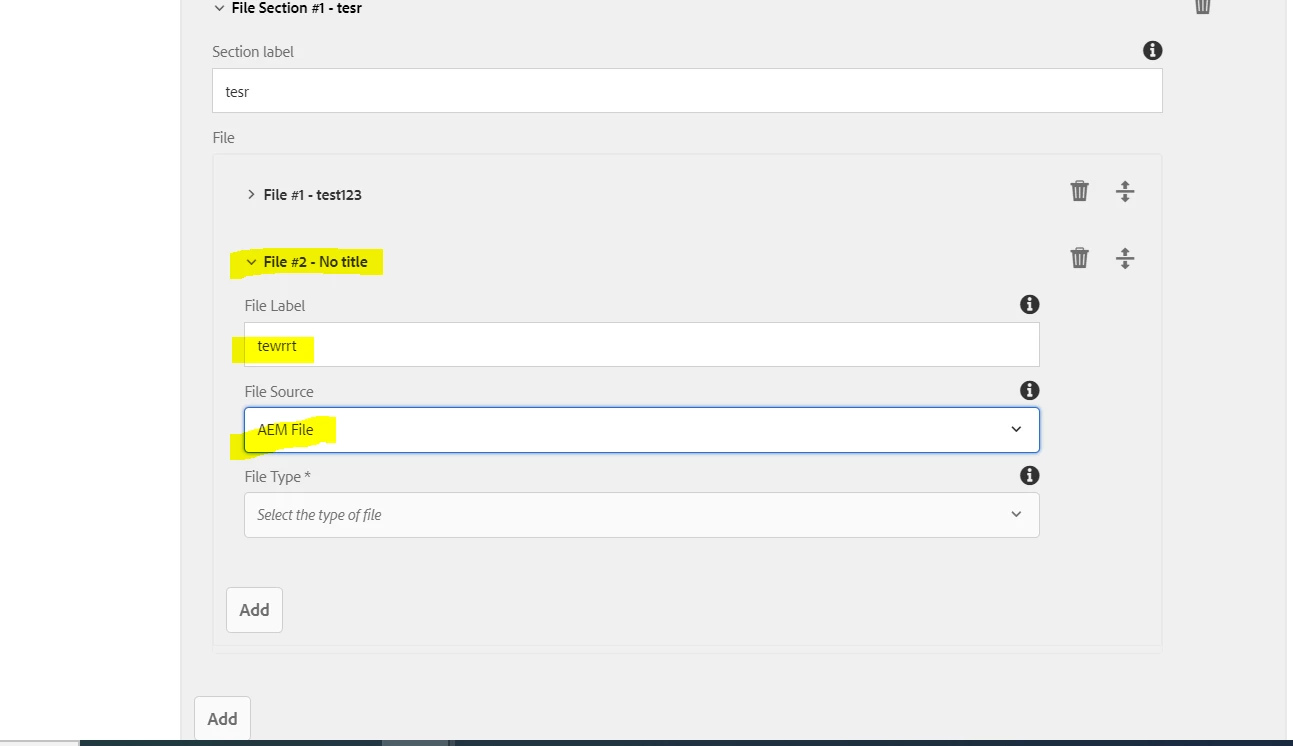
The issue is here when I am adding first time multifield for file set the value is coming fine as shown above and the second time value is not coming fine , as shown below.
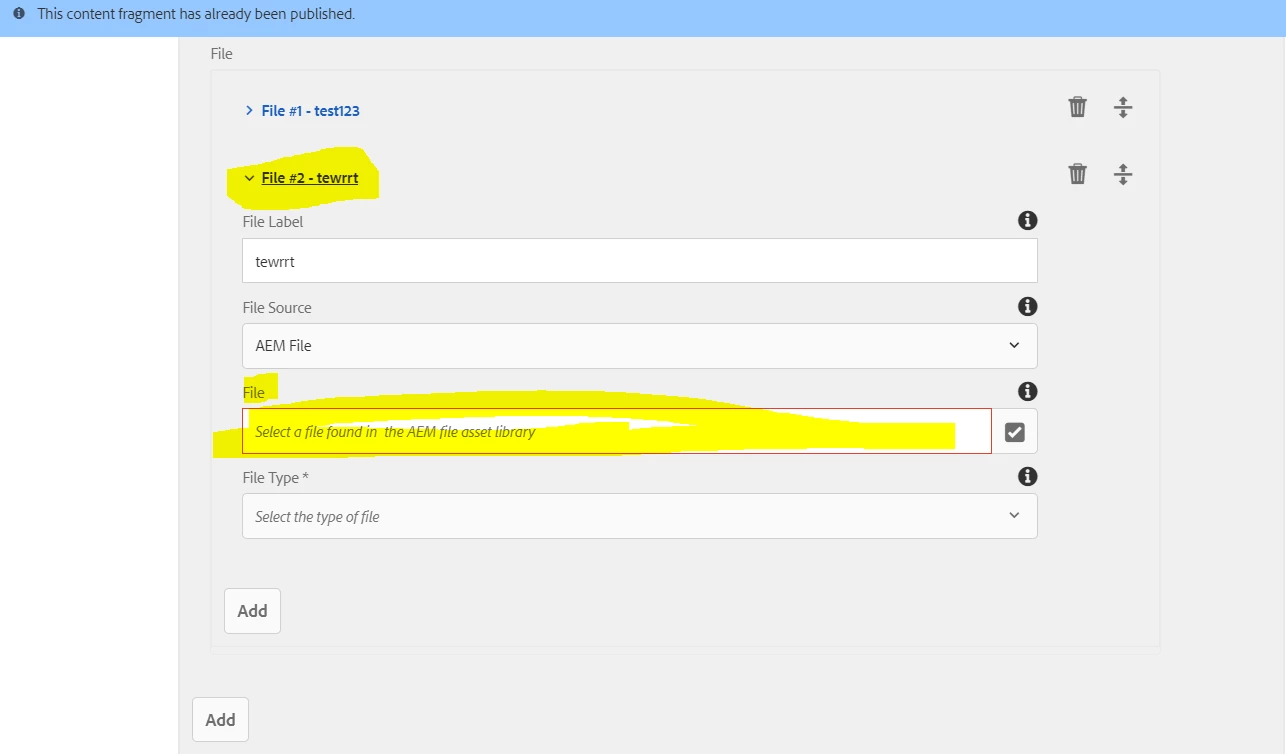
If I am closing the File #2 - tewrrt and opening then it is coming fine but it is not coming fine when I click on add multifield second time.
Can somebody pleas help me on this ?