Multiple selections from drop down list or list box to text field | Community
Skip to main content
Level 2
November 21, 2025
Question

Multiple selections from drop down list or list box to text field

  • November 21, 2025
  • 1 reply
  • 197 views

Hi gurus,


I came across the situation where I want to select multiple value from list box and display those selected values to Text field.

For eg: Lets say we have 2 fields. one is  list box. another is Text field. My  List box contains 

Red

Blue

Green

Yellow

Black

If user selects Red, Blue and Yellow. Then I want to display these 3 values on the Text field simultaneously.

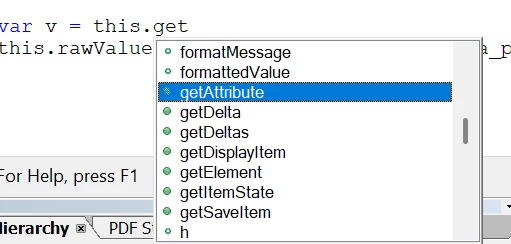
Now, I have seen the code where  var v = this.getField("ListBox1"); but the issue is I dont have this functionality(this.getField) in my adobe livecycle designer.Attached ss of not having functionality. so can you pls provide js or any solution through which I can resolve this. 
 

1 reply

VishalKa5
Level 5
November 21, 2025

Hi @fastdo,


In LiveCycle Designer (XDP forms), you cannot use this.getField() like in Acrobat forms. Instead, each field is accessed directly by its field name and you use FormCalc or JavaScript inside the form object.

For a list box with multi-select enabled, the selected values are stored as an array, so you simply read that array and join it into a string, then set it into the text field.

JavaScript solution (LiveCycle Designer):
Add this code in the change event of the list box: 

var items = ListBox1.rawValue; // returns array of selected values if (items !== null) { TextField1.rawValue = items.join(", "); }

This will display:
Red, Blue, Yellow in the text field after the user selects those values.


note:

  • Use rawValue in LiveCycle Designer (not this.getField).
  • Make sure the list box is set to Allow multiple selection in its properties.
  • The text field must be a normal text field (not calculated unless you use calculate event).

Summary:
LiveCycle doesn’t support Acrobat’s this.getField(). Instead, read the list box’s rawValue array and join it into the text field using simple JavaScript.


Thanks

fastdoAuthor
Level 2
November 21, 2025

Thank you for the reply. I am quite not successful in getting selected values(Red, Blue, Yellow) from list box. I used  

var oItems = xfa.resolveNode("this.#items"); var nItemsLength = oItems.nodes.length; for (nItemCount = 0; nItemCount < nItemsLength; nItemCount++){ if (textField1.rawValue == null) { TextField2.rawValue = oItems.nodes.item(nItemCount).value; } else { textField1.rawValue = textField1.rawValue + "\n" + oItems.nodes.item(nItemCount).value; } }

but this gave me all the values(all 5 colors) from list box. Wrote this in List Box field. in How do I get only selected values from list box?

VishalKa5
Level 5
November 21, 2025

Hi @fastdo ,


You are getting all items because this.#items returns the entire list-box item list, not the actual selected values. In LiveCycle Designer, the only way to get the selected values from a multi-select list box is to read the field’s rawValue, because rawValue automatically contains only the selected items as an array.

Use this code (JavaScript) in the change event of the list box:

var selected = this.rawValue; // returns array of selected items if (selected !== null) { TextField1.rawValue = selected.join(", "); } else { TextField1.rawValue = ""; }

this.rawValue > only the selected values (correct)
this.#items > all values in the list (not what you want) (Not work)

Important:
Make sure the List Box has Allow Multiple Selection = Yes in Object > Field.

In short:
Stop using this.#items - it always returns the full list.
Use this.rawValue, which returns only the selected items.


Thanks