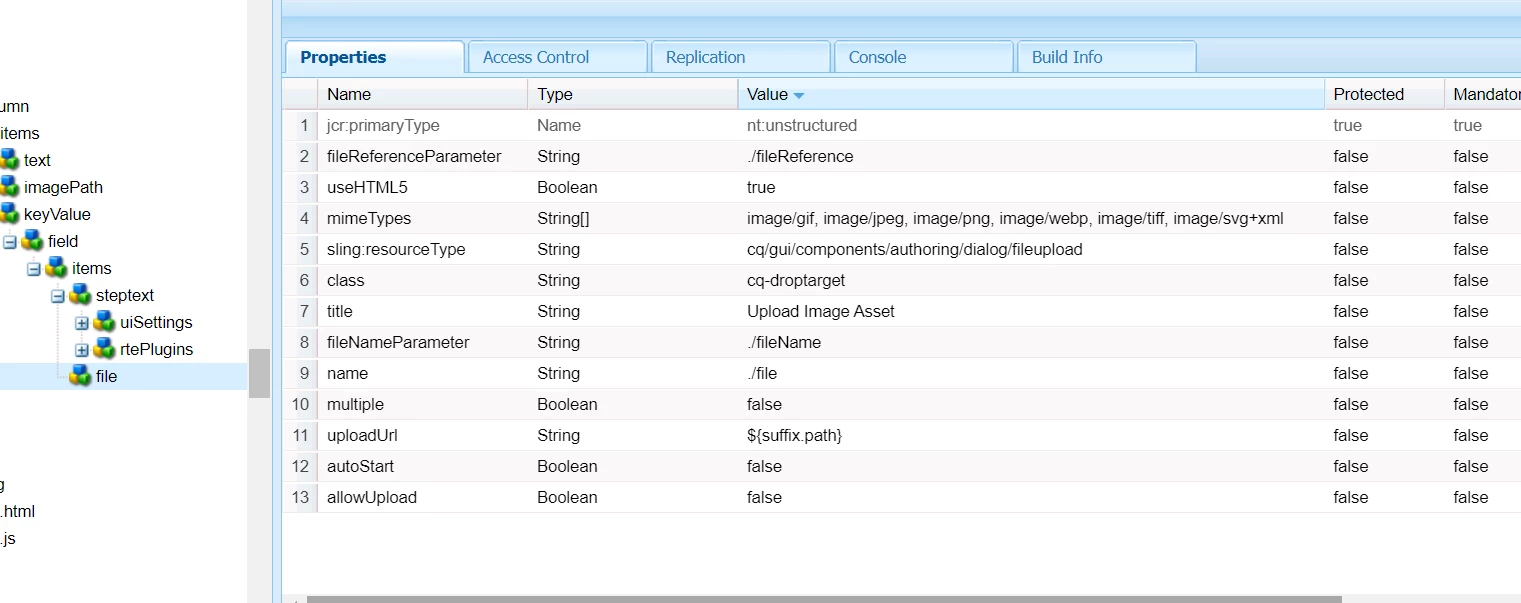
This is the content.xml file of the dialog.
<?xml version="1.0" encoding="UTF-8"?>
<jcr:root xmlns:sling="http://sling.apache.org/jcr/sling/1.0" xmlns:cq="http://www.day.com/jcr/cq/1.0" xmlns:jcr="http://www.jcp.org/jcr/1.0" xmlns:nt="http://www.jcp.org/jcr/nt/1.0"
jcr:primaryType="nt:unstructured"
jcr:title="Image Component"
sling:resourceType="cq/gui/components/authoring/dialog">
<content
jcr:primaryType="nt:unstructured"
sling:resourceType="granite/ui/components/coral/foundation/tabs">
<items jcr:primaryType="nt:unstructured">
<taskstep
jcr:primaryType="nt:unstructured"
jcr:title="Properties"
sling:resourceType="granite/ui/components/coral/foundation/fixedcolumns">
<items jcr:primaryType="nt:unstructured">
<column
jcr:primaryType="nt:unstructured"
sling:resourceType="granite/ui/components/foundation/container">
<items jcr:primaryType="nt:unstructured">
<text
jcr:primaryType="nt:unstructured"
sling:resourceType="granite/ui/components/foundation/include"
name="./text"
path="/apps/km/components/content/richText/text"
useFixedInlineToolbar="{Boolean}true"/>
<imagePath
jcr:primaryType="nt:unstructured"
sling:resourceType="cq/gui/components/authoring/dialog/fileupload"
autoStart="{Boolean}false"
class="cq-droptarget"
fileNameParameter="./imageName"
fileReferenceParameter="./imageReference"
mimeTypes="[image/gif,image/jpeg,image/png,image/webp,image/tiff,image/svg+xml]"
multiple="{Boolean}false"
name="./image"
title="Image Path"
uploadUrl="${suffix.path}"
useHTML5="{Boolean}true"/>
<multifield
jcr:primaryType="nt:unstructured"
sling:resourceType="granite/ui/components/coral/foundation/form/multifield"
composite="{Boolean}true"
fieldLabel="Multifield">
<field
jcr:primaryType="nt:unstructured"
sling:resourceType="granite/ui/components/coral/foundation/container"
name="./listValues">
<items jcr:primaryType="nt:unstructured">
<steptext
jcr:primaryType="nt:unstructured"
sling:resourceType="cq/gui/components/authoring/dialog/richtext"
name="./text"
useFixedInlineToolbar="{Boolean}true">
<uiSettings jcr:primaryType="nt:unstructured">
<cui jcr:primaryType="nt:unstructured">
<inline
jcr:primaryType="nt:unstructured"
toolbar="[format#bold,format#italic,format#underline,#justify,#lists,subsuperscript#subscript,subsuperscript#superscript,links#modifylink,links#unlink,links#anchor,#image,findreplace#find,findreplace#replace,spellcheck#checktext,misctools#specialchars,misctools#sourceedit,#styles,#paraformat,table#table,experience-aem#colorPicker,url-edit#urledit,clear-urledit#clearurledit,toolTip-aem#toolTip,clearTooltip-aem#clearToolTip,txtVisibleInMobile-aem#showInMobile,txtVisibleInMobile-aem#hideInMobile,txtVisibleInMobile-aem#clearMobileTag,edit#cut,edit#copy,edit#paste-default,edit#paste-plaintext,edit#paste-wordhtml,undo#undo,undo#redo,image#image]">
<popovers jcr:primaryType="nt:unstructured">
<justify
jcr:primaryType="nt:unstructured"
items="[justify#justifyleft,justify#justifycenter,justify#justifyright]"
ref="justify"/>
<lists
jcr:primaryType="nt:unstructured"
items="[lists#unordered,lists#ordered,lists#outdent,lists#indent]"
ref="lists"/>
<paraformat
jcr:primaryType="nt:unstructured"
items="paraformat:getFormats:paraformat-pulldown"
ref="paraformat"/>
<styles
jcr:primaryType="nt:unstructured"
items="styles:getStyles:styles-pulldown"
ref="styles"/>
</popovers>
</inline>
<dialogFullScreen
jcr:primaryType="nt:unstructured"
toolbar="[format#bold,format#italic,format#underline,#justify,#lists,subsuperscript#subscript,subsuperscript#superscript,links#modifylink,links#unlink,links#anchor,#image,findreplace#find,findreplace#replace,spellcheck#checktext,misctools#specialchars,misctools#sourceedit,#styles,#paraformat,table#table,experience-aem#colorPicker,url-edit#urledit,clear-urledit#clearurledit,toolTip-aem#toolTip,clearTooltip-aem#clearToolTip,txtVisibleInMobile-aem#showInMobile,txtVisibleInMobile-aem#hideInMobile,txtVisibleInMobile-aem#clearMobileTag,edit#cut,edit#copy,edit#paste-default,edit#paste-plaintext,edit#paste-wordhtml,undo#undo,undo#redo,image#image]">
<popovers jcr:primaryType="nt:unstructured">
<justify
jcr:primaryType="nt:unstructured"
items="[justify#justifyleft,justify#justifycenter,justify#justifyright]"
ref="justify"/>
<lists
jcr:primaryType="nt:unstructured"
items="[lists#unordered,lists#ordered,lists#outdent,lists#indent]"
ref="lists"/>
<paraformat
jcr:primaryType="nt:unstructured"
items="paraformat:getFormats:paraformat-pulldown"
ref="paraformat"/>
<styles
jcr:primaryType="nt:unstructured"
items="styles:getStyles:styles-pulldown"
ref="styles"/>
</popovers>
</dialogFullScreen>
<tableEditOptions
jcr:primaryType="nt:unstructured"
toolbar="[table#insertcolumn-before,table#insertcolumn-after,table#removecolumn,-,table#insertrow-before,table#insertrow-after,table#removerow,-,table#mergecells-right,table#mergecells-down,table#mergecells,table#splitcell-horizontal,table#splitcell-vertical,-,table#selectrow,table#selectcolumn,-,table#ensureparagraph,-,table#modifytableandcell,table#removetable,-,undo#undo,undo#redo,-,table#exitTableEditing,-]"/>
</cui>
</uiSettings>
<rtePlugins jcr:primaryType="nt:unstructured">
<format
jcr:primaryType="nt:unstructured"
features="*"/>
<justify
jcr:primaryType="nt:unstructured"
features="*"/>
<lists
jcr:primaryType="nt:unstructured"
features="*"/>
<paraformat
jcr:primaryType="nt:unstructured"
features="*">
<formats jcr:primaryType="nt:unstructured">
<default_p
jcr:primaryType="nt:unstructured"
description="Paragraph"
tag="p"/>
<default_h1
jcr:primaryType="nt:unstructured"
description="Heading 1"
tag="h1"/>
<default_h2
jcr:primaryType="nt:unstructured"
description="Heading 2"
tag="h2"/>
<default_h3
jcr:primaryType="nt:unstructured"
description="Heading 3"
tag="h3"/>
<default_h4
jcr:primaryType="nt:unstructured"
description="Heading 4"
tag="h4"/>
<default_h5
jcr:primaryType="nt:unstructured"
description="Heading 5"
tag="h5"/>
<default_h6
jcr:primaryType="nt:unstructured"
description="Heading 6"
tag="h6"/>
<default_blockquote
jcr:primaryType="nt:unstructured"
description="Quote"
tag="blockquote"/>
<default_pre
jcr:primaryType="nt:unstructured"
description="Preformatted"
tag="pre"/>
</formats>
</paraformat>
<links
jcr:primaryType="nt:unstructured"
features="*"/>
<image
jcr:primaryType="nt:unstructured"
features="*"/>
<findreplace
jcr:primaryType="nt:unstructured"
features="*"/>
<subsuperscript
jcr:primaryType="nt:unstructured"
features="*"/>
<spellcheck
jcr:primaryType="nt:unstructured"
features="*"/>
<misctools
jcr:primaryType="nt:unstructured"
features="*">
<specialCharsConfig jcr:primaryType="nt:unstructured">
<chars jcr:primaryType="nt:unstructured">
<copyright
jcr:primaryType="nt:unstructured"
entity="&#169;"/>
<trademark
jcr:primaryType="nt:unstructured"
entity="&#8482;"/>
<registered
jcr:primaryType="nt:unstructured"
entity="&#174;"/>
<emDash
jcr:primaryType="nt:unstructured"
entity="&#8212;"/>
<pound
jcr:primaryType="nt:unstructured"
entity="&#163;"/>
<nbsp
jcr:primaryType="nt:unstructured"
entity="&#160;"/>
</chars>
</specialCharsConfig>
</misctools>
<styles
jcr:primaryType="nt:unstructured"
features="*">
<styles jcr:primaryType="nt:unstructured">
<plainSpan
jcr:primaryType="nt:unstructured"
cssName="defaultSpan"
text="Default (add span tag)"/>
<h2header
jcr:primaryType="nt:unstructured"
cssName="suo-headerh2"
text="h2bold"/>
<wrapperh2
jcr:primaryType="nt:unstructured"
cssName="pzn-wrapperh2"
text="h1"/>
<disclaimerText
jcr:primaryType="nt:unstructured"
cssName="pzn-disclaimer-text"
text="disclaimer-text"/>
<styleh3
jcr:primaryType="nt:unstructured"
cssName="pzn-styleh3"
text="h3"/>
<white-text
jcr:primaryType="nt:unstructured"
cssName="pzn-white-text"
text="white-text"/>
<h6header
jcr:primaryType="nt:unstructured"
cssName="suo-headerh6"
text="h6Strong"/>
<support-headerTitle
jcr:primaryType="nt:unstructured"
cssName="support-headerTitle"
text="h1bold"/>
<support-headerTitleBoldTablet
jcr:primaryType="nt:unstructured"
cssName="support-headerTitleBoldTablet"
text="headerTitletabletbold"/>
<support-footnote
jcr:primaryType="nt:unstructured"
cssName="support-footnote"
text="Support Footnote"/>
<lead
jcr:primaryType="nt:unstructured"
cssName="lead"
text="Lead"/>
<font-mlarge
jcr:primaryType="nt:unstructured"
cssName="font-mlarge"
text="Medium large (60px)"/>
<font-large-bold
jcr:primaryType="nt:unstructured"
cssName="font-large-bold"
text="Large (Bold 32px)"/>
<font-large-bold-white
jcr:primaryType="nt:unstructured"
cssName="font-large-bold-white"
text="Large (Bold 32px white)"/>
<font-large
jcr:primaryType="nt:unstructured"
cssName="font-large"
text="Large (32px)"/>
<font-small-bold
jcr:primaryType="nt:unstructured"
cssName="font-small-bold"
text="Small (Bold 20px)"/>
<font-small-bold-white
jcr:primaryType="nt:unstructured"
cssName="font-small-bold-white"
text="Small (Bold 20px white)"/>
<font-small
jcr:primaryType="nt:unstructured"
cssName="font-small"
text="Small (20px)"/>
<font-small-white
jcr:primaryType="nt:unstructured"
cssName="font-small-white"
text="Small (20px white)"/>
<font-small-23-bold
jcr:primaryType="nt:unstructured"
cssName="font-small-23-bold"
text="Small (23px) bold"/>
<font-small-23-white-bold
jcr:primaryType="nt:unstructured"
cssName="font-small-23-white-bold"
text="Small (23px) white bold"/>
<font-small-16
jcr:primaryType="nt:unstructured"
cssName="font-small-16"
text="Small (16px)"/>
<font-mlarge-bold
jcr:primaryType="nt:unstructured"
cssName="font-mlarge-bold"
text="Medium large (Bold 60px)"/>
</styles>
</styles>
<table
jcr:primaryType="nt:unstructured"
features="*"/>
<tracklinks
jcr:primaryType="nt:unstructured"
features="*"/>
<undo
jcr:primaryType="nt:unstructured"
features="*"/>
<toolTip-aem
jcr:primaryType="nt:unstructured"
features="*"/>
<clearTooltip-aem
jcr:primaryType="nt:unstructured"
features="*"/>
<url-edit
jcr:primaryType="nt:unstructured"
features="*"/>
<clear-urledit
jcr:primaryType="nt:unstructured"
features="*"/>
<experience-aem
jcr:primaryType="nt:unstructured"
features="*"/>
<txtVisibleInMobile-aem
jcr:primaryType="nt:unstructured"
features="*"/>
<edit
jcr:primaryType="nt:unstructured"
features="*"/>
<keys
jcr:primaryType="nt:unstructured"
features="*"/>
</rtePlugins>
</steptext>
<file
jcr:primaryType="nt:unstructured"
sling:resourceType="cq/gui/components/authoring/dialog/fileupload"
allowUpload="{Boolean}false"
autoStart="{Boolean}false"
class="cq-droptarget"
fileNameParameter="./fileName"
fileReferenceParameter="./fileReference"
mimeTypes="[image/gif,image/jpeg,image/png,image/webp,image/tiff,image/svg+xml]"
multiple="{Boolean}false"
name="./file"
title="Upload Image Asset"
uploadUrl="${suffix.path}"
useHTML5="{Boolean}true"/>
</items>
</field>
</multifield>
</items>
</column>
</items>
</taskstep>
</items>
</content>
</jcr:root>
We need the drag and drop option for image, not pathfield element.