Multi level list with bullet point/number | Community
Skip to main content
varuns46785756
Level 5
May 10, 2018
Question

Multi level list with bullet point/number

  • May 10, 2018
  • 3 replies
  • 2298 views

Hi ,

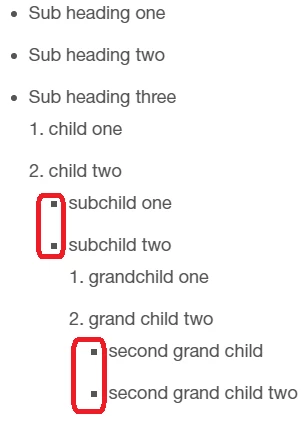
I am using AEM 6.1 and I have requirement to create multi level list with  bullet points/number in RTE. I am using indent/outdent  and creating list. Issue is after one level of bullet circle point I am not able to use circle bullets again in second level , it will convert circle into square bullet.

I am trying to achieve below list in AEM RTE but I am not able to convert square bullet into circle bullet after first level

  1. heading
    • subheading
    • subheading two
      • child one
      • child two
        1. sub child one
        2. subchild two
          • grandchild one
          • grandchild two

--------------------------------------------------------------------

: Screen shot of my list in AEM RTE
Thanks

This post is no longer active and is closed to new replies. Need help? Start a new post to ask your question.

3 replies

arunpatidar
Community Advisor
Community Advisor
May 10, 2018

You can use style for list, which will be easy to handle list-decoration via CSS.

Arun Patidar
varuns46785756
Level 5
May 11, 2018

Thanks Arun, is there way in AEM RTE to convert square bullet into circle bullet without adding any personal style because my Client doesn't want to select style every time to author the list. Please suggest

Thanks,

arunpatidar
Community Advisor
Community Advisor
May 11, 2018

yes, you can do for that you need to write below css in your clientlibs

ul{list-style-type: disc;}

please specify outer wrapper class also to applicable this changes within scope.

e.g.

.page__main ul{list-style-type: disc;}

it will convert all your bullet list style to disc.

Arun Patidar