Modifying the default columns in AEM Asset Reports | Community
Skip to main content
August 19, 2019
Question

Modifying the default columns in AEM Asset Reports

  • August 19, 2019
  • 3 replies
  • 1545 views

I have requirement where I have to change/add the list of columns in the Default Columns list for the reports. Those custom columns should be displayed by default once I create a AEM report, so that the user should not have to add the columns manually using custom columns. I don't have to create a custom report type, rather I need to change that in  the existing report types.

Can anyone share some idea or provide some approach how this can be achieved?

This post is no longer active and is closed to new replies. Need help? Start a new post to ask your question.

3 replies

Adobe Employee
August 19, 2019

You can overlay "/libs/dam/gui/content/reports/reportlist/jcr:content/views/list/columns" and change the colums as per your requirement. Please do not update anything under the libs directory.

August 19, 2019

Thanks JaideepBrar​, for quick response.

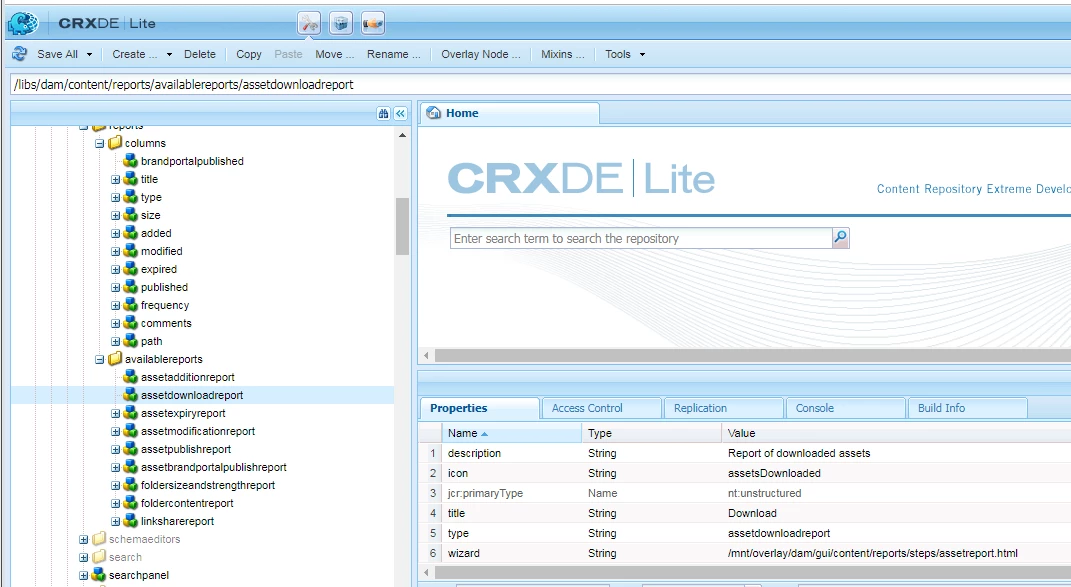
As per my understanding, the available reports are using column list as per the below screenshot.

Now, consider the below scenario:

We have created some custom indexes under oak:index location, which we have added in our custom metadata schema for the asset

eg., /oak:index/damAssetLucene/indexRules/dam:Asset/properties/dcBrand having property

jcr:content/metadata/brand

Now, lets say I have to generate Download report for assets using the Download report provided. Once I go to configure columns step, I should be able to get Brand Column available as default which maps to property jcr:content/metadata/brand.

Kindly suggest any workaround.

Level 3
October 11, 2022

@abhishekdas0701  Are you able to figure out this one ? I have the same requirement.