Mode selector in AEM page | Community
Skip to main content
anshus83799232
Level 2
May 10, 2018
Solved

Mode selector in AEM page

  • May 10, 2018
  • 6 replies
  • 3133 views

Hi All,

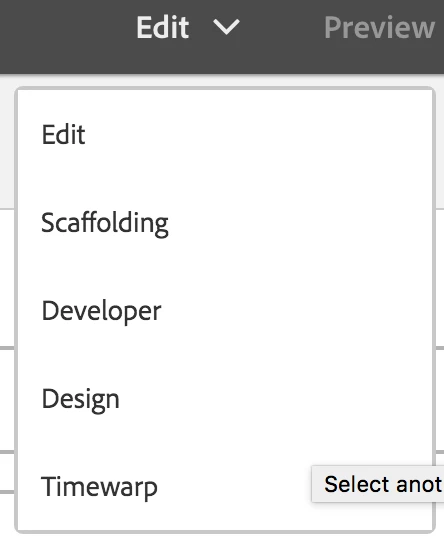
I have a requirement where I do not want timewarp and scaffolding option in my page mode selector. How do I disable these? Any help would be much appreciated.
This post is no longer active and is closed to new replies. Need help? Start a new post to ask your question.
Best answer by arunpatidar

if you really want to do this, you can use javascript also like below to disable modes, create clientlib with cq.authoring.dialog category

(function($, $document) {

    "use strict";

    $(document).on("click", ".editor-GlobalBar-layerSwitcher", function(e) {

    var field = $("button.js-editor-LayerSwitcherTrigger[coral-list-item]");

    if (typeof field !== undefined) {

      field.each(function() {

      if($( this ).val() === "Scaffolding" || $( this ).val()==="Timewarp"){

      $( this ).attr("disabled", true);

      }

      });

    }

    });

})($, $(document));

If you want to remove these two mode,  play with javascript to remove selected elements from DOM.

Thanks

Arun

6 replies

Hemant_arora
Level 8
May 10, 2018

overlay the js below

go to line # 142 and add conditon

/libs/cq/gui/components/authoring/editors/clientlibs/core/js/ui/ui.globalBar.js

kautuk_sahni
Community Manager
Community Manager
May 10, 2018

From what I know, and please anyone correct me if I am wrong, there is no overlaying of clientlibs.

Clientlibs are registered globally via a 'Category Name'.

Categorys are then called on to be placed into a page.

If you create a custom javascript, and add it to a category that already exists, say 'cq.authoring.dialog' then when that clientlib is called, that code gets called as well. If you create a file that already exists in the clientlib, it doesn't replace that file during clientlib resolution, it just gets stacked onto it. The method you are suggestion would might be working but it would be calling both of the scripts.

You can do this just extending the clientlib, and this is performed just putting in your clientlib the same categories of foundation clientlib.

-Kautuk

Kautuk Sahni
smacdonald2008
Level 10
May 10, 2018

Also - if you do not want to use a specific feature of AEM - then do not use it. Can you explain why its a requirement to remove a menu item in the UI?

arunpatidar
Community Advisor
arunpatidarCommunity AdvisorAccepted solution
Community Advisor
May 10, 2018

if you really want to do this, you can use javascript also like below to disable modes, create clientlib with cq.authoring.dialog category

(function($, $document) {

    "use strict";

    $(document).on("click", ".editor-GlobalBar-layerSwitcher", function(e) {

    var field = $("button.js-editor-LayerSwitcherTrigger[coral-list-item]");

    if (typeof field !== undefined) {

      field.each(function() {

      if($( this ).val() === "Scaffolding" || $( this ).val()==="Timewarp"){

      $( this ).attr("disabled", true);

      }

      });

    }

    });

})($, $(document));

If you want to remove these two mode,  play with javascript to remove selected elements from DOM.

Thanks

Arun

Arun Patidar
Hemant_arora
Level 8
May 11, 2018

Well I am not sure if both the scripts are called.

I created the same folder structure under apps and added the specific js file

/apps/cq/gui/components/authoring/editors/clientlibs/core/js/ui/ui.globalBar.js

It works.

anshus83799232
Level 2
May 11, 2018

thanks.. your post was really helpful