Missing dependencies abc:abc.ui.apps required dependencies missing: [adobe/cq60:core.wcm.components.content:2.7.0, adobe/cq60:core.wcm.components.config:2.7.0] | Community
Skip to main content
April 16, 2020
Solved

Missing dependencies abc:abc.ui.apps required dependencies missing: [adobe/cq60:core.wcm.components.content:2.7.0, adobe/cq60:core.wcm.components.config:2.7.0]

  • April 16, 2020
  • 2 replies
  • 5593 views

Hi Team,

I am getting the following error while installing packages to the VM server.

Installing content
FATAL: org.apache.jackrabbit.vault.packaging.DependencyException: Refusing to install package project-ui.apps:1.0-SNAPSHOT. required dependencies missing: [adobe/cq60:core.wcm.components.content:2.7.0, adobe/cq60:core.wcm.components.config:2.7.0]

I have the ui.apps pom file in which these dependencies are already mentioned. Please refer to the following image.
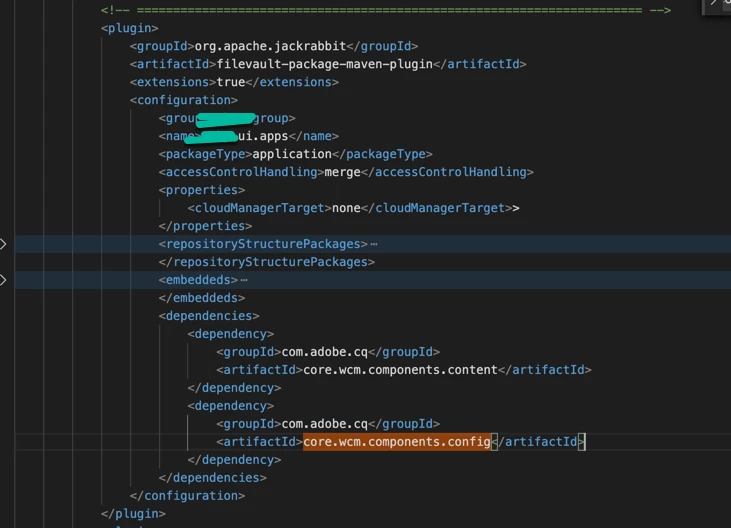
 

Any suggestions?

This post is no longer active and is closed to new replies. Need help? Start a new post to ask your question.
Best answer by arunpatidar

you need to add those package as depency in your ui.apps/pom.xml

e.g.


<dependency> <groupId>com.abc</groupId> <artifactId>com.abc.core</artifactId> <version>1.0-SNAPSHOT</version> </dependency> <dependency> <groupId>com.adobe.cq</groupId> <artifactId>core.wcm.components.core</artifactId> </dependency> <dependency> <groupId>com.adobe.cq</groupId> <artifactId>core.wcm.components.content</artifactId> <type>zip</type> </dependency> <dependency> <groupId>com.adobe.cq</groupId> <artifactId>core.wcm.components.config</artifactId> <type>zip</type> </dependency>


2 replies

arunpatidar
Community Advisor
arunpatidarCommunity AdvisorAccepted solution
Community Advisor
April 19, 2020

you need to add those package as depency in your ui.apps/pom.xml

e.g.


<dependency> <groupId>com.abc</groupId> <artifactId>com.abc.core</artifactId> <version>1.0-SNAPSHOT</version> </dependency> <dependency> <groupId>com.adobe.cq</groupId> <artifactId>core.wcm.components.core</artifactId> </dependency> <dependency> <groupId>com.adobe.cq</groupId> <artifactId>core.wcm.components.content</artifactId> <type>zip</type> </dependency> <dependency> <groupId>com.adobe.cq</groupId> <artifactId>core.wcm.components.config</artifactId> <type>zip</type> </dependency>


Arun Patidar
April 23, 2020
@2271399_Patidar: I have added both dependencies in ui.apps/pom.xml as well also added core module as a dependency in ui.apps/pom xml file. I am running jenkins CRX Content Package Deployer plugin to deploy the package on VM machine. Build is showing success but while deployment I am getting this log.: Package uploaded Will attempt to install package. Installing content FATAL: org.apache.jackrabbit.vault.packaging.DependencyException: Refusing to install package
Adobe Employee
April 21, 2020

Adding to Arun's update , Try using the latest archetype and the core components dependency should be automatically included in the POM file.

April 23, 2020
I have compare the latest archetype but there is not much difference other than project specific.