Meta Keywords in DOM from AEM Tagging | Community
Skip to main content
Level 3
April 26, 2024

Meta Keywords in DOM from AEM Tagging

  • April 26, 2024
  • 5 replies
  • 1258 views

Hi,

We have multiple tags created that follow a hierarchical taxonomy.

 

Tags when added to pages show them in the hierarchy
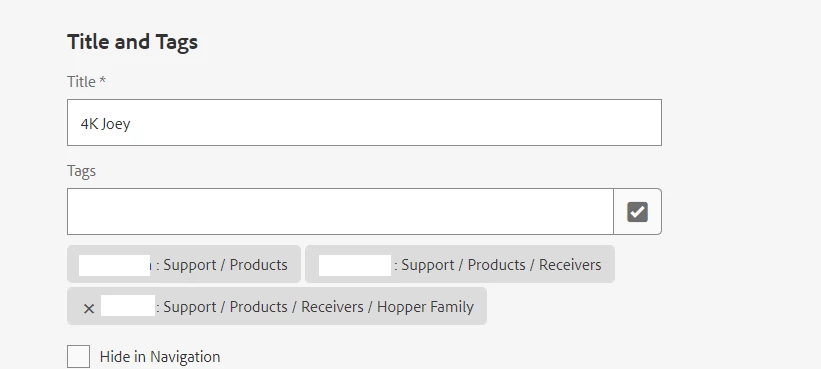
Is there a way that we could persist the order when they are translated to keywords in the <meta> tag?


Here's what is rendered on Page

<meta name="keywords" content="Receivers,Hopper Family,Products">


v/s maintaining the hierarchy(what we need)

<meta name="keywords" content="Products, Receivers, Hopper Family">


Is this possible? Thanks in advance for the help.


-Manasa


This post is no longer active and is closed to new replies. Need help? Start a new post to ask your question.

5 replies

Shashi_Mulugu
Community Advisor
Community Advisor
April 28, 2024

@manasabojja7 how they are stored in jcr? Can you check that? Ideally order of keywords displayed in page html depends on order in which they are stored in jcr..

Level 3
April 29, 2024

@shashi_mulugu cq:tags show the proper hierarchy


On the Page:


gkalyan
Community Advisor and Adobe Champion
April 29, 2024

@manasabojja7 Is there a reason why you want to order the tags? Is this for SEO purpose?

The order of keywords typically depends on the order in which they are stored in the JCR (Java Content Repository). If the tags are stored in the desired order in the JCR, they should be displayed in that order in the page HTML.


The keywords are usually stored in a property like cq:tags . You can fetch this property, modify the order of keywords as needed, and then save the changes back to the node.


Something like this:

Node pageNode = session.getNode(pagePath);
if (pageNode != null) {
    // Fetch the keywords property
    String[] keywords = pageNode.getProperty("cq:tags").getStrings();
    
    // Modify the order of keywords as needed
    // This is just an example of reversing the order
    ArrayUtils.reverse(keywords);
    
    // Save the modified keywords back to the property
    pageNode.setProperty("cq:tags", keywords);
    
    // Save the session to persist changes
    session.save();
}


HrishikeshKagne
Community Advisor
Community Advisor
April 30, 2024

Hi @manasabojja7 ,

To achieve the desired behavior of maintaining the hierarchical order of tags when translated to keywords in the <meta> tag, you would typically need to customize the logic that generates the <meta> tag content. This customization can be done in the backend Java code of your AEM project.

Here's a high-level approach to implement this customization:

  1. Retrieve Tags with Order: Modify the logic that retrieves the tags associated with the page to ensure that they are retrieved in the desired hierarchical order. You might need to query the tags with a specific order or sort them programmatically based on their hierarchy.

  2. Generate Meta Keywords: Generate the <meta> tag content by concatenating the tags in the desired order, separating them with commas.

  3. Inject Meta Keywords: Set the generated <meta> tag content as a property of your page's resource or as part of the response output. This can be done in your Java code where you handle the rendering of the page.

Here's a simplified example of how you might implement this logic in Java code (assuming you're using AEM's Sightly scripting language for rendering):


import org.apache.sling.api.resource.Resource; import org.apache.sling.api.resource.ValueMap; import com.adobe.cq.wcm.api.Page; import org.apache.sling.api.SlingHttpServletRequest; import org.apache.sling.api.SlingHttpServletResponse; import org.apache.sling.api.servlets.ServletResolverConstants; import org.apache.sling.api.servlets.SlingAllMethodsServlet; import org.osgi.service.component.annotations.Component; import javax.servlet.Servlet; import javax.servlet.ServletException; import java.io.IOException; import java.util.Arrays; import java.util.List; import java.util.stream.Collectors; @Component( service = { Servlet.class }, property = { ServletResolverConstants.SLING_SERVLET_PATHS + "=/bin/my/custom/servlet", ServletResolverConstants.SLING_SERVLET_METHODS + "=GET" } ) public class MyCustomServlet extends SlingAllMethodsServlet { @Override protected void doGet(SlingHttpServletRequest request, SlingHttpServletResponse response) throws ServletException, IOException { // Retrieve the current page Page currentPage = request.getResource().adaptTo(Page.class); // Retrieve tags associated with the page List<String> tags = Arrays.asList(currentPage.getProperties().get("cq:tags", new String[]{})); // Sort the tags based on hierarchical order List<String> sortedTags = sortTags(tags); // Generate meta keywords content String metaKeywords = sortedTags.stream().collect(Collectors.joining(", ")); // Set meta keywords as a property of the current page's resource Resource pageResource = currentPage.getContentResource(); pageResource.adaptTo(ValueMap.class).put("metaKeywords", metaKeywords); } // Custom method to sort tags based on hierarchical order private List<String> sortTags(List<String> tags) { // Implement logic to sort tags based on hierarchy // You might need to traverse the tag hierarchy and sort them accordingly // For simplicity, I'll just sort them alphabetically return tags.stream().sorted().collect(Collectors.toList()); } }


In this example:

  • MyCustomServlet is a servlet that retrieves the tags associated with the current page and generates the <meta> tag content.
  • sortTags() is a custom method to sort tags based on the desired hierarchical order. You would need to implement the logic to sort tags according to your specific requirements.
  • The generated meta keywords content is set as a property of the current page's resource (metaKeywords).

You would need to register this servlet in your AEM project and map it to an appropriate URL. Additionally, you might need to adapt this code to fit your specific project structure and requirements.

Hrishikesh Kagane
gkalyan
Community Advisor and Adobe Champion
May 2, 2024

 manasabojja7, Did any of the suggestions worked for you? Can you share your findings?

kautuk_sahni
Community Manager
Community Manager
May 20, 2024

@manasabojja7 Did you find the suggestions from users helpful? Please let us know if more information is required. Otherwise, please mark the answer as correct for posterity. If you have found out solution yourself, please share it with the community.

Kautuk Sahni