Merge Launches | Community
Skip to main content
Level 2
June 27, 2024
Solved

Merge Launches

  • June 27, 2024
  • 1 reply
  • 755 views

Hi all! I'm hoping to be able to set up a launch branch (A) say, from July 1s that gets promoted live (C) on July 30th. I'd like to start another branch (B) on July 15th from the same origin page, but then promote the changes from branch B to branch C, for a final live version of the origin page from branches A and B (assuming the changes don't conflict.) 


Does anyone know if this is possible via launches or some other functionality?


Thanks in advance for your help!
This post is no longer active and is closed to new replies. Need help? Start a new post to ask your question.
Best answer by EstebanBustamante

Hi, 


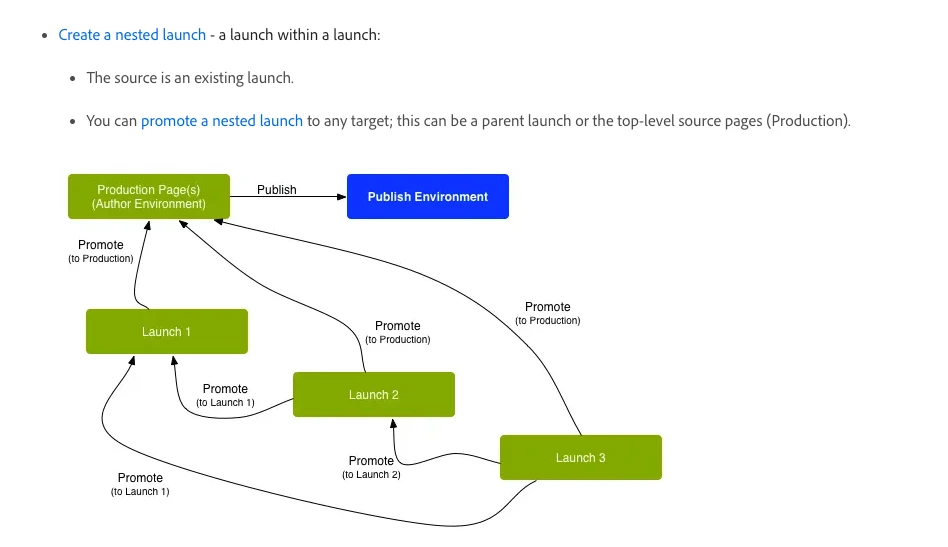
Launches work in a parent-child relationship, you cannot merge content between "siblings", however, you can create "nested" launches that will allow you to merge your changes to different targets(sources), so creating a nested structure can work for your use case. I am not sure if I understood correctly your use case, but I think you could create something like this:

 - A (source) 

   - C (child) You can promote to A 

     - B (grandchild of A) You can promote to C or A 


You can read more about Nested Launches here: https://experienceleague.adobe.com/en/docs/experience-manager-cloud-service/content/sites/authoring/launches/overview 

https://experienceleague.adobe.com/en/docs/experience-manager-cloud-service/content/sites/authoring/launches/creating#creating-a-nested-launch

Hope this helps


1 reply

EstebanBustamante
Community Advisor and Adobe Champion
EstebanBustamanteCommunity Advisor and Adobe ChampionAccepted solution
Community Advisor and Adobe Champion
June 27, 2024

Hi, 


Launches work in a parent-child relationship, you cannot merge content between "siblings", however, you can create "nested" launches that will allow you to merge your changes to different targets(sources), so creating a nested structure can work for your use case. I am not sure if I understood correctly your use case, but I think you could create something like this:

 - A (source) 

   - C (child) You can promote to A 

     - B (grandchild of A) You can promote to C or A 


You can read more about Nested Launches here: https://experienceleague.adobe.com/en/docs/experience-manager-cloud-service/content/sites/authoring/launches/overview 

https://experienceleague.adobe.com/en/docs/experience-manager-cloud-service/content/sites/authoring/launches/creating#creating-a-nested-launch

Hope this helps


Esteban Bustamante
NicholeVeAuthor
Level 2
November 1, 2024

hello again Esteban! I had one other question about nested launches. When I created a nested launch (B or C in the above example), the nested launch I create- is that a branch of a launch? Or of the source page?


Basically, if my page edits on launch C are underway, and I create launch B, do the edits up on launch C until that point carry over to launch B, or is launch B an un-edited version of source page A?
