Make workflow title field mandatory | Community
Skip to main content
Sumanth-Narra
July 16, 2018
Solved

Make workflow title field mandatory

  • July 16, 2018
  • 4 replies
  • 2576 views

Hi,

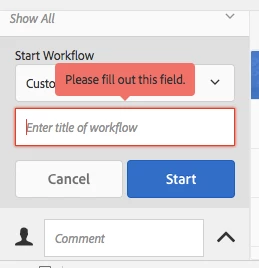
I'm using AEM 6.3 where when I execute the workflow from /assets.html, the workflow title field should be mandatory as per project requirement.

I've found OOTB node where I need to make the change. Please find below the path.

</libs/dam/gui/coral/content/commons/sidepanels/timeline/items/toolbar/items/workflows/items/form/items>

If I make a change in fieldLabel field then I can see the change reflected on the page but when I ado add required={Boolean}true, it's making it mandatory.

Any reason, why?

Regards,

Sumanth

This post is no longer active and is closed to new replies. Need help? Start a new post to ask your question.
Best answer by arunpatidar

Hi,

It shows popup when you filled details and make it empty but it won't disabled the button and allow workflow to be created

You need to write custom validation to fix this http://localhost:4502/libs/cq/gui/components/coral/common/admin/timeline/events/workflow/clientlibs/workflow.js

1.If you want you can keep required attribute in node

2. In above Js get the value of title $('form.cq-common-admin-timeline-toolbar-actions-workflow-form > input[name="workflowTitle"]').val()

3. Validate, if empty show the notify popup

$(window).adaptTo("foundation-ui").notify("",  Granite.I18n.get("Please select Title "), "error");

or keep submit button disabled until title is not filled.

you can modify

// workflow layer: listener of the select workflow field: handle "mandatory"

  $(document).on("change", selector + "-select", function (e) {

  $(selector + "-ok")[0].disabled = false;

  });

To

var workflowTitleSelector = "form.cq-common-admin-timeline-toolbar-actions-workflow-form > input[name='workflowTitle']";

$(document).on("change", selector + "-select", function (e) {

  if($(workflowTitleSelector).val() !== ""){

        $(selector + "-ok")[0].disabled = false;

  }

  else{

  $(selector + "-ok")[0].disabled = true;

  }

});

$(document).on("change", workflowTitleSelector, function (e) {

  if($(workflowTitleSelector).val()!==""){

        $(selector + "-ok")[0].disabled = false;

  }

  else{

  $(selector + "-ok")[0].disabled = true;

  }

});

This is the sample code, you can play with code in order to achieve whatever you want.

Thanks

Arun

4 replies

arunpatidar
Community Advisor
arunpatidarCommunity AdvisorAccepted solution
Community Advisor
July 16, 2018

Hi,

It shows popup when you filled details and make it empty but it won't disabled the button and allow workflow to be created

You need to write custom validation to fix this http://localhost:4502/libs/cq/gui/components/coral/common/admin/timeline/events/workflow/clientlibs/workflow.js

1.If you want you can keep required attribute in node

2. In above Js get the value of title $('form.cq-common-admin-timeline-toolbar-actions-workflow-form > input[name="workflowTitle"]').val()

3. Validate, if empty show the notify popup

$(window).adaptTo("foundation-ui").notify("",  Granite.I18n.get("Please select Title "), "error");

or keep submit button disabled until title is not filled.

you can modify

// workflow layer: listener of the select workflow field: handle "mandatory"

  $(document).on("change", selector + "-select", function (e) {

  $(selector + "-ok")[0].disabled = false;

  });

To

var workflowTitleSelector = "form.cq-common-admin-timeline-toolbar-actions-workflow-form > input[name='workflowTitle']";

$(document).on("change", selector + "-select", function (e) {

  if($(workflowTitleSelector).val() !== ""){

        $(selector + "-ok")[0].disabled = false;

  }

  else{

  $(selector + "-ok")[0].disabled = true;

  }

});

$(document).on("change", workflowTitleSelector, function (e) {

  if($(workflowTitleSelector).val()!==""){

        $(selector + "-ok")[0].disabled = false;

  }

  else{

  $(selector + "-ok")[0].disabled = true;

  }

});

This is the sample code, you can play with code in order to achieve whatever you want.

Thanks

Arun

Arun Patidar
smacdonald2008
July 17, 2018

Great response as usual!

Sumanth-Narra
July 17, 2018

arunp99088702

I've added the piece of code provided by you but it doesn't seem to work. When I put the debug statement, I don't see the control coming to code on click of Start Workflow button.

I'm attaching the file, Please have a look if I've put the code at the right place.

/*

* ADOBE CONFIDENTIAL

*

* Copyright 2015 Adobe Systems Incorporated

* All Rights Reserved.

*

* NOTICE:  All information contained herein is, and remains

* the property of Adobe Systems Incorporated and its suppliers,

* if any.  The intellectual and technical concepts contained

* herein are proprietary to Adobe Systems Incorporated and its

* suppliers and may be covered by U.S. and Foreign Patents,

* patents in process, and are protected by trade secret or copyright law.

* Dissemination of this information or reproduction of this material

* is strictly forbidden unless prior written permission is obtained

* from Adobe Systems Incorporated.

*/

/**

* Handle starting of workflows in the toolbar.

*/

(function(document, $) {

    var selectionLength;

    var selector = ".cq-common-admin-timeline-toolbar-actions-workflow";

    var ns = "cq-common-admin-timeline-toolbar-actions-workflow";

    var eventName = "cq-common-admin-timeline-change";

    var timelineSelector = ".cq-common-admin-timeline";

    var timelineNs = "cq-common-admin-timeline";

    // workflow layer: listener of the select workflow field: handle "mandatory"

var workflowTitleSelector = "form.cq-common-admin-timeline-toolbar-actions-workflow-form > input[name='workflowTitle']";

$(document).on("change", selector + "-select", function (e) {

  if($(workflowTitleSelector).val() !== ""){

$(selector + "-ok")[0].disabled = false;

  } else{

$(selector + "-ok")[0].disabled = true;

  }

});

$(document).on("change", workflowTitleSelector, function (e) {

  if($(workflowTitleSelector).val()!==""){

$(selector + "-ok")[0].disabled = false;

  }else{

$(selector + "-ok")[0].disabled = true;

  }

});

    // workflow layer: listener of the start button

    $(document).on("click." + ns, selector + "-ok", function (e) {

        submitTimelineForm();

    });

    // workflow layer: listener of form submit event

    $(document).on("submit", selector + "-form", function(e) {

        e.preventDefault();

        submitTimelineForm();

    });

    function submitTimelineForm() {

        var $button = $(selector + "-ok");

        var $form = $(selector + "-form");

        var event = $.Event("before-timeline-workflow-actions");

        $button.trigger(event);

        if (event.isDefaultPrevented()) {

            return;

        }

        if ($button.hasClass("disabled")) {

            // mandatory select workflow field empty

            return;

        }

        var paths = [];

        if ($(timelineSelector).data("paths")) {

            paths = $(timelineSelector).data("paths");

        }

        createWorkflow(paths, $form);

    }

    function createWorkflow(paths, form) {

        var data = form.serializeArray();

        selectionLength = paths.length;

        for (var i = 0; i < paths.length; i++) {

            if (!paths[i]) {

                // empty "paths" attribute results in [""] >> abort

                $(selector).attr("hidden", true);

                return;

                // note: this case of starting a workflow with an empty path is no longer possible

            }

            data.push({

                name: "payload",

                value: paths[i]

            });

        }

        $.ajax({

            url: form.attr("action"),

            type: form.attr("method") || "post",

            data: data,

            success: function() {

                // reset select workflow field

                // clearing the select is not supported yet therefore do not disable the button

                //$(selector + "-select")[0].clear();

                //$(selector + "-ok")[0].disabled = true;

                form.find("input[type=text]").val("");

                startWorkflowCallback(true);

            },

            error: function() {

                var msg = form.data("errormessage");

                $(window).adaptTo("foundation-ui").notify("", msg ? Granite.I18n.getVar(msg) : Granite.I18n.get("Failed to create workflow"), "error");

                startWorkflowCallback(false);

            }

        });

    }

    function startWorkflowCallback(status) {

        // todo: handle errors

        if (selectionLength > 1) {

            if (status) {

                $(window).adaptTo("foundation-ui").notify("", Granite.I18n.get("Workflows created for multiple items"), "success");

            }

            hideActionButton();

        } else {

            // single selection: refresh events and alerts

            if (status) {

                $(window).adaptTo("foundation-ui").notify("", Granite.I18n.get("Workflow successfully created"), "success");

            }

            $(timelineSelector).trigger(eventName + "." + timelineNs, {

                refresh: true

            });

        }

    }

    // click handler of submit button in create workflow dialog (action bar) (since 6.2)

    $(document).on("click." + ns, ".cq-common-createworkflowdialog-submit", function (e) {

        submitDialog();

    });

    $(document).on("submit", ".cq-common-createworkflowdialog-form", function(e) {

        e.preventDefault();

        submitDialog();

    });

    function submitDialog() {

        var $dialog = $(".cq-common-createworkflowdialog");

        if ($dialog.length !== 0) {

            $dialog[0].hide();

        }

        var paths = [];

        $(".cq-siteadmin-admin-childpages.foundation-collection .foundation-collection-item.is-selected").each(function() {

            paths.push($(this).data("foundation-collection-item-id"));

        });

        var form = $(".cq-common-createworkflowdialog-form");

        createWorkflow(paths, form);

        //show timeline after workflow creation

        var timelinePanelTrigger = $('.granite-toggleable-control [data-granite-toggleable-control-target*="timeline"]');

        if (timelinePanelTrigger.length > 0) {

            timelinePanelTrigger[0].selected = true;

        }

    }

})(document, Granite.$);

arunpatidar
Community Advisor
Community Advisor
July 17, 2018

Hi,

You need to update http://localhost:4502/libs/dam/gui/coral/components/admin/timeline/events/workflow/clientlibs/workflow.js

Apologies for confusion.

you need to update     // workflow layer: listener of the select workflow field: handle "mandatory" section only.

Below is the code.

    // workflow layer: listener of the select workflow field: handle "mandatory"

var workflowTitleSelector = "form.cq-common-admin-timeline-toolbar-actions-workflow-form > input[name='workflowTitle']";

    $(document).off("change", selector + "-select").on("change", selector + "-select", function (e) {

        var v = e.selected;

        var tVal=$(workflowTitleSelector).val();

        console.log(tVal);

        if (e.selected === "" || tVal==="") {

            disable();

        }

        else {

            $(selector + "-ok").removeAttr("disabled");

            $(selector + "-action-ok").removeAttr("disabled");

        }

    });

    $(document).on("change", workflowTitleSelector, function (e) {

var tVal=$(workflowTitleSelector).val();

        console.log(tVal);

        if (tVal==="") {

            disable();

        }

        else {

            $(selector + "-ok").removeAttr("disabled");

            $(selector + "-action-ok").removeAttr("disabled");

        }

    });

Note : Please remove console.log once works fine.

Arun Patidar