Make ajax call to get the published status of page : Touch ui | Adobe Higher Education
Skip to main content
laughingb220006
Level 2
January 22, 2018
Resuelto

Make ajax call to get the published status of page : Touch ui

  • January 22, 2018
  • 6 respuestas
  • 4680 visualizaciones

- when i click on delete button on selcted page from sites console,i want the published status of the page.

- i found the below js file which calls when the delete click happens on selected page.

/libs/cq/gui/components/common/wcm/clientlibs/wcm/js/delete.js

Can we know how to make a ajax call from js to wcm/cmd servelt to get the properties of the page ?
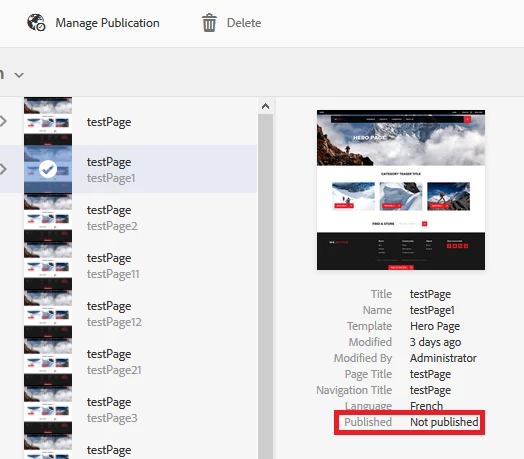
Please refer below js file how they did for dam console :

/libs/dam/gui/coral/components/admin/clientlibs/actions/js/delete.js

Este tema ha sido cerrado para respuestas.
Mejor respuesta de Techaspect_Solu

Hi,

You can make JQuery AJAX request to call the Sling Servlet, as shown in the following example.

//JQuery AJAX request to call Sling Servlet

$.ajax({    

     type : "GET",  

     url : '/bin/custom/path',    

     /*data : {        

          pass your request parameter here

     },*/    

     success : function(data, textStatus, jqXHR) {

         //write your logic that you need to perform on sucess                          

      },    

      error : function(XMLHttpRequest, textStatus, errorThrown) {

         //write your logic that you need to perform on error    

      }

});

Please refer the links below to get clear understanding about how to write AJAX requests to call servlet:

Adobe Experience Manager Help | Submitting Adobe Experience Manager form data to Java Sling Servlets

http://www.aemcq5tutorials.com/tutorials/sling-servlet-in-aem/

NOTE: You can make AJAX call to servlet as shown in the above example to fetch jcr:content path of the required page and look for the required properties.

We hope this information helps!

Regards,

TechAspect Solutions

6 respuestas

edubey
Level 10
January 22, 2018

If you have page path, you can make basic javascript ajax to jcr:content path of that page and look for these properties

laughingb220006
Level 2
January 22, 2018

thanks for the response,

yes I have page paths but I don’t now how to make a call to servlet.

Hemant_arora
Level 8
January 22, 2018

@Reference Replicator replicator; @Reference SlingRepository repository; Session  session = repository.loginAdministrative(null); ReplicationStatus status=replicator.getReplicationStatus(session, “nodepath”); status.isDelivered();//Checks if the content is delivered Other methods to get the different status isActivated() isDeactivated isPending()

laughingb220006
Level 2
January 22, 2018

Thanks for response .

But as per my requirements i have to make a call from java script.

Techaspect_Solu
Level 7
January 22, 2018

Hi,

You can make JQuery AJAX request to call the Sling Servlet, as shown in the following example.

//JQuery AJAX request to call Sling Servlet

$.ajax({    

     type : "GET",  

     url : '/bin/custom/path',    

     /*data : {        

          pass your request parameter here

     },*/    

     success : function(data, textStatus, jqXHR) {

         //write your logic that you need to perform on sucess                          

      },    

      error : function(XMLHttpRequest, textStatus, errorThrown) {

         //write your logic that you need to perform on error    

      }

});

Please refer the links below to get clear understanding about how to write AJAX requests to call servlet:

Adobe Experience Manager Help | Submitting Adobe Experience Manager form data to Java Sling Servlets

http://www.aemcq5tutorials.com/tutorials/sling-servlet-in-aem/

NOTE: You can make AJAX call to servlet as shown in the above example to fetch jcr:content path of the required page and look for the required properties.

We hope this information helps!

Regards,

TechAspect Solutions

Ravi_Pampana
Community Advisor
Community Advisor
January 23, 2018

Hi,

As you know the page path, you can use below url to get the page properties in json format

"http://localhost:4502/"+pagepath+"/_jcr_content.infinity.0.json"

Replace pagepath string with the path of the page. Make sure ajax call is triggered before delete.

You can iterate through the json and read the required values. Change 0 (infinity.0) to 1/2/3 to get more information about the page/child pages.

Hope this helps.