logs not getting updated when running AEM inside windows | Community
Skip to main content
jayv25585659
Level 8
August 9, 2022

logs not getting updated when running AEM inside windows

  • August 9, 2022
  • 3 replies
  • 1135 views

as above.

So it's my first time using Windows as a local development machine. I've always used Macs before my latest role. But my issue is that none of the files inside /crx-quickstart/log is getting updated.

as an example:


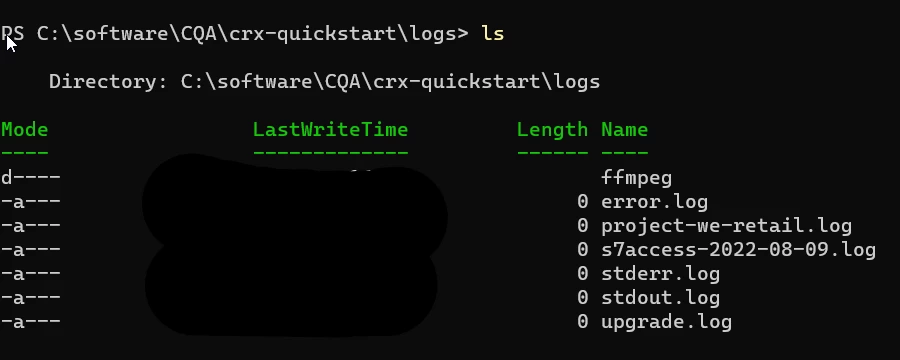
        if I open up a page for editing, the cmd.exe will be very busy with logging. But if I check the files inside /log, none of them has increased in size. When using AEM inside a Mac, I know access.log and error.log will be very busy getting updates.


Any ideas on what's happening? Thanks


--------


Things I tried:


  1. I tried running java -Xmx4096m -jar cq-author-p4502.jar
  2. I tried using the start scripts inside crx-quickstart/bin
  3. I tried numbers 1 and 2 but using cmd.exe (run-as admin)
  4. I tried numbers 1 and 2 but using powershell (run-as admin)
  5. As a test, I deleteg all the *.log inside /crx-quickstart/logs and restarted AEM. all the files are showing up as zero bytes. (I tried opening the file using nano in Windows terminal and there's nothing there.)

This post is no longer active and is closed to new replies. Need help? Start a new post to ask your question.

3 replies

B_Sravan
Community Advisor
Community Advisor
August 9, 2022

Hi @jayv25585659 ,

I believe it is nothing regarding the platform, can you try opening the files in Notepad++ and check?

jayv25585659
Level 8
August 11, 2022

I opened error.log using nano (a console text editor similar to vi) inside Windows terminal and the file is empty.

HeenaMadan
Community Advisor and Adobe Champion
August 9, 2022

there is nothing related to Operating system windows/linux. Close file explorer,

Open  <aem-installed>/crx-quickstart\logs , refresh and open logs in notepad++ or any other app and reload if required.


Bhuwan_B
Community Advisor
Community Advisor
August 11, 2022

@jayv25585659 you can tail log in windows using Jtail.jar. Please refer to below article:

https://aem4beginner.blogspot.com/how-to-tail-log-files-of-aem-in-windows