Lock Page Doesn't Work in Edit Mode | Community
Skip to main content
this-that-the-otter
Level 4
February 22, 2023
Solved

Lock Page Doesn't Work in Edit Mode

  • February 22, 2023
  • 1 reply
  • 1609 views

We're running AEM 6.5.13.

As normal users, we can lock and unlock pages within the site manager - e.g. from within /sites.html/content/<site>/en/test.html

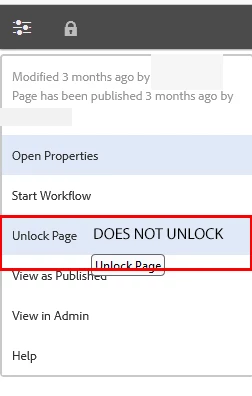
We cannot unlock pages within the editor - e.g. we cannot unlock pages from within /editor.html/content/<site>/en/test.html - though we can lock them here.

I don't see an error in the log files when trying (and failing) to unlock pages from within the editor.

The same is true when logged in as the admin user.

How might we remove either or both of the lock opportunities (i.e. from site manager and or from the editor) from the Touch UI display?


This post is no longer active and is closed to new replies. Need help? Start a new post to ask your question.
Best answer by SivakumarKanoori

Thanks for the info @sivakumarkanoori

I checked it out but it's not clear to me what the solution is.

Initially, it looked like it might have been necessary to add a node/property somewhere (maybe to the page) i.e.:


“dependencies” of String[] type with value of “cq.shared”


and rebuild clientlibs.

The last by comment @michaelc3108339 suggests adding some code somewhere:


After migration: from 6.2 to 6.4. There is no need to add cq:shared, just review in detail where the code started to fail. Add the next code to load user data at the contentWindow level. var contentFrame = parent.frames["ContentFrame"]; Granite.author.ContentFrame = contentFrame; Granite.author.ContentFrame.contentWindow.CQ = {}; Granite.author.ContentFrame.contentWindow.CQ.shared = {}; Granite.author.ContentFrame.contentWindow.parent.CQ.shared.User.load() Granite.author.ContentFrame.contentWindow.CQ.shared.User = Granite.author.ContentFrame.contentWindow.parent.CQ.shared.User;


where this might be added isn't 100% clear to me.

The last replier @briankasingli (also running AEM 6.5) implies the above is not a long term solution.


@this-that-the-otter :  Usually , i dont suggest to make changes directly in /libs , instead you can overlay and make changes. In our case first try it under /libs if it works then you can overlay.


As per the comment ..


you can go to below url add the code 


/libs/cq/gui/components/authoring/editors/clientlibs/core/js/actions/lockMode.js


go to the below function unlockPage()  function and add the below code in starting of the function 


var contentFrame = parent.frames["ContentFrame"];
ns.ContentFrame = contentFrame;
ns.ContentFrame.contentWindow.CQ = {};
ns.ContentFrame.contentWindow.CQ.shared = {};
ns.ContentFrame.contentWindow.parent.CQ.shared.User.load()
ns.ContentFrame.contentWindow.CQ.shared.User = ns.ContentFrame.contentWindow.parent.CQ.shared.User;


Thanks,

Siva

1 reply

SivakumarKanoori
Community Advisor
Community Advisor
February 23, 2023

@this-that-the-otter 

When we click on the lock page there is a call happen to below url :

https://localhost:4502/bin/wcmcommand

payload :

  1. path:
    /content/test/abc.html
  2. cmd:
    lockPage

when we unclock the page also the call happens to the same url with different payload as 

  1. path:
    /content/test/abc.html
  2. cmd:
    unlockPage


So can you check in the dev tools network tab, as it is throwing any error for unlock page option


Thanks,Siva
this-that-the-otter
Level 4
February 24, 2023

Hi @sivakumarkanoori  - thanks for the info. I do see an error in the browser console when trying to unlock pages from within the editor -


Uncaught TypeError: ns.ContentFrame.contentWindow.CQ is undefined unlockPage http://localhost:4502/libs/cq/gui/components/authoring/editors/clientlibs/core.js line 266 > srcScript:1048 jQuery 2 dispatch handle


When unlocking the page via site manager there are no corresponding errors in the console.

I'm not sure if this is related, but in the editor, for the page I am trying to unlock, in the gray bar at the top of the screen, the page name displayed is: MY PAGE TITLE: UNDEFINED


Thanks for your help!

this-that-the-otter
Level 4
March 2, 2023

@this-that-the-otter :  Usually , i dont suggest to make changes directly in /libs , instead you can overlay and make changes. In our case first try it under /libs if it works then you can overlay.


As per the comment ..


you can go to below url add the code 


/libs/cq/gui/components/authoring/editors/clientlibs/core/js/actions/lockMode.js


go to the below function unlockPage()  function and add the below code in starting of the function 


var contentFrame = parent.frames["ContentFrame"];
ns.ContentFrame = contentFrame;
ns.ContentFrame.contentWindow.CQ = {};
ns.ContentFrame.contentWindow.CQ.shared = {};
ns.ContentFrame.contentWindow.parent.CQ.shared.User.load()
ns.ContentFrame.contentWindow.CQ.shared.User = ns.ContentFrame.contentWindow.parent.CQ.shared.User;


Thanks,

Siva


@sivakumarkanoori This fixes the issue in my case.

I'm still wondering if Adobe has added this fix to a CFP, and if not - why?