load clientLib based on components(CQ.AUTHORING.DIALOG GETS LOADED ON ALL THE PAGES OR ALL THE PROJECTS) | Community
Skip to main content
November 22, 2016
Solved

load clientLib based on components(CQ.AUTHORING.DIALOG GETS LOADED ON ALL THE PAGES OR ALL THE PROJECTS)

  • November 22, 2016
  • 12 replies
  • 14800 views

we have defined components clientLibs as cq.authoring.dialog, But these js libs will be loaded for all templates(all projects) while authoring the pages.

Can we restrict them based on template or components as these JS may create issue in other AEM projects?

I tried extraClientLibs but its not working properly..

Is there anyway other then overlaying out-of-box components?

Thanks,

Malli

This post is no longer active and is closed to new replies. Need help? Start a new post to ask your question.
Best answer by akashs51893872

Hi mallipanchal,

I solved this problem by inserting two lines of HTL code in the component HTML itself.  PFA the screenshot:

You need to have a clientLibraryFolder created with this category name:

Now, ONLY wherever you have this component, the JS/CSS files for this component will be loaded.

Good Luck...

12 replies

smacdonald2008
November 22, 2016

In this use case - the best way is to overlay components. If you want to change the style of the overlay component - introduce a new clientlib that contains CSS or JS. This is best practice for AEM. 

kautuk_sahni
Community Manager
Community Manager
November 23, 2016

Hi 

Please have a look at this community article for AEM Client Libraries best practices.

If you want to create component specific clientlibs then you need to create a new clientlibs that gets applied to that particular component. See the article to know how to do it.

Link:- http://blogs.adobe.com/experiencedelivers/experience-management/clientlibs-explained-example/

This article will explain:

  • multiple components with their own JavaScript and CSS files
  • global JavaScript and CSS files
  • apps folder is not available on the publish instance
  • CSS resources have to go in the <head>, JavaScript resources at the end of the page
  • Resources need to be minified
  • Some resources need to be merged

I hope this would help you.

~kautuk

Kautuk Sahni
November 23, 2016

kautuksahni wrote...

Hi 

Please have a look at this community article for AEM Client Libraries best practices.

If you want to create component specific clientlibs then you need to create a new clientlibs that gets applied to that particular component. See the article to know how to do it.

Link:- http://blogs.adobe.com/experiencedelivers/experience-management/clientlibs-explained-example/

This article will explain:

  • multiple components with their own JavaScript and CSS files
  • global JavaScript and CSS files
  • apps folder is not available on the publish instance
  • CSS resources have to go in the <head>, JavaScript resources at the end of the page
  • Resources need to be minified
  • Some resources need to be merged

I hope this would help you.

~kautuk


By this method we can load site specific styles and JS. But I want include TouchUI dialog specific JS in editmode. Currently we used id as cq.authoring.dialog(but these JS loads in all pages or in all project components while editing )

smacdonald2008
November 23, 2016

I spoke to some of our experts - it lines up with my 1st response. 

If not needed for all projects or templates it is better not to attach to cq.authoing.dialog and use cq:includeClientLib with a new category

(introduce a new clientlib that contains CSS or JS.) 

antoniom5495929
November 23, 2016

I've a similar issue, but i fix it just creating a new clientlibrary named custom.authoring.dialog and including it by using extraClientLibs in our components.

November 24, 2016

antoniom54959291 wrote...

I've a similar issue, but i fix it just creating a new clientlibrary named custom.authoring.dialog and including it by using extraClientLibs in our components.


Yeah, Even I tried this. BUT

Using extraClientlib property on the cq:dialog, This can be done  but issue here is dialog DOM elements and JS lib were loaded at the same point syncing is not happening. so when we open dialog first time its not working, close the dialog and open it again it works fine(JS were loaded in first time, so it works fine second time onwords).

Note: we are using custom-multifield.

November 24, 2016

smacdonald2008 wrote...

I spoke to some of our experts - it lines up with my 1st response. 

If not needed for all projects or templates it is better not to attach to cq.authoing.dialog and use cq:includeClientLib with a new category

(introduce a new clientlib that contains CSS or JS.) 


Where should I include it in page component or in any of the particular components script.( I hope we need this only in EDIT mode)??

smacdonald2008
November 24, 2016

Include the clientlib in the script that corresponds to the component. If its a page component - place it there. 

akashs51893872
akashs51893872Accepted solution
August 8, 2018

Hi mallipanchal,

I solved this problem by inserting two lines of HTL code in the component HTML itself.  PFA the screenshot:

You need to have a clientLibraryFolder created with this category name:

Now, ONLY wherever you have this component, the JS/CSS files for this component will be loaded.

Good Luck...

akashs51893872
October 31, 2018

+ antoniom54959291​, kautuksahni​, smacdonald2008

Hi mallipanchal,

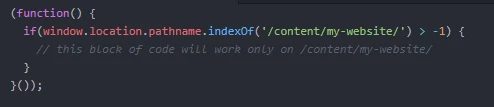
There is one more solution to this. In the client-library that has the category `cq.authoring.dialog`, you can include a sort of name-spacing.  For ex:

Good Luck...