List out metadata of the Assets | Community
Skip to main content
October 6, 2022
Solved

List out metadata of the Assets

  • October 6, 2022
  • 2 replies
  • 741 views

HI Team


I have a 1500+ PDF's under "/content/dam/project/en" and those pdf has below properties.


1. title (String )

2. tags (value might be String[] -- tags can be multiple)

3. id (String)

4. category (String[] - value can be one or multiple )

5. doc type  (String[] - value can be one or multiple )

6. property-1 (String[] - value can be one or multiple )


Note: Those properties will not mandatory to all the assets, few properties will be empty also (like 1 asset will have only title not other properties) All this properties under metadata node.


I have a requirement to update all the assets from above path in excel with those properties in below format (Updated below for reference)


Name of asset tags id category doc type propert-1
Asset path tag1 1 abc:def/ghi/jkl abc:dfe/hig/klm abc:dfh/gji/jkm
Asset path tag1 1 abc:def/ghi/jkl Empty Empty


can anyone help me here the best process I can follow.


Thanks in Advance.
 

This post is no longer active and is closed to new replies. Need help? Start a new post to ask your question.
Best answer by SwetaB

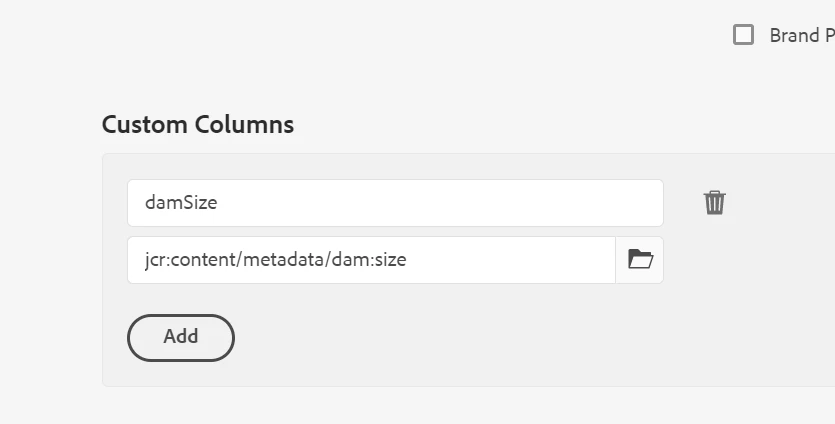
For the custom property or metadata property you can use the custom columns and add the mapping of the path as shown in the image


2 replies

Level 4
October 6, 2022

Hi @adhi36876232 ,


You can use the ootb asset report if the only PDFs are under that path in csv format. You can also add custom property.

https://experienceleague.adobe.com/docs/experience-manager-learn/assets/advanced/asset-reports.html?lang=en 


If this report is not as per your requirement then you need to create your own custom report using query builder API.


October 6, 2022

Hi Sweta,


Thanks for your help.

I am able to take the asset tag and title of the asset in excell format.

Is there any way to take the id and category and other properties too in excell.


SwetaBAccepted solution
Level 4
October 7, 2022

For the custom property or metadata property you can use the custom columns and add the mapping of the path as shown in the image