Linkchecker is not accessible in AEM as a Cloud Service | Community
Skip to main content
Level 2
August 20, 2025
Solved

Linkchecker is not accessible in AEM as a Cloud Service

  • August 20, 2025
  • 3 replies
  • 1021 views

We are trying to access the legacy Link Checker console at:

/etc/linkchecker.html

But in AEM as a Cloud Service, this URL throws the error:

Resource at '/etc/linkchecker.html' not found: No resource found

It seems that the old Classic UI console for managing broken links has been removed in AEMaaCS. We still need a way to monitor and report invalid/broken links within our site.
can you please suggest how can we monitor the report .
Best answer by giuseppebaglio

hi @udhayaprakash

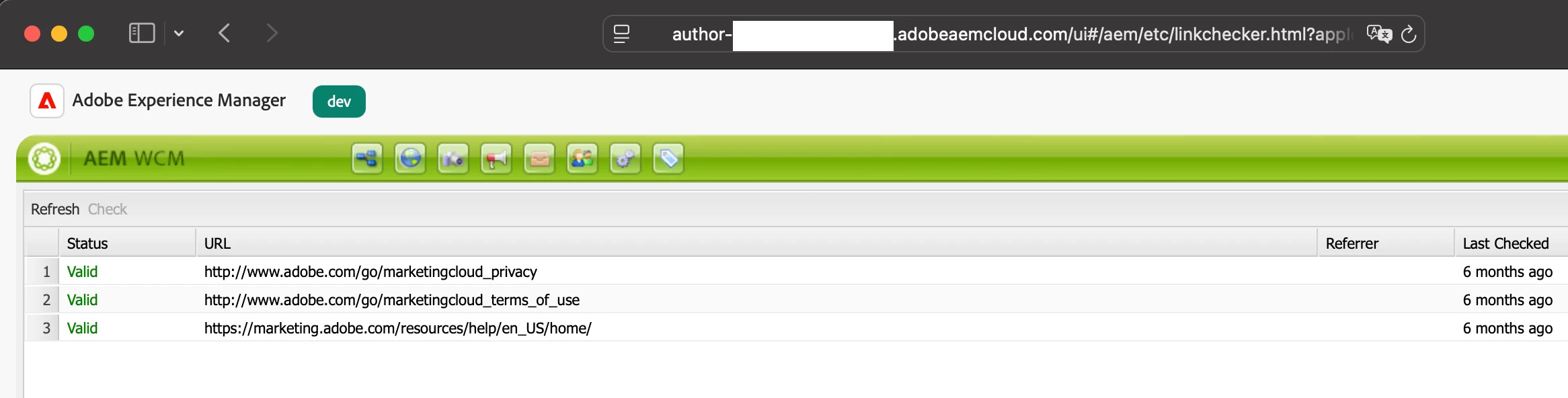
As shown in my screenshot, I can still access the Link Checker console at /etc/linkchecker.html. I recommend contacting Adobe to investigate this issue and determine an appropriate solution.


3 replies

giuseppebaglio
giuseppebaglioAccepted solution
Level 10
August 21, 2025

hi @udhayaprakash

As shown in my screenshot, I can still access the Link Checker console at /etc/linkchecker.html. I recommend contacting Adobe to investigate this issue and determine an appropriate solution.


HrishikeshKagne
Community Advisor
Community Advisor
August 21, 2025

Hi @udhayaprakash ,

In AEM as a Cloud Service, the old Link Checker console (/etc/linkchecker.html) is no longer available. To monitor broken links, you should use alternative approaches like the Sites Console “References” feature, custom reports/queries on cq:LinkChecker properties, or external link validation tools (e.g., Adobe’s Dispatcher/CDN logs, crawler-based link checkers). For ongoing governance, many teams implement custom reporting workflows or use ACS AEM Commons link checker utilities to track and fix broken links. This replaces the legacy console while keeping links healthy.

Hrishikesh Kagane
kautuk_sahni
Community Manager
Community Manager
September 1, 2025

@udhayaprakash just checking in! Were you able to get this resolved? If one of the replies above helped—whether it completely solved the issue or simply pointed you in the right direction—marking it as accepted can make it much easier for others with the same question to find a solution. And if you found a different way to fix it, sharing your approach would be a great contribution to the community. Your follow-up not only helps close the loop but also ensures others benefit from your experience. Thanks so much for being part of the conversation!

Kautuk Sahni