Layout mode unavailable | Community
Skip to main content
December 14, 2018
Solved

Layout mode unavailable

  • December 14, 2018
  • 9 replies
  • 3641 views

I have used a sample archetype to create pages in AEM 6.4. However, I am not able to use the layout feature as it is not appearing in dropdown. What could be its reason ? I have tried looking for it on the web only to fail. Please Help !
This post is no longer active and is closed to new replies. Need help? Start a new post to ask your question.
Best answer by arunpatidar

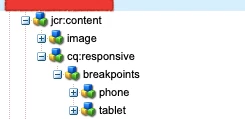
Actually to enable layout mode, your template is not setup properly for your custom template or you can directly add cq:resposive node in site root.

Configuring Layout Container and Layout Mode

9 replies

arunpatidar
Community Advisor
Community Advisor
December 14, 2018

Hi,

Could you please let us which command you have used to create project. I would suggest you to take reference from wretail site, you need to configure if your project doesn't contain same.

Trying out Responsive Layout in We.Retail

Arun Patidar
smacdonald2008
December 14, 2018

Just tested with this artilce -- Creating an Adobe Experience Manager 6.4 Project using Adobe Maven Archetype 13

That mode is there --

RishabhKrAuthor
December 15, 2018

This is the command that I have used for making my project.

mvn org.apache.maven.plugins:maven-archetype-plugin:2.4:generate -DarchetypeGroupId=com.adobe.granite.archetypes -DarchetypeArtifactId=aem-project-archetype -DarchetypeVersion=13 -DarchetypeCatalog=https://repo.adobe.com/nexus/content/groups/public/

RishabhKrAuthor
December 15, 2018

Yeah, problem is layout is not appearing in the dropdown as marked in your reply. For we-retail I am getting it but not for my project. Is it the problem with the archetype command that i have used:

mvn org.apache.maven.plugins:maven-archetype-plugin:2.4:generate -DarchetypeGroupId=com.adobe.granite.archetypes -DarchetypeArtifactId=aem-project-archetype -DarchetypeVersion=13 -DarchetypeCatalog=https://repo.adobe.com/nexus/content/groups/public/

arunpatidar
Community Advisor
Community Advisor
December 15, 2018

Can you check the page that you have created using templates which were created using command.

One more question are you creating your own templates?

Arun Patidar
RishabhKrAuthor
December 15, 2018

Yeah, sure. Initially there were two templates in the template folder. I deleted both of them and created one custom template. Is this the reason why layout mode is not showing up ?

VeenaVikraman
Community Advisor
Community Advisor
December 15, 2018

Hi Rishab

      There could be a chance that the template was not created properly. Could you please recheck ? Also are you using static template or editable template ? Can you give a screen shot of the options you are getting ?

Thanks

Veena

arunpatidar
Community Advisor
arunpatidarCommunity AdvisorAccepted solution
Community Advisor
December 15, 2018

Actually to enable layout mode, your template is not setup properly for your custom template or you can directly add cq:resposive node in site root.

Configuring Layout Container and Layout Mode

Arun Patidar
smacdonald2008
December 15, 2018

If you deleted the default templates that was built by a Maven Arch - that would explain it.