Language Copy Translation Job not translating assets - from non OOTB components
Hi Team,
For one of our client requirement, we are trying to leverage the "Language Copy" translation feature in AEM 6.3 SP2. While doing so, Translation jobs are not including the assets (for example: Images) in my custom components. But the same is working as expected for the OOTB components (e.g. OOTB Image component). Following are the steps which I followed:
- Created a Template named as /apps/example1/templates/home
- Created a Page Component named as /apps/example1/components/page/home with a single parsys
- Created a Content Component named as /apps/example1/components/content/header with an image field using cq:dialog node structure (Just copied from one of the component under we.retail).
- Created a page in the following structure using the above said page component and added my content component to it: http://localhost:4502/editor.html/content/example1/us/en/home.html
- Following is my assets folder structure: http://localhost:4502/assets.html/content/dam/example1/en
- Then I selected the above created page and started to create a language copy.
- Under the language copy creation steps, I have selected Arabic(ar) and selected "Create a new translation project" option under the translate tab and have provided a Title.
- While doing so, my page is getting translated (I mean copy is getting created). But the assets (fileReference) are not getting translated for my custom components. But the same is getting translated, when I am using the OOTB image component.
Is there any additional property or configuration, do we have to set for our custom components to be included for asset translation? I am not seeing any errors too in logs. Its looks like simply assets from my custom components are just excluded.
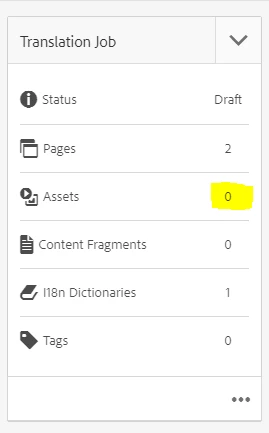
Snap Shot which shows assets are not considered when I did a language copy of a page with my custom component only:
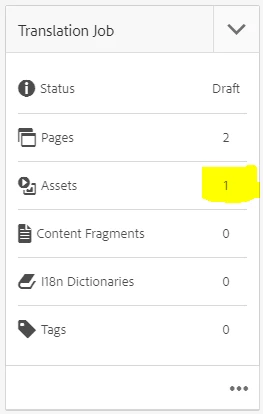
Snap Shot which shows assets are being considered when I did a language copy of a page with OOTB Image component only (even my custom component exist in this page, but still the assets referenced within it are not copied/considered):
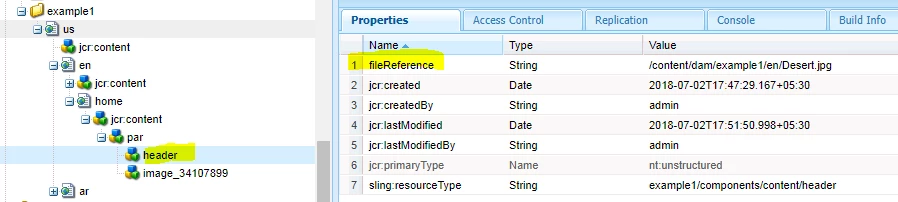
My page with my custom component in JCR with properties:
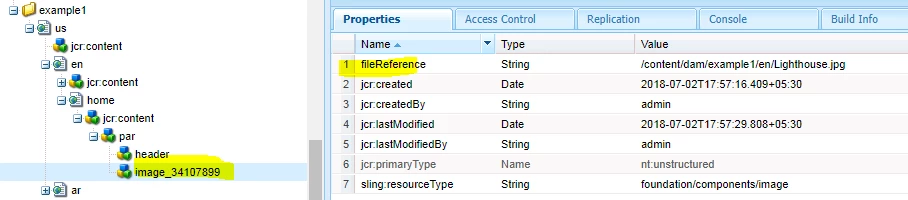
My page with OOTB component in JCR with properties:
Thanks for your time in going through the lengthy problem statement.
Regards,
Dinesh kumar L.