Language and Language Root field value in Page Properties not getting rolled out? | Community
Skip to main content
Jeanmaradiaga
Level 3
December 14, 2022
Solved

Language and Language Root field value in Page Properties not getting rolled out?

  • December 14, 2022
  • 1 reply
  • 902 views

The Language and Language Root fields are set in the master copies:
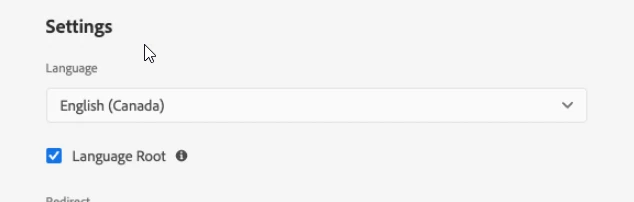


However when you roll out to the live copies, the properties are not being carried over:
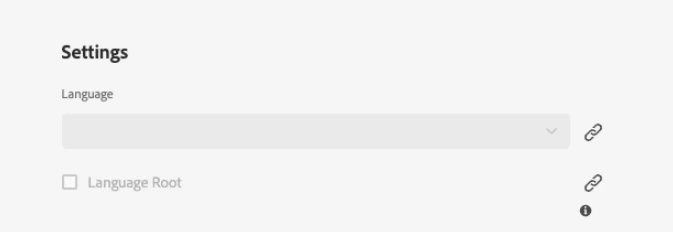


Workaround: We have had to cancel inheritance and manually set the Language and Language Root values.

This post is no longer active and is closed to new replies. Need help? Start a new post to ask your question.
Best answer by Nikita___Garg

hi @jeanmaradiaga ,


You can check the existing configuration using developer console. If you think changes needs to be made, then you can create configuration in your project.


For configuration creation you can refer Configuring OSGi for Adobe Experience Manager as a Cloud Service | Adobe Experience Manager


Hope this helps.


Thanks,

Nikita Garg

1 reply

Siva_Sogalapalli
Community Advisor
Community Advisor
December 14, 2022

Go to configuration manager in OSGI, http://localhost:4502/system/console/configMgr and search for CQ MSM Content Update Action configuration and make sure the properties are not in the excluded properties list. 


Jeanmaradiaga
Level 3
December 14, 2022

Thanks @siva_sogalapalli. The only issue is that this is happening on the Cloud environment not local. Should a configuration file be made for this?

Nikita___GargAdobe EmployeeAccepted solution
Adobe Employee
December 15, 2022

hi @jeanmaradiaga ,


You can check the existing configuration using developer console. If you think changes needs to be made, then you can create configuration in your project.


For configuration creation you can refer Configuring OSGi for Adobe Experience Manager as a Cloud Service | Adobe Experience Manager


Hope this helps.


Thanks,

Nikita Garg