Jsoup jar does not installed in OSGi Bundle | Community
Skip to main content
Level 3
October 3, 2017
Solved

Jsoup jar does not installed in OSGi Bundle

  • October 3, 2017
  • 7 replies
  • 10668 views

Hello Community!

For the better understanding of OSGi and Sling Model, I was working on this tutorial Adobe Experience Manager Help | Creating a HTML Template Language and Sling Model DOM parser component

At the Deploy the bundle to AEM section, I have a problem install Jsoup.

On the note, If  I get error message at JSoup, I need to remove version from Manufest file so I did.

However, I still have problem install the Jsoup

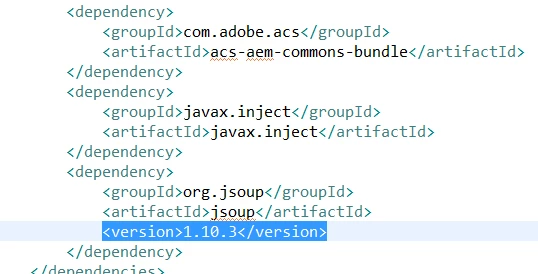
I have jsoup in pom.xml file as its dependency
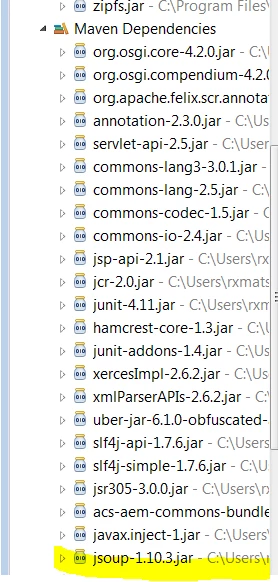
Also I could see the jar file under Maven Dependencies
Does anybody know what I make mistake ?

Thanks!

Ryu
This post is no longer active and is closed to new replies. Need help? Start a new post to ask your question.
Best answer by Ratna_Kumar

Hi,

Even if you have included dependency

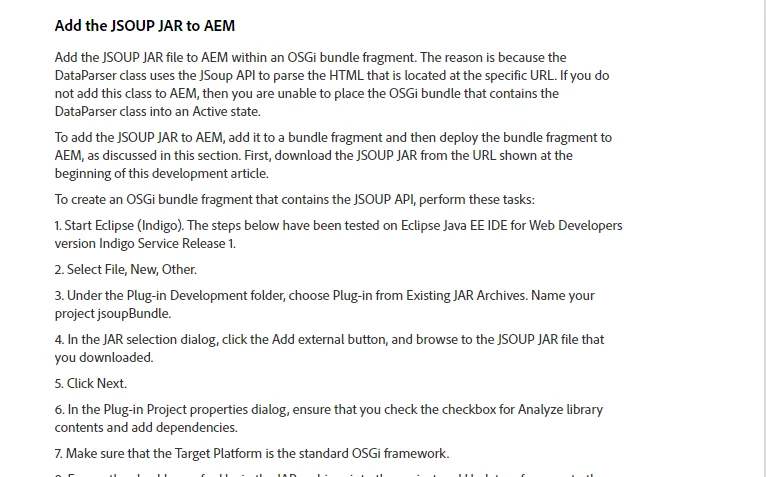
You have to add the JSOUP JAR to AEM as well. See the below screenshot and steps to follow in the article.

Hope this helps!!

~Ratna

7 replies

viveksachdeva
Community Advisor
Community Advisor
October 4, 2017

For any 3rd party Jar(not provided by the Felix container), you need to bundle it and send or embed it in your current bundle. Take a look at java - OSGI - handling 3rd party JARs required by a bundle - Stack Overflow . It talks about similar thing.

Hope this helps..

kautuk_sahni
Community Manager
Community Manager
October 4, 2017
Ratna_Kumar
Ratna_KumarAccepted solution
Level 10
October 4, 2017

Hi,

Even if you have included dependency

You have to add the JSOUP JAR to AEM as well. See the below screenshot and steps to follow in the article.

Hope this helps!!

~Ratna

Level 4
March 12, 2024

What are steps 8 and 9? From the screen-shot it looks to be cropped. Please share further steps.

Level 3
October 4, 2017

Hello Everyone!

Thanks to all the replay. I could resolved the problem.

I installed individual jsoup jar to AEM, and removed all the version number from Manifest file.

Cheers!

Ryu

stuarts51930720
October 4, 2017

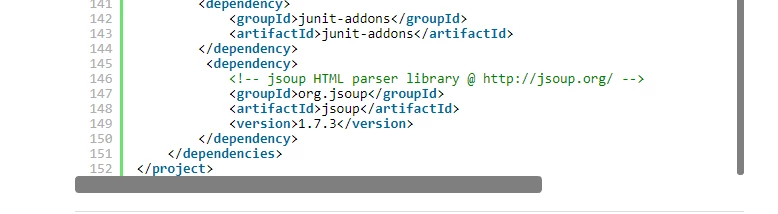
We had to more to get JSoup working in our project  for AEM 6.3 -- alot more.  Here is an extract from our pom.xml(It may not be complete, notice we had to pull down the libraries manually to make things work.):

<properties>

   ...

   <system.dependencies>${project.basedir}/lib</system.dependencies>

</properties>

<dependencyManagement>

   <dependencies>

   <dependency>

...

<dependency>

   <groupId>org.apache.tapestry</groupId>

   <artifactId>tapestry-json</artifactId>

   <version>5.4.1</version>

   <type>jar</type>

   <scope>system</scope>

   <systemPath>${system.dependencies}/org.apache.tapestry-5.4.1.jar</systemPath>

</dependency>

...

<!-- https://mvnrepository.com/artifact/org.jsoup/jsoup -->
<dependency>

   <groupId>org.jsoup</groupId>

   <artifactId>jsoup</artifactId>

   <version>1.10.3</version>

   <type>jar</type>

   <scope>system</scope>

   <systemPath>${system.dependencies}/jsoup-1.10.3.jar</systemPath>

</dependency>

<!-- https://mvnrepository.com/artifact/com.google.code.gson/gson -->
<dependency>

   <groupId>com.google.code.gson</groupId>

   <artifactId>gson</artifactId>

   <version>2.8.1</version>

   <type>jar</type>

   <scope>system</scope>

   <systemPath>${system.dependencies}/gson-2.8.1.jar</systemPath>

</dependency>

...

</dependencies>

</dependencyManagement>

arunpatidar
Community Advisor
Community Advisor
September 23, 2022

You check below sample pom to understand how to deploy external bundle to AEM

https://github.com/arunpatidar02/aemaacs-aemlab/blob/932349cb9fb5f201c53107317e0eeb5c33651e2a/all/pom.xml#L83 

Arun Patidar
Level 4
March 11, 2024

Hi Ratnakumar,


What are steps 8 and 9? From the screen-shot it looks to be cropped. Please share further steps.