jcr: content nodes don't want to display when browse and search using pathfiled in touch ui dialog | Community
Skip to main content
yellar5366253
Level 2
January 2, 2019
Solved

jcr: content nodes don't want to display when browse and search using pathfiled in touch ui dialog

  • January 2, 2019
  • 8 replies
  • 5296 views

I'm currently working on a site implementation with AEM 6.4 touch ui . We have a touch ui dialog that is using granite/ui/components/coral/foundation/form/pathfield, this is how the code looks like:        

                        <csvpath

                                       jcr:primaryType="nt:unstructured"

                                       jcr:title="CSV Link URL"

                                       sling:resourceType="/libs/granite/ui/components/coral/foundation/form/pathfield"

                                       fieldDescription="Location of the CSV with the graph data"

                                       fieldLabel="CSV Path"

                                       name="./csvPercentGraphPath"

                                       rootPath="/content/dam/lgs/us/legal/transparency/data”/>

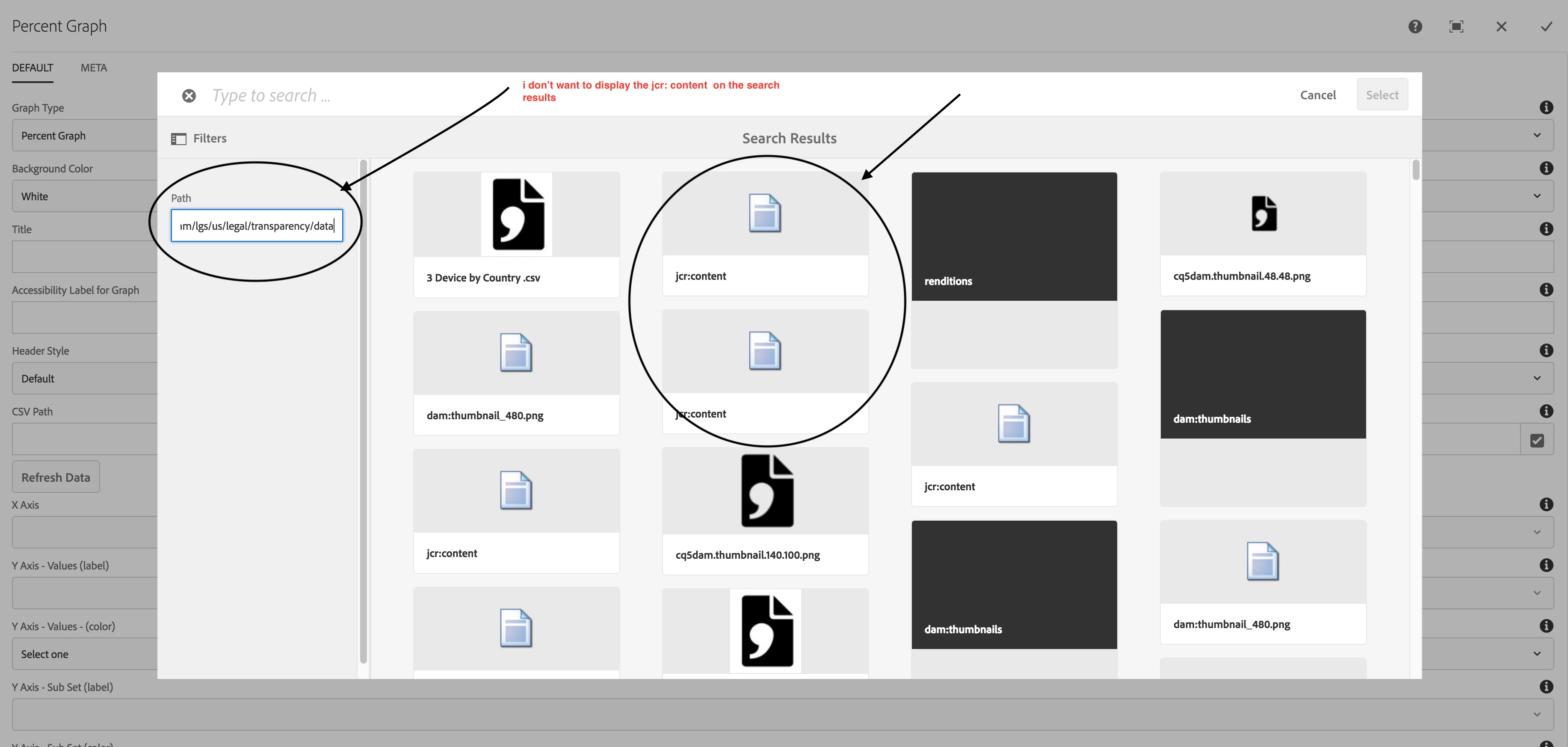
When edit the component and  click on path filed  going to the filters If  given the path  like "/content/dam/lgs/us/legal/transparency/data” I don’t want to display the jcr:content nodes on search results , could you please do the need full .

   I’m highlighted the jcr:content( I don’t want jcr:content  on search results ) on search results in below screen shot.
Arun Patidarsmacdonald2008Amy_Wongsoumyadipd33248700

This post is no longer active and is closed to new replies. Need help? Start a new post to ask your question.
Best answer by vish.dhaliwal

Hello Everyone,

The product team is currently working on this issue. The internal reference number is GRANITE-15894 and GRANITE-26358.

This has been classified as an enhancement to the product.

Regards,

Vishu

8 replies

yellar5366253
Level 2
January 2, 2019

Please answer immeditly ,  its  blocker for our  project.

Arun Patidar smacdonald2008Amy_Wongsoumyadipd33248700

arunpatidar
Community Advisor
Community Advisor
January 2, 2019

Hi

Not sure if filter property works but you can apply dialog filters to avoid jar:content as input.

Arun Patidar
yellar5366253
Level 2
January 2, 2019

Hi Arun,

     i tried  with filter with jcr:content  also not working,

arunpatidar
Community Advisor
Community Advisor
January 2, 2019

There is similar thread

if that helps otherwise you can use dialog validations.

Arun Patidar
yellar5366253
Level 2
January 2, 2019

Even i followed that blog also not working and i think it is product bug ,

Arun Patidar smacdonald2008Amy_Wongsoumyadipd33248700

aalfarocr
Level 2
August 30, 2019

Any updates on this ISSUE ??? , it looks like a product BUG ! Very annoying by the way ...

aalfarocr
Level 2
August 30, 2019

Hey yellar5366253​ at the end have u figure it out ? We're facing the same annoying issue now... thx !

vish.dhaliwalAdobe EmployeeAccepted solution
Adobe Employee
September 4, 2019

Hello Everyone,

The product team is currently working on this issue. The internal reference number is GRANITE-15894 and GRANITE-26358.

This has been classified as an enhancement to the product.

Regards,

Vishu