Java: How do I get the URL of a custom page thumbnail? | Community
Skip to main content
jayv25585659
Level 8
January 2, 2024
Solved

Java: How do I get the URL of a custom page thumbnail?

  • January 2, 2024
  • 4 replies
  • 2027 views

TLDR: I need to get the URL of thumbnail I uploaded manually to page properties so I can use it in the page metadata.


example: <meta name="og:image" content="/content/mysite/my-page/jcr:content/my-custom-thumbnail-image-here.png>


Thanks!

------------------------------------------------------------------------

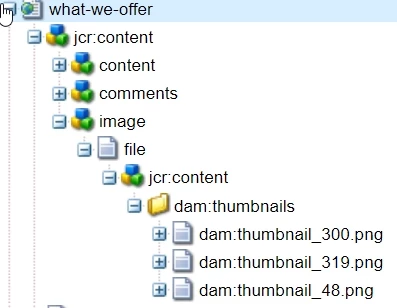
When I upload an image to Page properties/Thumbnail, I can see that AEM creates these paths


  • /content/mysite/mypage/jcr:content/image/file/jcr:content/dam:thumbnails/dam:thumbnail_300.png
  • /content/mysite/mypage/jcr:content/image/file/jcr:content/dam:thumbnails/dam:thumbnail_48.png

(Sometimes there's a thumbnail_319.png path as well but unsure what triggers its creation.)


I using javax.jcr classes, I can check for the existence of these nodes but is there more targeted (AEM-specific) class I can use?


There was an old discussion here that mentioned Social Media component + getThumbnail but I cannot find any instances of these combo. All I can find about getThumbnail is a "inbox" class (which I assume relates to emails)


-----------------------------------------------


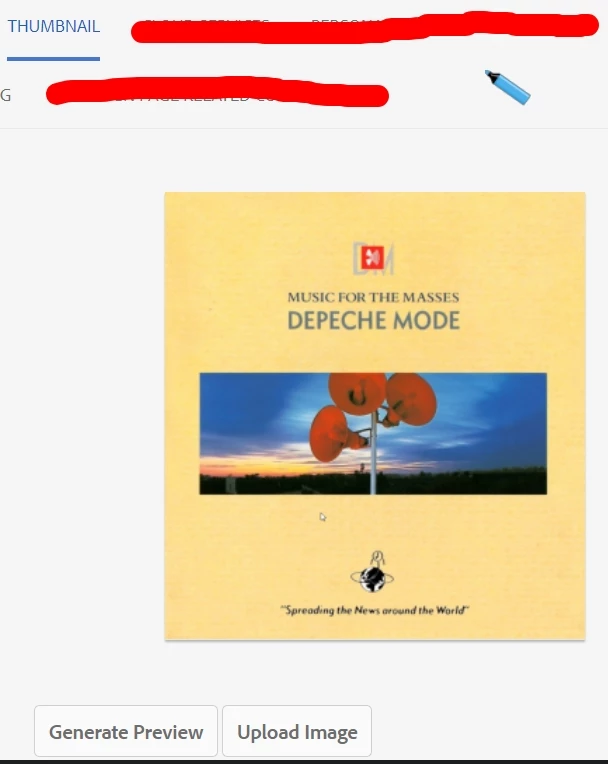
This is how I uploaded the custom thumbnail in page properties


this is the node structure after uploading the custom thumbnail.


This post is no longer active and is closed to new replies. Need help? Start a new post to ask your question.
Best answer by VeenaVikraman

Hi @jayv25585659 


 I don't know which version of AEM you are using, but for cloud I use the below line of code to fetch the featured image from page properties. 


Resource cqFeaturedRes = page.getContentResource().getChild( com.adobe.cq.wcm.core.components.models.Page.NN_PAGE_FEATURED_IMAGE); String propertyValue = StringUtils.EMPTY; if (Objects.nonNull(cqFeaturedRes)) { final ValueMap valueMap = cqFeaturedRes.adaptTo(ValueMap.class); if (Objects.nonNull(valueMap) && valueMap.containsKey(DownloadResource.PN_REFERENCE)) { propertyValue = valueMap.get(DownloadResource.PN_REFERENCE, String.class); } }


This works untill your page is not null


Thanks

Veena ✌

4 replies

pulkitvashisth
Community Advisor
Community Advisor
January 2, 2024

To retrieve the URL of the thumbnail uploaded to page properties in AEM, you can use AEM's APIs to fetch the thumbnail's rendition path and generate the URL.

public String getThumbnailURL(Page page, ResourceResolver resourceResolver) { String thumbnailURL = ""; Asset thumbnailAsset = page.getContentResource().adaptTo(Asset.class); if (thumbnailAsset != null) { Rendition thumbnailRendition = thumbnailAsset.getRendition("cq5dam.thumbnail.319.319.png"); if (thumbnailRendition != null) { thumbnailURL = thumbnailRendition.getPath(); } } return thumbnailURL; }


jayv25585659
Level 8
January 3, 2024

I tried this code and asset is null. Any other ideas?

PageManager pageManager = resourceResolver.adaptTo(PageManager.class);

Page page = pageManager.getPage("/content/mysite/myfolder/what-we-offer");
Resource resource1 = page.getContentResource();

Asset asset = page.getContentResource().adaptTo(Asset.class);
VeenaVikraman
Community Advisor
VeenaVikramanCommunity AdvisorAccepted solution
Community Advisor
January 2, 2024

Hi @jayv25585659 


 I don't know which version of AEM you are using, but for cloud I use the below line of code to fetch the featured image from page properties. 


Resource cqFeaturedRes = page.getContentResource().getChild( com.adobe.cq.wcm.core.components.models.Page.NN_PAGE_FEATURED_IMAGE); String propertyValue = StringUtils.EMPTY; if (Objects.nonNull(cqFeaturedRes)) { final ValueMap valueMap = cqFeaturedRes.adaptTo(ValueMap.class); if (Objects.nonNull(valueMap) && valueMap.containsKey(DownloadResource.PN_REFERENCE)) { propertyValue = valueMap.get(DownloadResource.PN_REFERENCE, String.class); } }


This works untill your page is not null


Thanks

Veena ✌

Hemendra
Level 2
January 2, 2024

Hi @jayv25585659 , I have done it with the following way-


private void getThumbnailImageRenditions(final ResourceResolver resourceResolver, String pagePath){ Session session = this.resourceResolver.adaptTo(Session.class); //thumbnail stores as image node under page's jcr:content node Node node = session.getNode(pagePath+"/jcr:content/image"); String assetpath = node.getProperty("fileReference").getString(); AssetManager assetManager = this.resourceResolver.adaptTo(AssetManager.class); Asset asset = assetManager.getAsset(assetpath); // it's a iterator you can get all renditions of assets asset.listRenditions().next().getPath() }


jayv25585659
Level 8
January 3, 2024

I'm on 6.4 and when I uploaded custom thumbnails on  3 pages, I cannot see "fileReference" property in the image node. any ideas? thanks

kautuk_sahni
Community Manager
Community Manager
January 8, 2024

@jayv25585659 Did you find the suggestions from users helpful? Please let us know if more information is required. Otherwise, please mark the answer as correct for posterity. If you have found out solution yourself, please share it with the community.

Kautuk Sahni