Issue with order of disinherited component in Live Copy | Community
Skip to main content
Level 4
November 15, 2023
Solved

Issue with order of disinherited component in Live Copy

  • November 15, 2023
  • 1 reply
  • 1809 views

Hi,


I have a component - component A that has been rolled out from Lang Master into Live Copy along with other components. The component A is the last component in the Language Master(bottom of the page).

The inheritance of this component  A in live copy is broken to modify it.

Now, if I update my Lang Master and rollout, I see the comp A somewhere in the mid of the Live Copy (the broken inheritance one) and another occurrence of component A in the end of the Live copy page (the inherited one which just got rolled out).


This has caused placement issue in the live copy as the position should ideally be in the bottom. one above the other but one comp is in the mid of the page and other one is at the bottom.

Once I re-inherited the broken inheritance comp and then rolled out the lang master again, I could see only one component in the bottom.


Is it expected for the order of the component to change like this ? from last position in LM to somewhere on top in Live Copy when the inheritance of it is broken?

Any idea/thoughts here?
 

This post is no longer active and is closed to new replies. Need help? Start a new post to ask your question.
Best answer by MarkusBullaAdobe

Hi @markusbullaadobe 


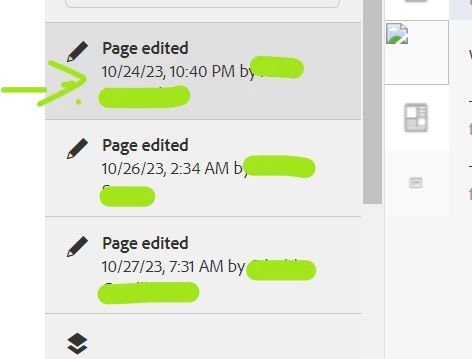
When I select a page and click on timeline feature, only if a version is created it shows options to view the difference between current and the version.

Otherwise, I can only see page edited on so and so date by the author but when i click on it , there is no option to view difference.

Even though I have clicked on the first one - i dont see option to view what was edited


That's right. AEM does not store each and every page edit in a way to allow for comparison. It does track page edits (who edited a page at what time) but not in-depth content level comparison is only possible between different versions or between a version and the current state of the page.


Versions are created automatically on publication. In addition, versions can be created manually by content authors. It would also be possible to create versions based on other events by implementing a custom workflow.

However, if you evaluate to create versions more often you might want to double check on the version cleanup maintenance task to ensure your repository does not grow extensively.


Hope this helps!


1 reply

arunpatidar
Community Advisor
Community Advisor
November 16, 2023

Hi @shibani06 
I don't think so this is a expected behaviour. You should not be seeing 2 components in the live copy.

Could you please try in vanilla instance with wknd/weretail project if the behaviour is same or different?

Arun Patidar
SHIBANI06Author
Level 4
November 16, 2023

Hi @arunpatidar  I also wanted to know if there is any other way to track the content updates made to AEM pages? I'm aware of the timeline feature and also the audit log search but it is not serving the purpose.

MarkusBullaAdobe
Adobe Employee
MarkusBullaAdobeAdobe EmployeeAccepted solution
Adobe Employee
November 16, 2023

Hi @markusbullaadobe 


When I select a page and click on timeline feature, only if a version is created it shows options to view the difference between current and the version.

Otherwise, I can only see page edited on so and so date by the author but when i click on it , there is no option to view difference.

Even though I have clicked on the first one - i dont see option to view what was edited


That's right. AEM does not store each and every page edit in a way to allow for comparison. It does track page edits (who edited a page at what time) but not in-depth content level comparison is only possible between different versions or between a version and the current state of the page.


Versions are created automatically on publication. In addition, versions can be created manually by content authors. It would also be possible to create versions based on other events by implementing a custom workflow.

However, if you evaluate to create versions more often you might want to double check on the version cleanup maintenance task to ensure your repository does not grow extensively.


Hope this helps!