Issue with dynamically added resources with data-sly-resource | Community
Skip to main content
September 30, 2022
Solved

Issue with dynamically added resources with data-sly-resource

  • September 30, 2022
  • 2 replies
  • 3123 views

I have a custom "container" and "row" component. On the container touch UI dialog, an author can select the number of rows they want to add. In the HTL, I am using data-sly-list for the loop through, and inside the loop, I am using data-sly-resource to add the number of rows. This works great when I am increasing the number of rows for example from 1 to 3. So for each row, it creates child nodes under the container component.

The issue we are seeing is that when we decrease the number from 3 to 1, it's not deleting the child nodes.

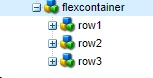
For example, let's say I entered 3 in the number of rows field in the container component and submit the dialog; it will create the nodes like below.


container - row1 - row2 - row3


Now if I open the container dialog again and change the number of rows to 1, it still keeps the row2 and row3 nodes that were created previously. It doesn't delete it. It's not breaking anything as based on the logic it will only render the row1 in the final output, but those nodes are still there that are not being used.

Is there a way to delete those dynamically created nodes every time the value is updated?  

This post is no longer active and is closed to new replies. Need help? Start a new post to ask your question.
Best answer by poojac_2204

You can fetch the existing count on dialog load. On dialog submission, fetch the newly authored count. If it's lower than the previous value,  run a loop for the difference to add the below input elements:


<input class="foundation-field-related" type="hidden" name="./container/row{count}@Delete">


once done, continue the dialog submission.

2 replies

September 30, 2022

You can need to send a delete request for the removed nodes separately on dialog submission.

webdev91Author
September 30, 2022

Thank you, @poojac_2204 

I have a javascript that I am using for the dialog. Is it possible to make a request to delete the JCR node from the javascript on dialog submission?

poojac_2204Accepted solution
October 3, 2022

You can fetch the existing count on dialog load. On dialog submission, fetch the newly authored count. If it's lower than the previous value,  run a loop for the difference to add the below input elements:


<input class="foundation-field-related" type="hidden" name="./container/row{count}@Delete">


once done, continue the dialog submission.

milind_bachani
Adobe Employee
Adobe Employee
September 30, 2022

@webdev91 

I see a gap in understanding of the component implementation.

If you are using "data-sly-resource" in the HTML, the resources are loaded on the fly in the page and is not part of the content in JCR.


Since you mentioned "it creates child nodes under the container component" which clearly implies that it is part of your JCR node structure.

Are you creating nodes on dialog submission using JS? If yes, you can also use a similar logic to delete additional nodes on decrement or row count.

Alternatively, you can save yourself from any node additions/ deletions by looping for the rowCount and using :

<div data-sly-resource="${'row' @resourceType='myPro/components/row'}"/>
// this will not have 'row' as part of your content structuring


Feel free to post your pseudo code incase you are looking for some amendments in your implementation.

Best Regards,
Milind

webdev91Author
September 30, 2022

Hi @milind_bachani,

Sorry for the confusion.

Yes, data-sly-resource is not directly adding the node. Also, I am not creating nodes on dialog submission . The row component gets added under the container component using data-sly-resource, and as soon as I author the row component, it adds nodes for the row component under the container component. For example.

Adding code snippets for your reference.

Container component HTL:

<div data-sly-repeat="${container.rows}">
        <div data-sly-set.counter="row${item}"
             data-sly-unwrap
             data-sly-resource="${counter @ resourceType='app/components/layout/row'}">
        </div>
    </div>

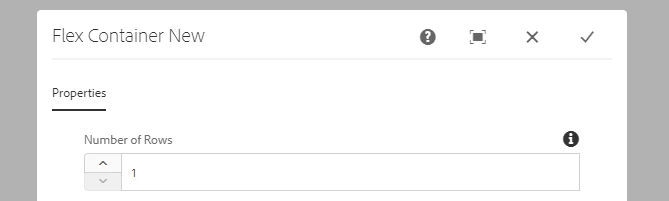
Container component dialog:

What I am looking for is, is there a way I can remove the JCR node on dialog submit (in case there are more than expected rows under the container)? Is this possible to achieve using JavaScript on dialog submit? If not, what are the other options?


Thank you!


webdev91Author
October 6, 2022

@webdev91 You could try handling this from sling model-


@ValueMapValue
private int numberOfRows;

private List<String> rowsNodeNames;

@PostConstruct
protected void init() {
generateRowsNodeNames();
}

public void setNumberOfItems(int numberOfRows) {
this.numberOfRows = numberOfRows;
generateRowsNodeNames();
}

private void generateRowsNodeNames() {
itemNodeNames = IntStream.range(0, numberOfRows)
.boxed()
.map(i -> "item" + i)
.collect(Collectors.toList());
}


<sly data-sly-list="${yourmodel.itemNodeNames}">
<sly
data-sly-resource="${item @ resourceType='app/components/layout/row', decorationTagName='div'}">
</sly>
</sly>

Hope this helps.


Hi @manu_mathew_ 

Thank you for responding.

This approach would definitely make my HTL code cleaner, but I believe it won't solve the problem of deleting the nodes.

Anyways, thank you very much.