Issue with Dispatcher Flush Agents | Community
Skip to main content
sambashiva0808
Level 2
March 15, 2018
Solved

Issue with Dispatcher Flush Agents

  • March 15, 2018
  • 17 replies
  • 15350 views

Hi Everyone,

We're trying to clear the Dispatcher Cache of the Vanity URLs using some custom logic, where it is not exactly working.
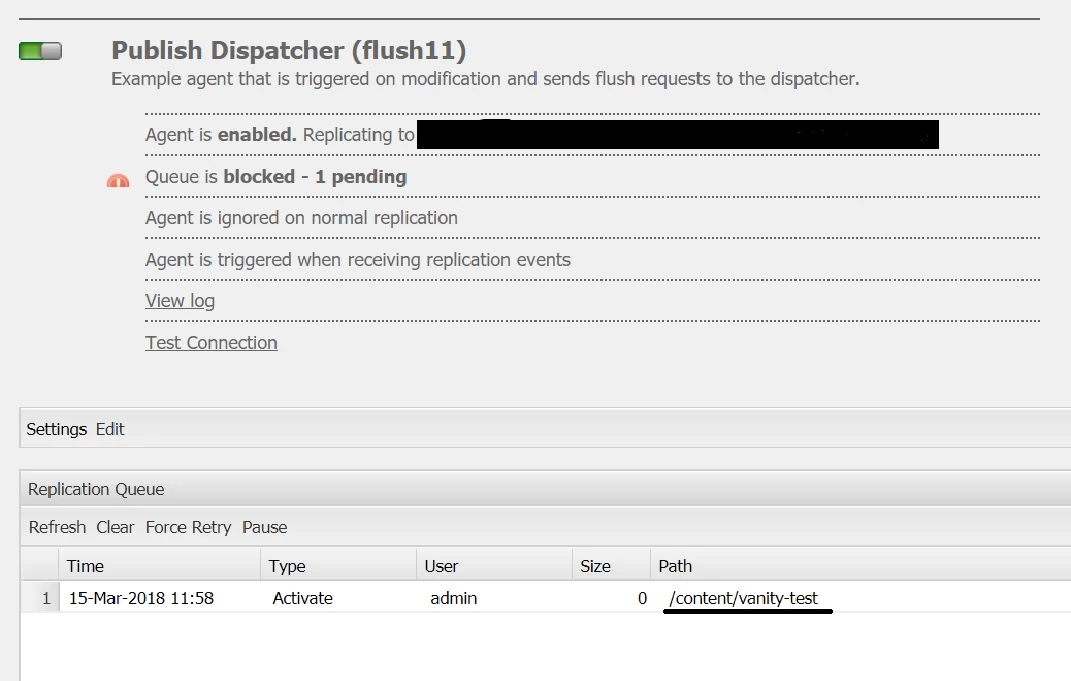
We've created a page and configured some Vanity URLs for that page.  Now when we activate the page all the URLs(Page URL and Vanity URLs) are passing through the Dispatcher Flush Agent of Author, but the Flush Agent configured in Publish is not getting the the Vanity URLs but the page URL is passing through the agent.

Example:
Created a page "/content/vanity-test" and configured "/test-vanity-1" and "/test-vanity-2" to that page. Now when I activate the page, all the URLs:

  • /content/vanity-test
  • /test-vanity-1
  • /test-vanity-2

are passing through the Author Dispatcher.
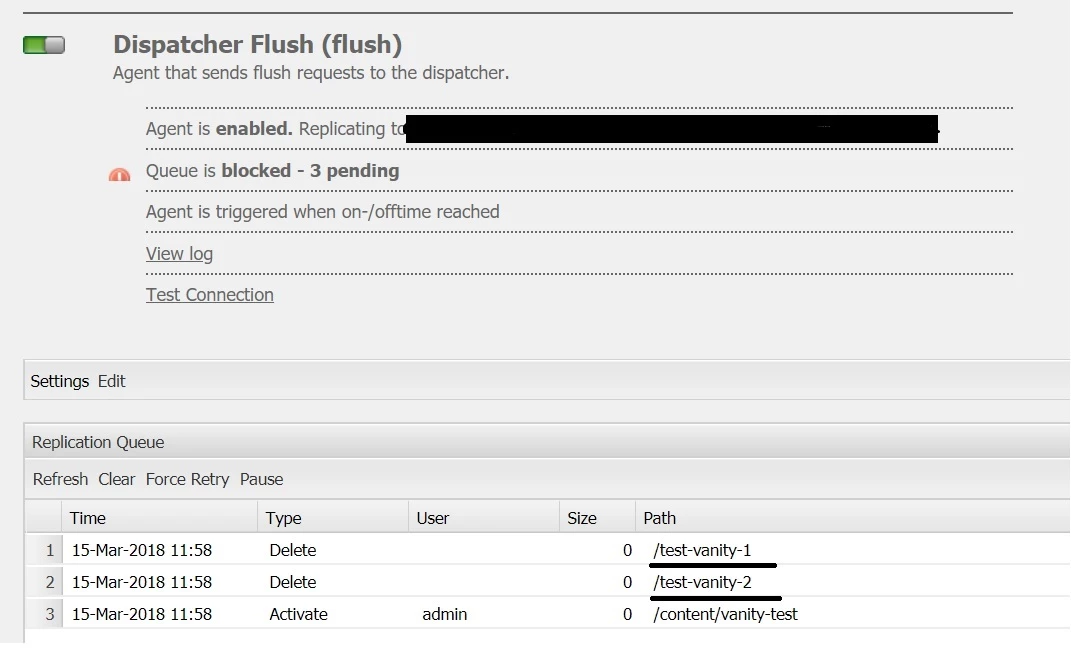
But the Vanity URLs are not getting into the Publish Dispatcher, only the page URL is passing through it.
Custom Code:

for (Map.Entry<String, Agent> e : agentManager.getAgents()

.entrySet()) {

     if ((e.getValue().isCacheInvalidator()

     && (e.getValue().getConfiguration().getTransportURI().contains(IntegrationConstants.CACHE_INVALDATION_URL))||

     e.getValue().getConfiguration().getTransportURI().contains(IntegrationConstants.AKAMAI_INVALDATION_URL))) {

           Agent dispatcherFlush = e.getValue();

          try {

               ReplicationAction ra = new ReplicationAction(

               ReplicationActionType.DELETE, path);

               ReplicationContent rc = dispatcherFlush.buildContent(session, ra);

               dispatcherFlush.replicate(ra, rc,

               new ReplicationOptions());

               LOGGER.debug("$Activator cache flush requested. Check queue");

               } catch (ReplicationException ex) {

                      LOGGER.error(ex.getMessage());

               }

       }

}

Please suggest why it would happen, where in Author Agent the Vanity URLs are going through but not in Publish Agent.

Note :

  • The Flush Agent configured in Author is only for testing, main Flush Agent is configured in Publish instance only.
  • The above code is in separate bundle and is deployed only in author not in publish. Is that could be the reason for the above issue ?
    If yes, how can I invoke my custom code in Publish instance as I'm relying on the Preprocessor Class when I replicate the page, where as this activation process cannot happen in Publish how can I invoke the custom code for clearing the cache of Vanity URLs. Please suggest. Thank you

This post is no longer active and is closed to new replies. Need help? Start a new post to ask your question.
Best answer by joerghoh

I cannot provide that much help based on this shared error message. Please go on and raise the ticket.

regards,

Jörg

17 replies

kautuk_sahni
Community Manager
Community Manager
March 15, 2018

Jörg Hoh​ Need your help here.

Kautuk Sahni
joerghoh
Adobe Employee
Adobe Employee
March 15, 2018

Have you checked the "Alias update" box in the configuration dialog of the invalidation agent on the publish instance (tab "Settings" at the very bottom)?

Jörg

sambashiva0808
Level 2
March 15, 2018

I tried checking for that but "Alias Update" Check box is not available in the Configuration Dialog. We're using AEM 6.1 version.

sambashiva0808
Level 2
March 15, 2018

For your reference, Please find the screenshot of the configuration dialog of the invalidation agent.

joerghoh
Adobe Employee
Adobe Employee
March 15, 2018

Check in the JCR repository (using CRXDE) if on your authoring instance on the /etc/replication/agents.author/publish/jcr:content node there is a property "aliasUpdate" with the value "true" (boolean type). And if it is missing on the agent on the publishing instance.

The code is already there to handle it, although the UI for AEM 6.1 does not yet expose that feature.

Jörg

Level 2
March 15, 2018

The location you gave is default Publish agent. We have our Custom Publish agents but these are configured on Author box only as those are not needed in Publish box. In Publish box there are only flush agents configured.

Can you please let us know where this aliasUpdate property should be added? Only in other or in Author publish replication agents and Publish Flush agent both?

joerghoh
Adobe Employee
Adobe Employee
March 15, 2018

Check on the system, where this is working, and compare to those where it does not. Adjust the agent names accordingly.

Jörg

Level 2
March 15, 2018

Thanks for your quick response. As of now in 6.1 none of the systems this attribute is present as it is not present in UI as well as we never used this functionality.

As you have advised I have added that "aliasUpdate" as true in my Author box "Publish Replication Agent". I referred Replication documentation as well and it was same as you mentioned and not asking to do anything additional.

Do I need to change any thing in Publish Flush Agent or Dispatcher?

joerghoh
Adobe Employee
Adobe Employee
March 15, 2018

The question for me is now: Why does it work on one instance and not on the other (the ones you shared the screenshots from) if you have configured these invalidation agents the very same way.

Can you please check your logs of both systems and paste the log statements like these:

Setting up replication with options: [...]

That should indicate if the aliasUpdate mechanism of the replication itself is used or if something else is causing the replication/invalidation of the vanity URLs.

Jörg

Level 2
March 15, 2018

The screenshot shared above of Author box Dispatcher is wrong I guess. We should not have Dispatcher configured at all right? We jsut need Replication Agents. Below changes I have done:

- I have disabled Dispatcher Flush agent in Author box.

Added aliasUpdate property to my publish replication agent in Author box.

Anything else in Author or Publish?