
Solved
issue with cq.jquery clientlib
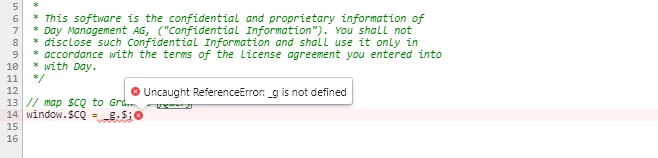
I am using cq.jquery clientlib . but it always shows following error on page load.
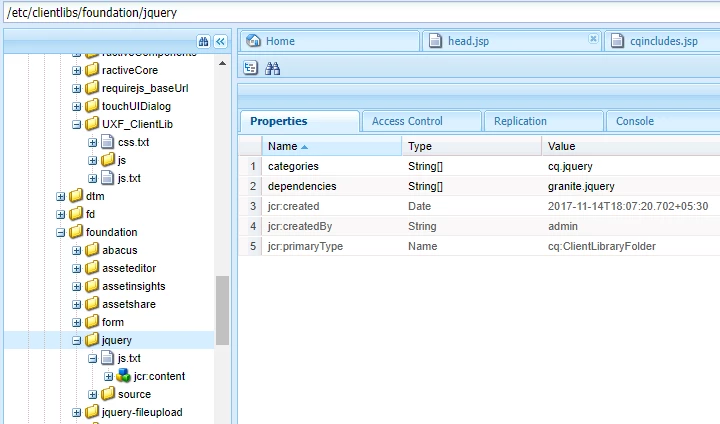
following are contents of http://localhost:4503/etc/clientlibs/foundation/jquery.js
Can anyone help here?
I am using cq.jquery clientlib . but it always shows following error on page load.
following are contents of http://localhost:4503/etc/clientlibs/foundation/jquery.js
Can anyone help here?
Please have a look at the documentation:- Using Client-Side Libraries
//
Using JSP [Using Client-Side Libraries ]
//
Add a ui:includeClientLib tag to your JSP code to add a link to client libraries in the generated HTML page. To reference the libraries, you use the value of the categories property of the ui:includeClientLib node.
1 2 | <%@taglib prefix="ui" uri="http://www.adobe.com/taglibs/granite/ui/1.0" %>
|
For example, the /etc/clientlibs/foundation/jquery node is of type cq:ClientLibraryFolder with a categories property of value cq.jquery. The following code in a JSP file references the libraries:
1 | <ui:includeClientLib categories="cq.jquery"/> |
The generated HTML page contains the following code:
1 | <script type="text/javascript" src="/etc/clientlibs/foundation/jquery.js"></script> |
Using HTL [HTL and ClientLibs ]
Calling Client Libraries from HTL
Because HTL is meant to be a general language, without specific AEM features, there is no data-sly-clientlibs feature for instance.
The best example is from the new foundation page component, this is located at /libs/wcm/foundation/components/page/head.html.
There, you see the following thing:
data-sly-use.clientlib="/libs/granite/sightly/templates/clientlib.html"
This declares a “clientlib” object, which is implemented as a template.
After that, you see statements like following one:
data-sly-call="${clientlib.all @ categories='cq.jquery'}"
Enter your E-mail address. We'll send you an e-mail with instructions to reset your password.



