Issue with Coral 3 Nested Multifield in AEM 6.5 where the dialog scrolls automatically to bottom when add new item is clicked. | Community
Skip to main content
akashkriz005
Level 2
July 30, 2024

Issue with Coral 3 Nested Multifield in AEM 6.5 where the dialog scrolls automatically to bottom when add new item is clicked.

  • July 30, 2024
  • 3 replies
  • 1755 views

The issue is with the Coral 3 nested multi field in AEM 6.5 where the dialog scrolls automatically to the bottom when we add a new item. It becomes more complex if data is being added more by the author. 

While checking at the console I was getting a jquery event being generated from createpagewizard.js. when ever we click on the add button and the scroll to the bottom behaviour triggers.
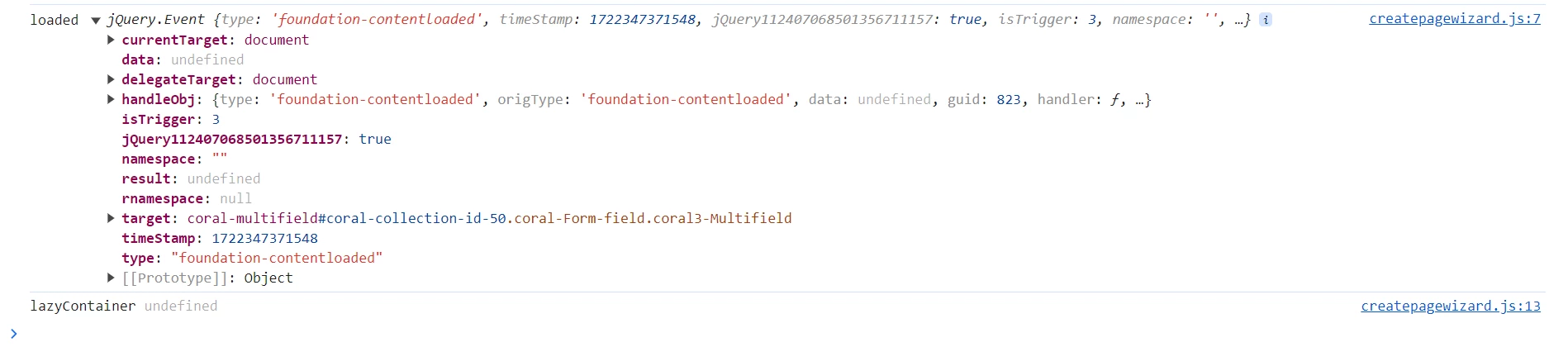


Is this an expected behaviour or do we have any working solution to restrict this scroll bottom ? 

This post is no longer active and is closed to new replies. Need help? Start a new post to ask your question.

3 replies

EstebanBustamante
Community Advisor and Adobe Champion
July 30, 2024

Hi, 

I don't see that behavior in AEM6.5.16. The "Add" button is at the bottom of the multifield, when you click on the "Add" button, the scroll keeps whenever it stays. Below is the config I am using

<?xml version="1.0" encoding="UTF-8"?> <jcr:root xmlns:sling="http://sling.apache.org/jcr/sling/1.0" xmlns:cq="http://www.day.com/jcr/cq/1.0" xmlns:jcr="http://www.jcp.org/jcr/1.0" xmlns:nt="http://www.jcp.org/jcr/nt/1.0" jcr:primaryType="nt:unstructured" jcr:title="Properties" sling:resourceType="cq/gui/components/authoring/dialog"> <content jcr:primaryType="nt:unstructured" sling:resourceType="granite/ui/components/coral/foundation/fixedcolumns"> <items jcr:primaryType="nt:unstructured"> <column jcr:primaryType="nt:unstructured" sling:resourceType="granite/ui/components/coral/foundation/container"> <items jcr:primaryType="nt:unstructured"> <multifield jcr:primaryType="nt:unstructured" sling:resourceType="granite/ui/components/coral/foundation/form/multifield" composite="{Boolean}true" fieldLabel="Add Items"> <field jcr:primaryType="nt:unstructured" sling:resourceType="granite/ui/components/coral/foundation/container" name="./items"> <items jcr:primaryType="nt:unstructured"> <column jcr:primaryType="nt:unstructured" sling:resourceType="granite/ui/components/coral/foundation/container"> <items jcr:primaryType="nt:unstructured"> <name jcr:primaryType="nt:unstructured" sling:resourceType="granite/ui/components/coral/foundation/form/textfield" fieldLabel="Name" name="./name"/> <jobTitle jcr:primaryType="nt:unstructured" sling:resourceType="granite/ui/components/coral/foundation/form/textfield" fieldLabel="Job Title" name="./jobTitle"/> </items> </column> </items> </field> </multifield> </items> </column> </items> </content> </jcr:root>

Hope this helps


Esteban Bustamante
akashkriz005
Level 2
July 31, 2024

Thanks for the info @estebanbustamante . Yes as you mentioned its working fine when simple multifield is implemented. The issue still persist in nested multifields. Giving a sample code below on which I have tried out. 

<?xml version="1.0" encoding="UTF-8"?> <jcr:root xmlns:sling="http://sling.apache.org/jcr/sling/1.0" xmlns:cq="http://www.day.com/jcr/cq/1.0" xmlns:jcr="http://www.jcp.org/jcr/1.0" xmlns:nt="http://www.jcp.org/jcr/nt/1.0" jcr:primaryType="nt:unstructured" jcr:title="Properties" sling:resourceType="cq/gui/components/authoring/dialog"> <content jcr:primaryType="nt:unstructured" sling:resourceType="granite/ui/components/coral/foundation/fixedcolumns"> <layout jcr:primaryType="nt:unstructured" sling:resourceType="granite/ui/components/foundation/layouts/tabs" type="nav"/> <items jcr:primaryType="nt:unstructured"> <column jcr:primaryType="nt:unstructured" sling:resourceType="granite/ui/components/coral/foundation/container"> <items jcr:primaryType="nt:unstructured"> <multifield jcr:primaryType="nt:unstructured" sling:resourceType="granite/ui/components/coral/foundation/form/multifield" composite="{Boolean}true" fieldLabel="Add Items"> <field jcr:primaryType="nt:unstructured" sling:resourceType="granite/ui/components/coral/foundation/container" name="./items"> <items jcr:primaryType="nt:unstructured"> <column jcr:primaryType="nt:unstructured" sling:resourceType="granite/ui/components/coral/foundation/container"> <items jcr:primaryType="nt:unstructured"> <name jcr:primaryType="nt:unstructured" sling:resourceType="granite/ui/components/coral/foundation/form/textfield" fieldLabel="Name" name="./name"/> <jobTitle jcr:primaryType="nt:unstructured" sling:resourceType="granite/ui/components/coral/foundation/form/textfield" fieldLabel="Job Title" name="./jobTitle"/> <secondMF jcr:primaryType="nt:unstructured" sling:resourceType="granite/ui/components/coral/foundation/form/multifield" composite="{Boolean}true" fieldLabel="Sub Section Feilds"> <field jcr:primaryType="nt:unstructured" jcr:title="Click to Expand" sling:resourceType="granite/ui/components/foundation/container" name="./secondMF"> <layout jcr:primaryType="nt:unstructured" sling:resourceType="granite/ui/components/foundation/layouts/collapsible"/> <items jcr:primaryType="nt:unstructured"> <thirdleveltitle jcr:primaryType="nt:unstructured" sling:resourceType="granite/ui/components/foundation/form/textfield" fieldLabel="Second Level Title" name="./thirdLevelTitle" required="{Boolean}true"/> <thirdlevelicontype jcr:primaryType="nt:unstructured" sling:resourceType="granite/ui/components/coral/foundation/form/select" fieldLabel="Level Type" name="./thirdlevelType" required="{Boolean}true"> <items jcr:primaryType="nt:unstructured"> <option1 jcr:primaryType="nt:unstructured" text="option1" value="option1"/> <option2 jcr:primaryType="nt:unstructured" text="option2" value="option2"/> <option3 jcr:primaryType="nt:unstructured" text="option3" value="option3"/> </items> </thirdlevelicontype> <thirdpagePath jcr:primaryType="nt:unstructured" sling:resourceType="granite/ui/components/coral/foundation/form/pathfield" fieldLabel="Page Path" name="./thirdpagePath" rootPath=""/> </items> </field> </secondMF> </items> </column> </items> </field> </multifield> </items> </column> </items> </content> </jcr:root>


If the data grows and in the first section if the author wants to add back the data , it will go down.

Can you please check on this one ?


EstebanBustamante
Community Advisor and Adobe Champion
July 31, 2024

 @akashkriz005 Thanks for clarifying. Unfortunately, this is a bug that Adobe is supposed to fix in the future. Please check this thread: AEM Upgrade 6.5.17 Issue with Nested Multi-Field Authoring Focus.

You could still use some JavaScript as a workaround to address the issue in the meantime, but be cautious to check and remove it once the original fix or another AEM upgrade is implemented on your end.

Esteban Bustamante
kautuk_sahni
Community Manager
Community Manager
August 1, 2024

@akashkriz005 Did you find the suggestions from users helpful? Please let us know if you require more information. Otherwise, please mark the answer as correct for posterity. If you've discovered a solution yourself, we would appreciate it if you could share it with the community. Thank you!

Kautuk Sahni
Level 2
June 4, 2025

I recently encountered a similar issue.

After some investigation, I found that the problem was caused by Coral 3's Nested Multifield — when clicking the Add button, it triggers a duplicate focus event, which causes the page to scroll to the wrong position.

To fix this, I chose to override the native _onAddItemClick method, which successfully resolved the scrolling issue.

Below is the code I used. Please note that this script must be loaded after the categories coralui3 library is fully loaded.

Hope this helps!

(function () { 'use strict'; Coral.Multifield.prototype._onAddItemClick = function (event) { var parent = event.target.closest("coral-multifield"); if (parent && parent === this) { event.stopPropagation(); this.items.add(new Coral.Multifield.Item); this.trigger("change"); this._trackEvent("click", "add item button", event); var addBtn = event.target; var items = this.items.getAll(); var setsize = items.length; var itemToFocus = items[setsize - 1]; window.requestAnimationFrame(function () { var focusableItem = itemToFocus.querySelector(Coral.commons.TABBABLE_ELEMENT_SELECTOR); if (focusableItem.hasAttribute("disabled")) addBtn.focus(); else focusableItem.focus() }); } }; }());